
Targeted Auditing Proof Of Concept | Community
Skip to main content
Doug_Den_Hoed__AtAppStore
Community Advisor
Community Advisor
February 25, 2019
Solved

Targeted Auditing Proof Of Concept

  • February 25, 2019
  • 30 replies
  • 9237 views

This morning, I did a proof of concept of "Targeted Auditing" and would like to share it with the Community.

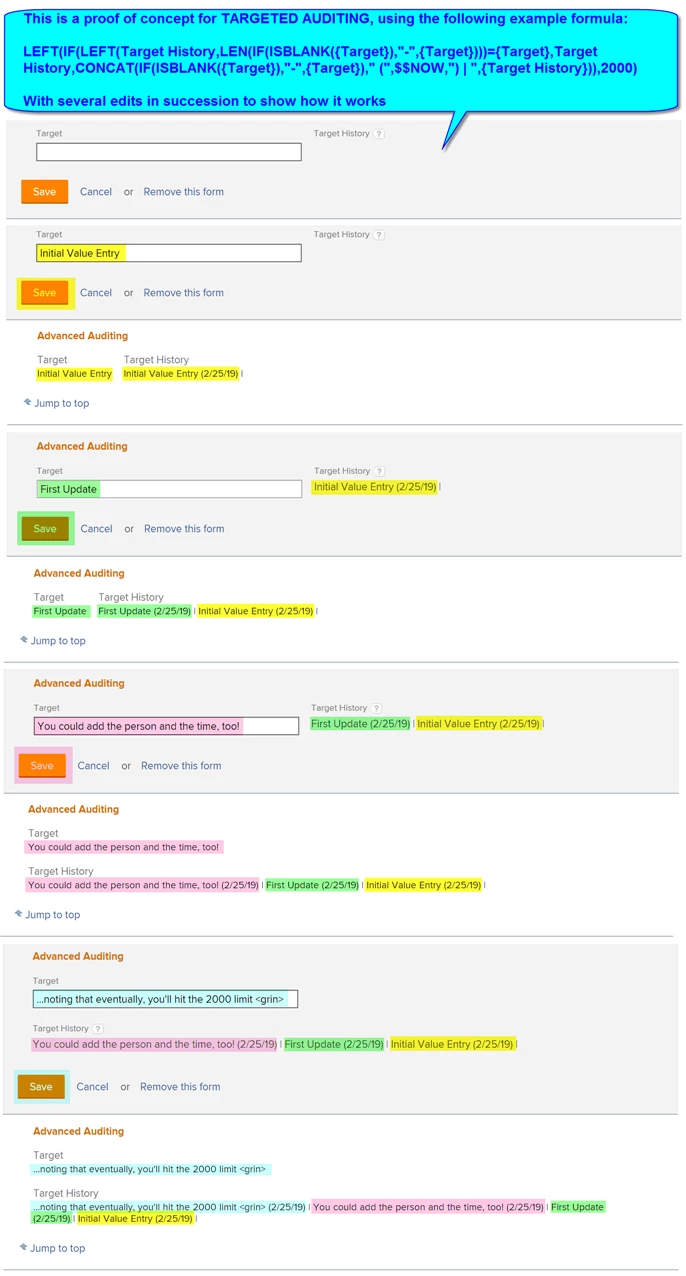
I thought of the idea years ago but never made time for until my unsatisfying response to this thread twigged my memory. As below, my example records the changes to a particular "Target" custom text parameter in its "Target History" custom calculated parameter counter part...and to my delight, actually works!

The formula turned out to be why-didn't-I-try-this-sooner? simple:

LEFT(IF(LEFT(Target History,LEN(IF(ISBLANK({Target}),"-",{Target})))={Target},Target History,CONCAT(IF(ISBLANK({Target}),"-",{Target})," (",$$NOW,") | ",{Target History})),2000)

And does the following:

- limits the Target History to the most recent 2000 characters (staying within the Workfront database limit)

- checks if the current Target value (treating it as "-" if it is blank) matches the front of the Target History value

- if they match, leaves the Target History "as is"

- if they don't match, replaces the Target History with the (latest) Target, followed by the current date, a vertical bar, and the previous Target History, which (similarly) preserves the previous value(s) and the time(s) entered

I've included a screenshot below so you can visualize how it works.

There are lots of other interesting bells and whistles you could add to what you capture (e.g. who, the time of day, etc.), so for those of you who find this of use and do make any cool enhancements, I encourage you to share them under this thread.

Have fun!

Regards,

Doug
Best answer by Doug_Den_Hoed__AtAppStore

Why, thank you, Heather. It was a satisfying one to finally figure out.

As for your excellent Status-in-English question, I'd suggest the crude but effective method of using a series of IF statements to transform each "Status" (e.g. CUR) to its appropriate counterpart (e.g. "Current") throughout the formula.

The pattern looks like this, being careful to let any unknown (future) Status drop out as itself in the final else:

IF(Status="CUR","Current",IF(Status="PLN","Planned",IF(Status=...,...,Status)))

Regards,

Doug

30 replies

Doug_Den_Hoed__AtAppStore
Community Advisor
Community Advisor
December 1, 2020
My pleasure Sherri, And yes, it’s definitely one of those Makes Sense Now That I See It techniques. Regards, Doug
Level 2
January 4, 2021

@Doug Den Hoed‚ & @Heather Kulbacki‚ First up - thanks! Finally got around to implementation just before the Holidays.

In the spirit of community I thought I would share an enhancement to the formula which will also include the time of the action. Maybe it's my understanding of WF but I could not seem to be able to format $$NOW to display as date & time - but hacked around it by extracting and concatenating Hour and Minute from $$NOW (note extra code to handle minutes 0-9 to insert the leading 0.

Below is my 'enhanced' version which will include the time (hh:mm) - with the addition highlighted in bold.

LEFT(IF(LEFT(Status History,LEN(IF(ISBLANK(Current Status),"-",Current Status)))=Current Status, Status History,CONCAT(IF(ISBLANK(Current Status),"-",Current Status)," (",$$NOW," ", IF(LEN(MINUTE($$NOW))>1, CONCAT(HOUR($$NOW),":",MINUTE($$NOW)), CONCAT(HOUR($$NOW),":0",MINUTE($$NOW)))," by ", Last Updated By.Name , ") | ",Status History)),2000)

Greg

Doug_Den_Hoed__AtAppStore
Community Advisor
Community Advisor
January 4, 2021

Glad you like it, Greg, and nice improvement: thanks for sharing!

Regards,

Doug

NuriaMunguia
Level 4
April 18, 2021

First thank you so much for sharing this code!! I have been testing this out and works really well.. Have a question though, instead of capturing the person who updated the record last - how can I capture whoever is making the change. I want to see who actually updated the record, whoever is logged in and clicking on the status or target field captured in the history field. Whoever updated the record last may not necessarily be the same person updating the status/target field.

Thanks in advance for your help. I tried $$USER.ID instead of Last Updated By.Name, but didnt work.

LEFT(IF(LEFT(Status History,LEN(IF(ISBLANK(Status),"-",Status)))=Status,Status History,CONCAT((IF(ISBLANK(Status),"-",Status)),Last Updated By.Name," - "," (",$$NOW,") | ",Status History)),2000)

Level 2
April 20, 2021

@Nuria Munguia‚ What we are tracking here is the name of the person updating the record, but limiting capture to a change in status.

It sounds you are looking to track other things beyond just the Status? Which could result in this getting very complicated very quickly!

I'd suggest creating a report based on Notes - have a play with the fields available, and you can filter this down to see the only the types of changes / updates, when they were made, by whom etc. Then create a Dashboard, Add the Report to a Dashboard, then add this new Dashboard to the relevant users group as a Custom Section on the Project - and bingo - a really clear history of who made what changes to the project.

In fact, I liked the idea above so much I've just implemented it across all of our projects 😃.

Doug_Den_Hoed__AtAppStore
Community Advisor
Community Advisor
April 18, 2021
Hi Nuria, Because it is a formula, I suspect you can get it working by adding the curly brace syntax (eg {lastUpdatedBy}.{name}, etc), as above. Regards, Doug
NuriaMunguia
Level 4
April 20, 2021

Thank you Doug! for some reason replacing "Last Updated By.Name" by {$$USER}.{ID} or any other combination didn't work. :(

LEFT(IF(LEFT(Status History,LEN(IF(ISBLANK(Status),"-",Status)))=Status,Status History,CONCAT((IF(ISBLANK(Status),"-",Status)),Last Updated By.Name," - "," (",$$NOW,") | ",Status History)),2000)

Doug_Den_Hoed__AtAppStore
Community Advisor
Community Advisor
April 21, 2021

Hi Nuria,

I expanded all the threads in this post so I could refresh my memory, and if I'm now following, think that either my "Glad you like it Sherri (long version)" or Greg's "First up - thanks! (hh:nn version)" might actually work for you As Is.

The nature of Targeted Auditing is that it is checking for situations when the target (Status, in both examples) has changed from what it was to something different in the edit that is in progress. When such a change occurs, by definition, it is the logged in person (i.e. $$USER) who made the change, and is therefor also the "Last Updated By" at that moment in time.

Given that, the Status History will show a Targeted Audit of each Status Change, When it was made, and By Whom...which I believe is what you seek.

Regards,

Doug

NuriaMunguia
Level 4
April 21, 2021

Thanks so much Doug, somehow that is not what I am seeing 😔 . I understand what you are saying and technically, thats how it should work. see attached.

Doug_Den_Hoed__AtAppStore
Community Advisor
Community Advisor
April 22, 2021

Hi Nuria,

Just to double check...

  • what is the object type for each of the rows in your screenshot?
  • is Current Status a custom dropdown parameter on a custom form attached to each such row?
  • is Status History a calculated custom parameter on that same custom for attached to each such row?
  • what formula are you using within the Status History calculated custom parameter?

Regards,

Doug

NuriaMunguia
Level 4
April 22, 2021

Thank you Doug!!! here are my responses:

  • what is the object type for each of the rows in your screenshot? Issue records
  • is Current Status a custom dropdown parameter on a custom form attached to each such row? No is a free text field in a custom form.
  • is Status History a calculated custom parameter on that same custom for attached to each such row? Yes
  • what formula are you using within the Status History calculated custom parameter?

LEFT(IF(LEFT(Status History,LEN(IF(ISBLANK(Current Status),"-",Current Status)))=Current Status, Status History,CONCAT(IF(ISBLANK(Current Status),"-",Current Status)," (",$$NOW," ", IF(LEN(MINUTE($$NOW))>1, CONCAT(HOUR($$NOW),":",MINUTE($$NOW)), CONCAT(HOUR($$NOW),":0",MINUTE($$NOW)))," by ", Last Updated By.Name , ") | ",Status History)),2000)

Doug_Den_Hoed__AtAppStore
Community Advisor
Community Advisor
April 23, 2021

Hi Nuria,

🎭 You might want to sit down for this one.

In my original design (having refreshed my memory), Current Status is a calculated parameter, with the following formula (noting that for Issues, there would likely be more entries):

IF(Status="NEW","New"

,IF(Status="INP","In Progress"

,IF(Status="HLD","On Hold"

,IF(Status="CPL","Complete"

,Status

)

)

)

)

When an edit is made within Workfront, there a number of steps that occur in a certain order, among which, resolving calculations is (in my mind) "after" the edits have been made, but "before" the record is fully saved. In my case (and, I suspect, @Greg Wilson‚ and the others on this thread), that certain order might (I now appreciate) be part of the reason the behavior we are seeing is as we desire.

In your case, however, since Current Status is instead a custom text parameter, I suspect it is being evaluated "as" the edits are being made, which in turn is causing the unexpected behavior you are observing.

So! Presuming that you have good reason to leave Current Status as a text parameter, I suggest you try this (or something similar):

  • create a calculated parameter beside Current Status called "Current Status Calc"
  • set its formula to "=Current Status", effectively pointing at the manually entered status
  • edit your Status History custom calculated parameter's formula and replace "Current Status" with "Current Status Calc", thereby tapping into that special "after" edits but "before" sweet spot
  • save everything and test

I look forward to hearing how you make out, and hope it does the trick.

Regards,

Doug

Level 2
April 23, 2021

@Doug Den Hoed‚ A seat 💺 AND have had at least one ‚òï - but made total sense one the caffine kicked in! Let's hope that's the reason! If this stuff was easy we would not need a community!

Doug_Den_Hoed__AtAppStore
Community Advisor
Community Advisor
April 23, 2021

Fantastic Nuria.

Thanks for confirming, and yes, I see how "decoupling" the formula in that way has fringe benefits, too.

Excellent challenge, valuable insight, and bonus side effects: the trifecta.

Regards,

Doug

Jason_JB
Level 5
January 6, 2022

@Doug Den Hoed‚ - thank you for sharing the above!

I was able to leverage it to go a step further to address some needs we have. Sharing a recap below in case it helps others.

The examples focus on an internal metric we call "Pi health score". I needed to be able to capture the field, identify change since last entry, date of change, and wanted the historical record as noted above.

I've created 5 custom fields:

-Pi health score

-Pi health score - prior

-Pi health score - last change date

-Pi health score - change

-Pi health score - history

Formulas for each are:

Pi health score - prior

RIGHT({Pi Health Score - History},SUM(LEN({Pi Health Score - History}),-SUM(SEARCH("|",{Pi Health Score - History},1),2)))

Pi Health Score - Last Change Date

IF(ISBLANK(Pi Health Score),"",IF(Pi Health Score={Pi Health Score - Prior},{Pi Health Score - Last Change Date},$$NOW))

Pi Health Score - Change

SUM(Pi Health Score-{Pi Health Score - Prior})

Pi Health Score - History

IF(ISBLANK(Pi Health Score),IF(ISBLANK({Pi Health Score - Prior}),"",

LEFT(IF(LEFT({Pi Health Score - History}, IF(ISBLANK(Pi Health Score),0, SUM(SEARCH("(",{Pi Health Score - History}), -1))) =ROUND(Pi Health Score,2),{Pi Health Score - History},CONCAT(IF(ISBLANK(Pi Health Score),"-",ROUND(Pi Health Score,2))," (",$$NOW,") | ",{Pi Health Score - History})),1000)),LEFT( IF(LEFT({Pi Health Score - History}, IF(ISBLANK(Pi Health Score),0,SUM(SEARCH("(",{Pi Health Score - History}), -1))) =ROUND(Pi Health Score,2),{Pi Health Score - History},CONCAT(IF(ISBLANK(Pi Health Score),"-",ROUND(Pi Health Score,2))," (",$$NOW,") | ",{Pi Health Score - History})),1000))

I had to add some extra logic to the history field because I was getting blank values captured by the formula originally.

I've included an example from the test record I used during development.

Doug_Den_Hoed__AtAppStore
Community Advisor
Community Advisor
January 6, 2022

My pleasure Jason,

I'm impressed with how you were able to leverage it across multiple fields; particularly the SUM approach you used to pluck the Pi health score - prior out of the History -- very creative! And as sidebar, a shout-out to the Custom Data architects at Workfront for making the logic smart enough to resolve sequential calculations like these that have dependencies within separate calculations on the same custom form (e.g. Prior, then Last Change, then Change, then History).

In a related story, though, some caution about this technique...

These types of calculations -- as you mentioned -- often take some extra logic (and testing), and once they're working, life is good. However: if at some date you decide to change the logic, there is a high probability that the existing data will be cleared and lost. Permanently.

So, some mitigation strategies:

- don't change the formulas (from the "Doc, my arm hurts when I move it like this" department)

- if you must change them, consider introducing a new custom field along side the old one

- for critical situations, consider adding a text-based field along side the data and periodically transferring the data from the calculated field to the text-based field as backup, either manually, using Fusion, or using our Excel Updater solution (e.g. pick a day and back up ALL such fields on mass)

- as an extra precaution (suspecting you'll appreciate the cross-over to our parallel offline conversation), you might also consider periodically backing up all of your Workfront data using our Workfront Snapshot solution

Regards,

Doug

SLuna74
Level 3
December 13, 2024

This is great!  Can it be used with 'Text with formatting' fields?