
Targeted Auditing Proof Of Concept | Community
Skip to main content
Doug_Den_Hoed__AtAppStore
Community Advisor
Community Advisor
February 25, 2019
Solved

Targeted Auditing Proof Of Concept

  • February 25, 2019
  • 30 replies
  • 9237 views

This morning, I did a proof of concept of "Targeted Auditing" and would like to share it with the Community.

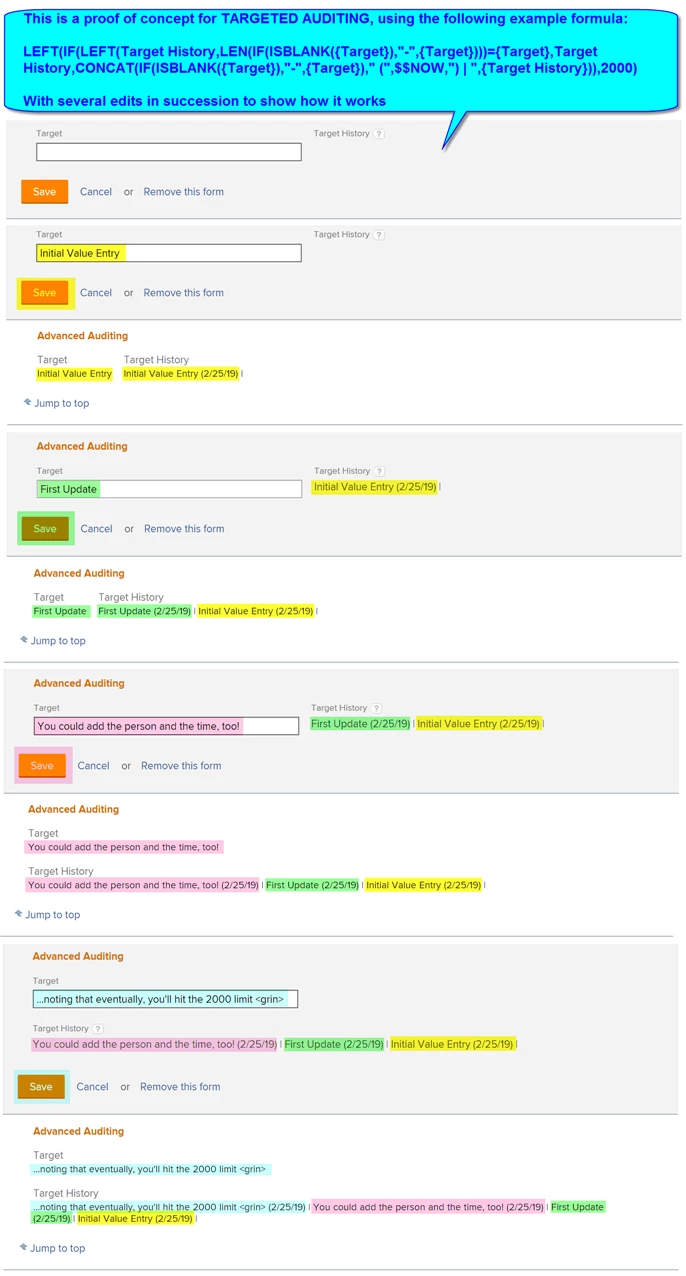
I thought of the idea years ago but never made time for until my unsatisfying response to this thread twigged my memory. As below, my example records the changes to a particular "Target" custom text parameter in its "Target History" custom calculated parameter counter part...and to my delight, actually works!

The formula turned out to be why-didn't-I-try-this-sooner? simple:

LEFT(IF(LEFT(Target History,LEN(IF(ISBLANK({Target}),"-",{Target})))={Target},Target History,CONCAT(IF(ISBLANK({Target}),"-",{Target})," (",$$NOW,") | ",{Target History})),2000)

And does the following:

- limits the Target History to the most recent 2000 characters (staying within the Workfront database limit)

- checks if the current Target value (treating it as "-" if it is blank) matches the front of the Target History value

- if they match, leaves the Target History "as is"

- if they don't match, replaces the Target History with the (latest) Target, followed by the current date, a vertical bar, and the previous Target History, which (similarly) preserves the previous value(s) and the time(s) entered

I've included a screenshot below so you can visualize how it works.

There are lots of other interesting bells and whistles you could add to what you capture (e.g. who, the time of day, etc.), so for those of you who find this of use and do make any cool enhancements, I encourage you to share them under this thread.

Have fun!

Regards,

Doug
Best answer by Doug_Den_Hoed__AtAppStore

Why, thank you, Heather. It was a satisfying one to finally figure out.

As for your excellent Status-in-English question, I'd suggest the crude but effective method of using a series of IF statements to transform each "Status" (e.g. CUR) to its appropriate counterpart (e.g. "Current") throughout the formula.

The pattern looks like this, being careful to let any unknown (future) Status drop out as itself in the final else:

IF(Status="CUR","Current",IF(Status="PLN","Planned",IF(Status=...,...,Status)))

Regards,

Doug

30 replies

Doug_Den_Hoed__AtAppStore
Community Advisor
Community Advisor
June 11, 2019
On second thought, I'd suggest you CONCAT one additional dash, for legibility: LEFT(IF(LEFT(Status History,LEN(IF(ISBLANK(Status),"-",Status)))=Status,Status History,CONCAT((IF(ISBLANK(Status),"-",Status)) ," - " ,Last Updated By.Name," - "," (",$$NOW,") | ",Status History)),2000) Regards, Doug Doug Den Hoed - AtAppStore Got Skills? Lend a hand! https://community.workfront.com/participate/unanswered-threads
Level 3
June 11, 2019
This works much better Doug. I figured it was something to do with the LEFT statement and I did not realize it was only testing the first 3 characters of the field. Thanks so much for your expertise and responsiveness. ELC is grateful to you. Cheers, Steve Steven Hirsch The Estee Lauder Companies Inc
Level 3
August 22, 2019
Hi Doug, I am interested in your method above to hopefully capture changes on fields within custom forms. This way we have the original entry and then the updated entry, for historical capture. My first questions to you are: How did you set this up to capture the data? Is there a form I have to create, or do I add new fields to the form(s) we are using? My second questions to you are: Is this a calculated field, and just input your formulas above? I am assuming that "Target" is the original field name and "Target History" is maybe where the calculated field is applied. Hoping you can help. Erika Garrett Gulfstream Aerospace
Doug_Den_Hoed__AtAppStore
Community Advisor
Community Advisor
August 23, 2019
Thanks for your interest, Erika. To answer your questions: I set up my example to capture the Target History data right next to its Target, which struck me as an intuitive location. You can do likewise and add new fields to the form(s) you are using (either "beside", as I did, or perhaps in a separate "History" section); or if you prefer, technically, the history parameters could even be on a separate form. Yes, the Target History is a calculated field, and yes, you can just input my sample formulas, replacing "Target" with your existing field name and "Target History" being the new calculated field in which the calculation is applied. Regards, Doug Doug Den Hoed - AtAppStore
Doug_Den_Hoed__AtAppStore
Community Advisor
Community Advisor
July 27, 2020

Back by popular request from this post...

If you'd like to set up Targeted Auditing to keep track of the Status of Tasks as they change between NEW, INP, HLD, and CPL, using the full Status labels (New, In Progress, On Hold, and Complete, thanks to @Heather Kulbacki‚ for her original improvement above), INCLUDING (as is @Kristina Walton‚) the name of the person who made such an edit, I invite you to do the following:

  • if you don't have one already, create a Task level custom form such as "Targeted Auditing" and add it to all Tasks of interest
  • on the Task level custom form, add two calculated text parameters called "Current Status" and "Status History", then save the form to make Workfront aware that both parameters now exist
  • paste in the calculation for each as shown below (noting that if you have more than just the four built in Task Statuses defined, you can continue the first formula's pattern to also translate such additional ones), then save the form again

With these in place, as each Task of Interest changes from one Status to another, the Status History will show "grow and show" a Targeted Audit record of what's changed, using the pattern of "Status Label on M/D/YYYY by User Name".

In this fashion, in addition to sifting through Notes records, you can quickly focus on changes to the Task Status over time.

Regards,

Doug

Current Status:

----------------------

IF(Status="NEW","New"

,IF(Status="INP","In Progress"

,IF(Status="HLD","On Hold"

,IF(Status="CPL","Complete"

,Status

)

)

)

)

Status History:

---------------------

LEFT(

IF(LEFT(Status History,LEN(IF(ISBLANK(Current Status),"-",Current Status)))=Current Status

, Status History

,CONCAT(IF(ISBLANK(Current Status),"-",Current Status)," (",$$NOW," by ", Last Updated By.Name , ") | ",Status History)

)

,2000

)

Level 9
October 22, 2020

Doug,

What is "Target" and what is "Target history"? Are these 2 calculated fields (date or Text) that you created?

Trying to do this formula in my project report - but i'm getting confused on what I put in text mode, vs what I just create as a custom field. Thanks for clarification.

Doug_Den_Hoed__AtAppStore
Community Advisor
Community Advisor
October 22, 2020

Hi Benetta,

In my opening post above, the "Target" custom text parameter is the one that I am interesting monitoring for changes to it, and its "Target History" custom calculated parameter counter part contains the formula that will accumulate the history of the changes to the target as they are made.

Over time now (thanks to @Heather Kulbacki‚ and others who've since joined in), the whole "Targeted Auditing" concept has broadened in that it can be used to track anything as a Target, whether Custom Parameters (text, number, date, dropdown, etc.) or a Built In Field (e.g. Status, Project Owner, Percent Complete, etc.)

Good luck with it, and I'm interested to hear how you make out!

Regards,

Doug

Community Advisor
November 30, 2020

I really love this idea, Doug! I've had this post open in a browser tab for a long while now and just got some time to noodle it out. I tried adding your Target & Target History fields to my Project Custom Form (in Preview environment), by copying/pasting your OP code, but I can't get it to take the calculation. Any idea what I'm missing?

Doug_Den_Hoed__AtAppStore
Community Advisor
Community Advisor
December 1, 2020

Glad you like it Sherri,

When there is a lot of bracketing in a formula such as this one, I often move it into a text editor so I can confirm everything is lined up correctly. In this case (noting that you also need to first add your Target and Target History parameters, save the form so it is "aware" they are available, and then paste in the self-referencing formula), I did so using my original Status / Status History version above, then substituted in your Target / Target History instead, and got the version below, which I invite you to try.

Regards,

Doug

LEFT(

IF(LEFT({DE:Target History}

,LEN(IF(ISBLANK({DE:Target})

,"-"

,{DE:Target}

)

)

)

=Target

,Target History

,CONCAT(

Last Updated By.Name

," - "

,(

IF(ISBLANK({DE:Target})

,"-"

,{DE:Target}

)

)

," ("

,$$NOW

,") | "

,{DE:Target History}

)

)

,2000)

Community Advisor
December 1, 2020

Oh my goodness, THANK YOU, Doug!! I never would have thought to add a calculated field without the calculation, save the form, then go back into it to add the calculation. Once the error kicked out, I kept backing out of creating the field altogether. Using this trick will be way more intuitive than the status timestamp I currently use, which is never recalculated properly. Let the happy dance commence 😄