Sum all Planned Hours and convert to % | Community
Skip to main content
Level 4
February 14, 2024
Solved

Sum all Planned Hours and convert to %

  • February 14, 2024
  • 1 reply
  • 1626 views

Hi WF Community,


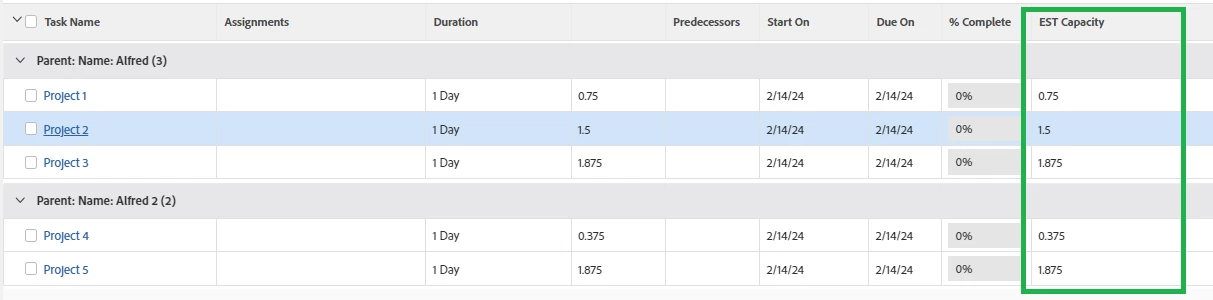
I am seeking help with my code. I wanted to sum all planned hours and aggregate to a percentage, but it was not showing me any results 😞 Might be a syntax error. Here's my code.


aggregator.function=SUM
aggregator.valuefield=estCapacity
displayname=EST Capacity
textmode=true
valueexpression=DIV(SUM({workRequired}),160)
valueformat=HTML
 

This post is no longer active and is closed to new replies. Need help? Start a new post to ask your question.
Best answer by J_Mas

Hi @j_mas ,


160 is the total number of hours in a month. We multiply 40 hours per week by four to get 160.


Ah, I see. I think you want to use 9600 instead of 160. It's my understanding that most time-related calculations in Workfront are done in minutes, not hours (even though the field says planned "hours"). So, 60 minutes * 160 hours = 9600.

Try this:

aggregator.displayformat=val
aggregator.function=SUM
aggregator.namekey=estCapacity Calc
aggregator.valueexpression=ROUND(DIV(SUM({workRequired}),9600)*100,2)
aggregator.valuefield=ROUND(DIV(SUM({workRequired}),9600)*100,2)
aggregator.valueformat=val
displayname=EST Capacity
textmode=true
valueexpression=ROUND(DIV(SUM({workRequired}),9600)*100,2)
valueformat=val

1 reply

J_Mas
Level 5
February 14, 2024

Give this a try:

aggregator.displayformat=doubleAsPercentRounded
aggregator.function=SUM
aggregator.namekey=estCapacity Calc
aggregator.valueexpression=ROUND(DIV(SUM({workRequired}),160)*100,2)
aggregator.valuefield=ROUND(DIV(SUM({workRequired}),160)*100,2)
aggregator.valueformat=customNumberAsPercentRoundedString
displayname=EST Capacity
textmode=true
valueexpression=ROUND(DIV(SUM({workRequired}),160)*100,2)
valueformat=customNumberAsPercentRoundedString

A_ENAuthor
Level 4
February 14, 2024

Hi @j_mas ,


I really appreciate your response, but I have a question: why does the percentage go beyond 100%? and when I tried to calculate in Excel, it did not give the same percentage as Excel.


J_Mas
Level 5
February 14, 2024

Hey @a_en , can you provide some additional details as to what you're trying to accomplish? You said that you're trying to Sum all planned hours and aggregate as a percentage. My questions are:

  • At what level (object type) are you trying to SUM the planned hours? (e.g. Project, Task, User, etc.)
  • What is the percentage meant to show?

For instance, are you trying to sum all the planned hours in a project (at the task level), and then the percentage would show the percent of planned hours that an individual task represents of the total project? (e.g. maybe the planned hours of a "Create Draft" task makes up 5% of the project's total hours).

Or, maybe you're trying to sum the total planned hours of a specific user, and then the percentage would show the percent of planned hours that an individual task represents of that user's total planned hours?

I ask because depending on what you're trying to represent, the formula may need to be adjusted.