SUB ({budget}, {Actual Expenses}) Native - calculated | Community
Skip to main content
Level 2
February 6, 2024
Question

SUB ({budget}, {Actual Expenses}) Native - calculated
  • February 6, 2024
  • 1 reply
  • 1441 views


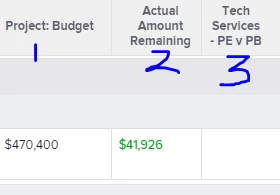
attempting to: subtract a calculated column of {actual expenses}  from the native project {budget} field. 

example: (column 1 "native budget field") - (column 2 "calculated actuals") = column 3


This post is no longer active and is closed to new replies. Need help? Start a new post to ask your question.

1 reply

KellieGardner
Community Advisor and Adobe Champion
February 6, 2024

You would need to include the calculation of your calculated column in the calculation for your third column.


SUB({budget},calculated column expression)


JamesCh6Author
Level 2
February 7, 2024
SUB({budget},{DE:Tech Services - Period 1 Actual},{DE:Tech Services - Period 2 Actual},{DE:Tech Services - Period 3 Actual},{DE:Tech Services - Period 4 Actual},{DE:Tech Services - Period 5 Actual},{DE:Tech Services - Period 6 Actual},{DE:Tech Services - Period 7 Actual},{DE:Tech Services - Period 8 Actual},{DE:Tech Services - Period 9 Actual},{DE:Tech Services - Period 10 Actual},{DE:Tech Services - Period 11 Actual},{DE:Tech Services - Period 12 Actual})
 
not returning any values
JamesCh6Author
Level 2
February 10, 2024

Final Question (I think).


What kind of report are you running? Based on your header for the budget field that's populating (project:budget), I'm now thinking this is not a project report as I expected. If it's not a project report you need to reference the fields differently.


For instance, if it's a project financial data report the project budget is actually {project}.{budget} and not just {budget} and your custom form fields would also need to have the {project} predecessor on them  - {project}.{DE:Tech Services - Period 1 Actual}


okay very helpful. Where can I find the predecessor for an expense object?


Here is the winning formula

SUB({project}.{budget},{DE:Tech Services - Actual Spend})
 
 
next steps is calculating all of these expenses into a new total that can be viewed in a summary.