Split a date field into YYYY-MM or YYYY format | Community
Skip to main content
Srinija_N
Level 7
November 19, 2024
Solved

Split a date field into YYYY-MM or YYYY format

  • November 19, 2024
  • 2 replies
  • 881 views

I have a date field in the general format MM-DD-YYYY. Now I need two new fields out of it in YYYY-MM and YYYY format. Can this be done via text mode view?

This post is no longer active and is closed to new replies. Need help? Start a new post to ask your question.
Best answer by Srinija_N

I was able to find the text mode by myself anyway.

YYYY/MM:

valueexpression=CONCAT(YEAR({lastLoginDate}), '/', MONTH({lastLoginDate}))


YYYY format:

valueexpression=YEAR({lastLoginDate})


and also found the below for any other formats.

Format Example valueformat=

MM/DD/YY10/11/18atDate
MM/DD/YY Time10/11/18 12:00pmlongAtDate
MM/DD/YY10/11/18shortAtDate
Mth, DD, YROct, 11, 2018mediumAtDate
DW, Mth, Day, YRMon, Oct, 11, 2018partialAtDate
DW, Mth, Day, YR TimeMon, Oct, 11, 2018 12:00 pmfullAtDate

2 replies

Madalyn_Destafney
Community Advisor
Community Advisor
November 19, 2024

Are you wanting to show the date fields in columns in a report? If so, you pull in the date field into your column and then in the advanced options of that column, you can select how you want the date field to appear/format.

If this helped you, please mark correct to help others : )
Srinija_N
Srinija_NAuthor
Level 7
November 19, 2024

There is no option to change the format in the advance options of the field. (May be due to the field is Standard)

Madalyn_Destafney
Community Advisor
Community Advisor
November 19, 2024

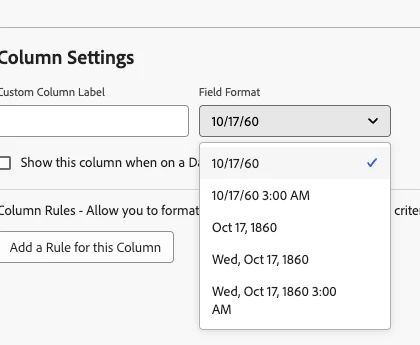
Hm interesting. When you have the date field in a report column > advanced options > you should see this dropdown.

If this helped you, please mark correct to help others : )
Srinija_N
Srinija_NAuthorAccepted solution
Level 7
November 19, 2024

I was able to find the text mode by myself anyway.

YYYY/MM:

valueexpression=CONCAT(YEAR({lastLoginDate}), '/', MONTH({lastLoginDate}))


YYYY format:

valueexpression=YEAR({lastLoginDate})


and also found the below for any other formats.

Format Example valueformat=

MM/DD/YY10/11/18atDate
MM/DD/YY Time10/11/18 12:00pmlongAtDate
MM/DD/YY10/11/18shortAtDate
Mth, DD, YROct, 11, 2018mediumAtDate
DW, Mth, Day, YRMon, Oct, 11, 2018partialAtDate
DW, Mth, Day, YR TimeMon, Oct, 11, 2018 12:00 pmfullAtDate