Sorting by a custom calculated field on a report | Community
Skip to main content
Level 5
June 10, 2021
Solved

Sorting by a custom calculated field on a report

  • June 10, 2021
  • 1 reply
  • 766 views

I have a calculated field on a custom form called "CalcPriScore"

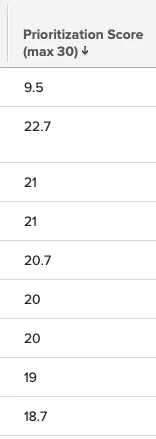
That field is a sorted column on a report. It is string though, rather than numerical so it isn't sorting properly. How can that column to be sorted numerically instead?

I have this text mode for the CalcPriScore (Prioritization Score) column:

displayname=Prioritization Score (max 30)

linkedname=direct

namekey=CalcPriScore

querysort=DE:CalcPriScore

sortOrder=1

sortType=desc

textmode=true

valueexpression=ROUND({DE:CalcPriScore},1)

valuefield=CalcPriScore

valueformat=customDataLabelsAsString

I tried valueformat=Int, but that didn't work either.

As you can see in the screenshot of the prioritization score column from my report, the top item is rated 9.5 and is at the top because 9 is greater than 2 when a string, vs looking at 9.5 vs 22.7 as numbers.
This post is no longer active and is closed to new replies. Need help? Start a new post to ask your question.
Best answer by Doug_Den_Hoed__AtAppStore

Hi Cathy,

I still occasionally catch myself in such situations, where I've neglected to change the datatype on a calculated column from the default "Text" to the proper datatype (e.g. Number, in your case). Provided data has not yet been entered, Workfront allows the datatype to be changed...but once data exists, the datatype cannot be changed.

To change it (which although painful, is usually the best answer, and would solve your problem), I typically:

  • rename the original parameter with a suffix (e.g. _DangItWrongDataType)
  • save (to "register" the name change)
  • create a "new" parameter with the correct name AND data type
  • add it next to the original parameter on the relevant custom form(s)
  • (optional) save (to "force" the new calculation to run)
  • (optional) inspect some existing data to confirm the new formula worked (e.g. "9.5" vs 9.5 in your case)
  • (optional) remove the original parameter from the custom form(s)
  • delete the original parameter

If, for some reason, you cannot or prefer not to do likewise, you could instead try wrapping your existing original parameter with the NUMBER keyword to convert it into a number, which might then also sort it numerically (untested)...but I have a suspicion that the querysort (which controls sorting) will still treat it as string.

Regards,

Doug

1 reply

Doug_Den_Hoed__AtAppStore
Community Advisor
Doug_Den_Hoed__AtAppStoreCommunity AdvisorAccepted solution
Community Advisor
June 10, 2021

Hi Cathy,

I still occasionally catch myself in such situations, where I've neglected to change the datatype on a calculated column from the default "Text" to the proper datatype (e.g. Number, in your case). Provided data has not yet been entered, Workfront allows the datatype to be changed...but once data exists, the datatype cannot be changed.

To change it (which although painful, is usually the best answer, and would solve your problem), I typically:

  • rename the original parameter with a suffix (e.g. _DangItWrongDataType)
  • save (to "register" the name change)
  • create a "new" parameter with the correct name AND data type
  • add it next to the original parameter on the relevant custom form(s)
  • (optional) save (to "force" the new calculation to run)
  • (optional) inspect some existing data to confirm the new formula worked (e.g. "9.5" vs 9.5 in your case)
  • (optional) remove the original parameter from the custom form(s)
  • delete the original parameter

If, for some reason, you cannot or prefer not to do likewise, you could instead try wrapping your existing original parameter with the NUMBER keyword to convert it into a number, which might then also sort it numerically (untested)...but I have a suspicion that the querysort (which controls sorting) will still treat it as string.

Regards,

Doug

Level 5
June 10, 2021

Perfect solution, @Doug Den Hoed‚! Once again, thank you for your help. My report is functioning as intended now. 🙌