
Showing Percent of Total on Matrix Report | Community
Skip to main content
J_Mas
Level 5
April 11, 2023
Solved

Showing Percent of Total on Matrix Report

  • April 11, 2023
  • 2 replies
  • 1160 views

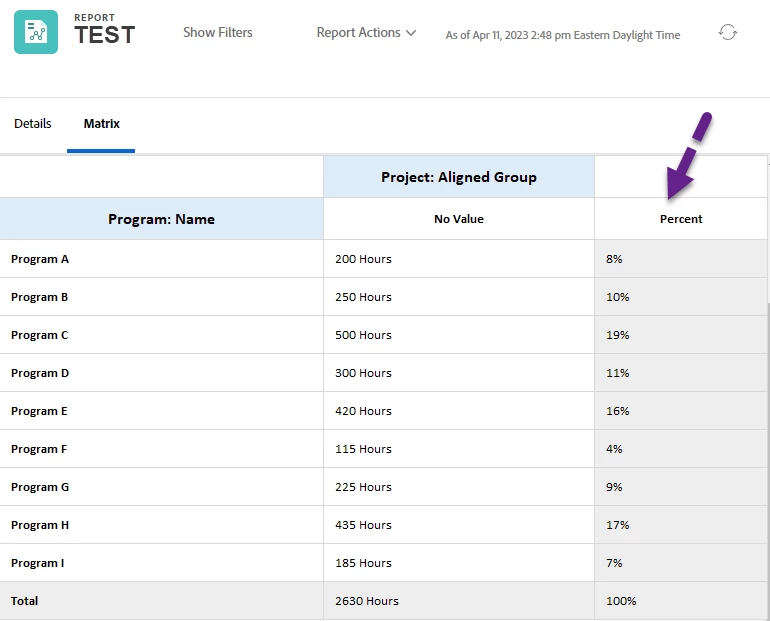
Is there any way to show the % of a Total on a matrix report? For instance (see example image), if I have total planned hours by program, can I show the % of the total for each program? Getting the total planned hours for the program is easy enough, but I haven't been able to find a way to include a percentage.
 

This post is no longer active and is closed to new replies. Need help? Start a new post to ask your question.
Best answer by Kundanism

@j_mas 

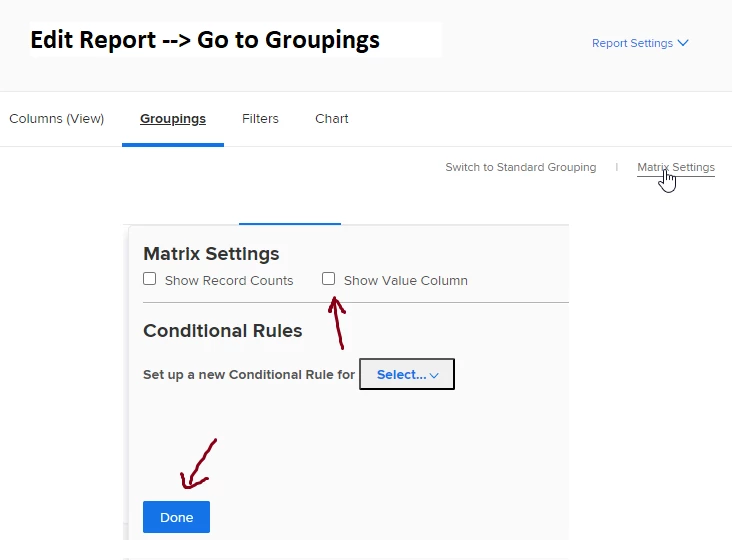
Give a try in matrix settings while editing report;


2 replies

Kundanism
KundanismAccepted solution
Level 10
April 12, 2023

@j_mas 

Give a try in matrix settings while editing report;


J_Mas
J_MasAuthor
Level 5
April 12, 2023

Hey @kundanism , in my (admittedly brief) experience with the Show Value Column button, having it turned on in the Matrix Settings just gives me a column with the name of the value already being displayed (not an actual value). So in my above screenshot, if I turn on Show Value Column, I end up with a new column called Value between Program: Name and Project: Aligned Group that just displays the words "Planned Hours (Sum)" for every row. Are you implying that I should be able to use that setting to somehow see a percentage instead?

Kundanism
Level 10
April 13, 2023

Just an idea @j_mas , cannot we create a custom field which can convert hours in to percent. I haven't tried yet but thinking in this drection too.

Rafal_Bainie
Community Advisor
Community Advisor
April 12, 2023

I would risk saying that if all programs are part of the same portfolio, than maybe you can setup calculated field on program level that would calculate that %of total value.
it can definitely be done if you think of requests/task VS total in a project.

I don't work with programs that much so I'm not sure