
Show task assignee name as a column on a Project report | Community
Skip to main content
Donna_Boj
Level 3
September 2, 2022
Solved

Show task assignee name as a column on a Project report

  • September 2, 2022
  • 2 replies
  • 2707 views

Hello All,

I am hoping someone can help with my query.
I have a project level report that I want to show who is assigned to the current task.
I have managed to show the name of the current task as a column but I am struggling to find the code to show who is assigned to that task.
I am hoping someone might have the code to show this?

Thank you in advance.
This post is no longer active and is closed to new replies. Need help? Start a new post to ask your question.
Best answer by RhondaGayleTX

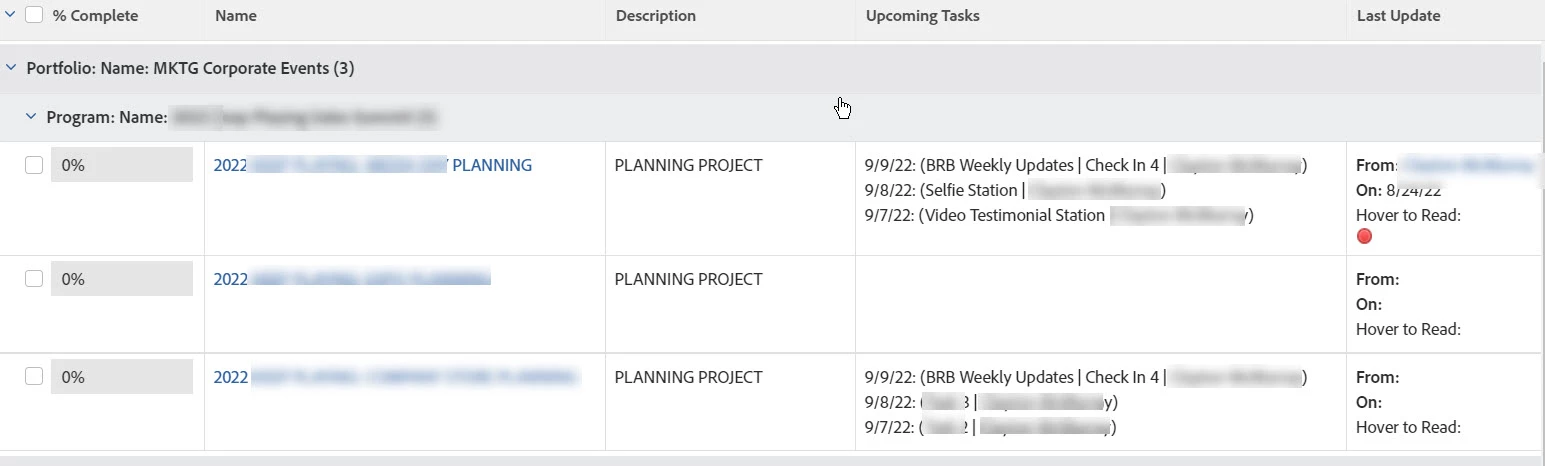
I have a column that displays task due date, name of task, assignee for tasks due in the next 7 days:

TASKS=A WEEK AHEAD 
displayname=Upcoming Tasks
listdelimiter=<div>
listmethod=nested(tasks).lists
textmode=true
type=iterate
valueexpression=IF({numberOfChildren}=0,IF({plannedCompletionDate}>$$TODAY+1d && {plannedCompletionDate}<$$TODAY+1w,IF(ISBLANK({actualCompletionDate}),CONCAT({plannedCompletionDate},": (",{name}," | ", {assignedTo},")"))))
valueformat=HTML
width=300

I hope this helps! 

2 replies

Jason_JB
Level 5
September 2, 2022

This feels like a job for collections (https://experienceleague.adobe.com/docs/workfront/using/reporting/reports/text-mode/reference-collections-report.html?lang=en)


I think the largest variation in the code is going to be how you're determining what the "current task" is/are.

I'll note that I've found collections to be helpful, but that they also impact performance.


If the current task logic is involved, it feels closer to what we're using Fusion for where it needs to find a very specific task on a project and then write the field value to a field on the project object.  We have jobs doing this for both assignments and planned/actual dates.

RhondaGayleTX
RhondaGayleTXAccepted solution
Level 5
September 6, 2022

I have a column that displays task due date, name of task, assignee for tasks due in the next 7 days:

TASKS=A WEEK AHEAD 
displayname=Upcoming Tasks
listdelimiter=<div>
listmethod=nested(tasks).lists
textmode=true
type=iterate
valueexpression=IF({numberOfChildren}=0,IF({plannedCompletionDate}>$$TODAY+1d && {plannedCompletionDate}<$$TODAY+1w,IF(ISBLANK({actualCompletionDate}),CONCAT({plannedCompletionDate},": (",{name}," | ", {assignedTo},")"))))
valueformat=HTML
width=300

I hope this helps! 

Doug_Den_Hoed__AtAppStore
Community Advisor
Community Advisor
September 6, 2022


Oooh! Very nice, @rhondagayletx!


That (showing the Tasks and Owners planned to be completed within the next 7 days from within a Project report) is a very useful bit of textmode, and is similar to our Hot Sheet solution, which also sorts the items, includes those that are late (optionally, in red), and includes a link beside each for navigation, as per our video.


Regards,

Doug