
Show me your proof reports! | Community
Skip to main content
SamanthaIsin
Level 7
September 23, 2020
Question

Show me your proof reports!

  • September 23, 2020
  • 5 replies
  • 2205 views

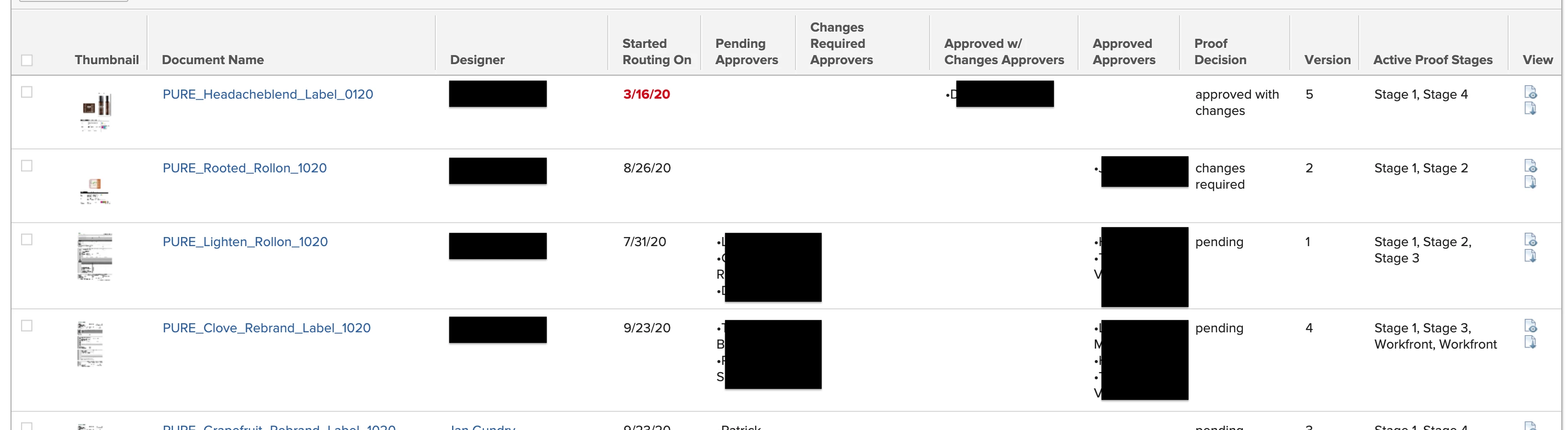
I'm super interested in seeing any kind of document approval reports people have created to manage their proofs! Here is a screenshot of the report we're currently using, but it's in need of some upgrades!
This post is no longer active and is closed to new replies. Need help? Start a new post to ask your question.

5 replies

KierstenKollins
Community Advisor
Community Advisor
September 24, 2020

Hi Samantha,

I posted a question the other day in community to see if there is a way to pull the stage end time into a report like this to know when the route period has ended and the stage has locked. Have you happened to figure out a way to do that?

Thanks,

Kiersten

SamanthaIsin
Level 7
September 24, 2020

No, I haven't, but it would be extremely valuable to us.

Level 2
September 24, 2020

Hi Samantha,

Here is one that we have setup for use, very similar to yours really. what else are you thinking that it needs ?

Level 5
September 25, 2020

How do you get those status icons column?

Level 2
September 24, 2020

I am looking to add an "Open Proof" button shortly

SamanthaIsin
Level 7
September 24, 2020

How soon will this be available? It would be extremely helpful.

Level 10
September 24, 2020

This is nice Samantha. Any chance you could list the fields used in each column?

Level 9
September 24, 2020

How do you add the thumbnail and status column (and what kind of report is this)?

SamanthaIsin
Level 7
September 25, 2020

Thumbnail:

displayname=Thumbnail

linkedname=document

namekey=view.relatedcolumn

namekeyargkey.0=document

namekeyargkey.1=documentthumbnail

textmode=true

tile.name=component.documentthumbnail

valueformat=HTML

viewalias=document:documentthumbnail

Status columns:

displayname=Pending Approvers

listdelimiter=<p>

listmethod=nested(proofApprovals).lists

styledef.case.0.comparison.icon=false

styledef.case.0.comparison.leftmethod=documentID

styledef.case.0.comparison.lefttext=documentID

styledef.case.0.comparison.operator=notblank

styledef.case.0.comparison.operatortype=string

styledef.case.0.comparison.righttext=

styledef.case.0.comparison.trueproperty.0.name=fontstyle

styledef.case.0.comparison.trueproperty.0.value=bold

styledef.case.0.comparison.trueproperty.1.name=textcolor

styledef.case.0.comparison.trueproperty.1.value=d30519

styledef.case.0.comparison.truetext=

textmode=true

type=iterate

valueexpression=IF({approverDecision}="pending"||{approverDecision}="Pending",CONCAT("•",{approver}.{name}))

valueformat=HTML

The pending approvers, approvers, etc. all come from the 'status' column.

Level 2
October 21, 2020

Hi Samantha- I am trying to add in the thumbnail and status icons to my proof reporting using the text html above, but it's showing up blank. Any ideas what could need adjusting? Thank you! I am new to workfront and appreciate the support.