Setting that allows a Planner to edit task start/end dates only through duration? | Community
Skip to main content
July 17, 2024
Question

Setting that allows a Planner to edit task start/end dates only through duration?

  • July 17, 2024
  • 2 replies
  • 1240 views

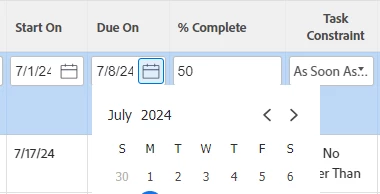
Currently our users can directly change a start or end date in a project, which changes the associated task constraint to Must Start On or Must Finish On. I have memory of users not being able to do that previously; the only way to change a date was through adjusting the duration.

Is there a setting that allows a Planner to edit task start/end dates only through duration? If so, where can that be accessed?


If you have a recommendation on the best practice for date adjustment for users new to project management/Workfront, please let me know.


Thanks!

This post is no longer active and is closed to new replies. Need help? Start a new post to ask your question.

2 replies

KellieGardner
Community Advisor
Community Advisor
July 18, 2024

If they have manage access you can't limit their ability to move the dates.


Options

  1. You could create a view that only has the date fields visible but formatted so they can't edit directly from that project view. They could still go into the task and edit the dates but you could try limiting it on their actual view to see if that helps. Going into text mode and making it a valueexpression instead of a valuefield will make it uneditable in the view screen. 
  2. In a view you could use conditional formatting to highlight date fields in red or something to flag when a task constraint turns to a must start on or finish on. This way it makes the PM aware that they have hard coded the date. 
valueexpression={plannedStartDate} querysort=plannedStartDate valueformat=atDate displayname= linkedname=direct namekey=plannedStartDate


It's really going to be a coaching exercise with your users. Explaining to them that hand picking a date overrides the functionality of Workfront's timeline features.


HannahKr2Author
July 19, 2024

Hi Kellie. Thanks for the answer.

Has it always been like this? I could have sworn that our users weren't able to hard code dates when the constraint was set to As Soon As Possible and were only able to change dates by adjusting the duration.

Rafal_Bainie
Community Advisor
Community Advisor
July 29, 2024

in a sense you are both right @hannahkr2  @kelliegardner 

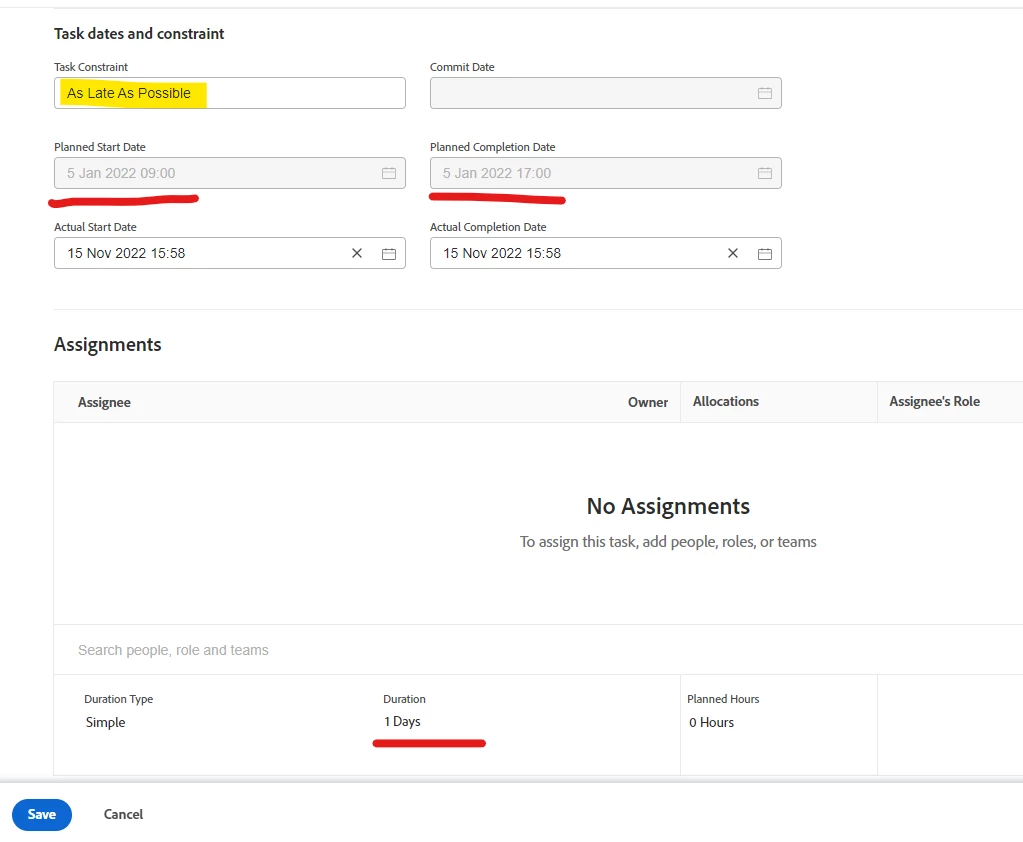
when task is set to ASAP, planned dates are greyed out and not editable, while duration is still editable.


At the same time, depending on user's task level access they can still go in, adjust the constraint and edit the dates...

KellieGardner
Community Advisor
Community Advisor
July 29, 2024

You are right it does gray them out in the task settings area however from the main project screen where most planners setup their timelines and do their planning, it does not.


All dates are editable and the only way around it is to control it from their view.


HannahKr2Author
July 31, 2024

Hi Kellie. Thanks for the answer.


Has it always been like this? I could have sworn that our users weren't able to hard code dates when the constraint was set to As Soon As Possible and were only able to change dates by adjusting the duration. One of the biggest pieces of feedback we received was "Dates can't be changed" so this is throwing me for a loop now that they can be changed with a double click.