Requestor Limited Access to Projects & Tasks??? | Community
Skip to main content
January 31, 2024
Solved

Requestor Limited Access to Projects & Tasks???

  • January 31, 2024
  • 1 reply
  • 614 views

Hi all,


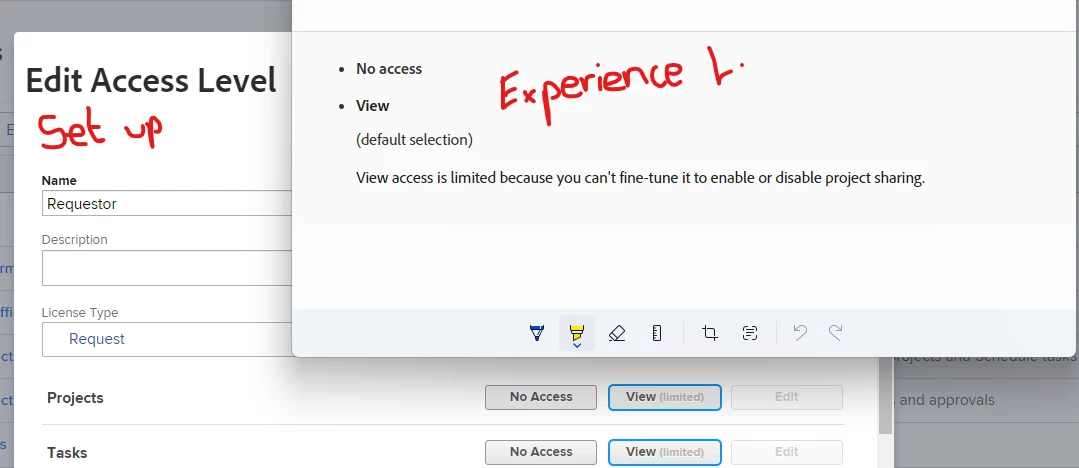
Does anyone who what the limitations are for Requestor licences within Projects / Tasks. My understanding was they have no access to these, but the Experience League page says they can limited access to Tasks. The WF Set Up area has Projects and Tasks as limited with no other options. If it were completely closed it should state no access right?

Thanks

Matt


This post is no longer active and is closed to new replies. Need help? Start a new post to ask your question.
Best answer by VicSellers

Hi @17635835 - They have the ability to view tasks in a project, just aren't able to edit / work on tasks. 


Sometimes what I find helpful is creating test users in the system, might depend if your instance is on admin console or not, and assigning them the different access levels to see the experience (what they can/can't do) from that vantage point (you might already being doing that though). 

1 reply

VicSellers
Community Advisor
VicSellersCommunity AdvisorAccepted solution
Community Advisor
January 31, 2024

Hi @17635835 - They have the ability to view tasks in a project, just aren't able to edit / work on tasks. 


Sometimes what I find helpful is creating test users in the system, might depend if your instance is on admin console or not, and assigning them the different access levels to see the experience (what they can/can't do) from that vantage point (you might already being doing that though). 

January 31, 2024

Hi Victoria,

Thanks for this. I've been doing a bit of testing, but I can't make the tasks visible to the Requestor in the project I'm using. Do you know if there's a setting that needs to be turned on for this?

And when is says view the task, does that mean they should be able to see everything within the task, e.g., comments documents?

I'm just not sure my testing is showing me everything.

Thanks again

Matt