Requester documents view | Community
Skip to main content
March 29, 2023
Solved

Requester documents view

  • March 29, 2023
  • 1 reply
  • 1611 views

Here is the scenario:

- I have "External Requesters" set up with the highest level of visibility on the master Project we use for their Requests in the Edit Project screen

- I have given the Requester Access Level Setup to be able to manage Documents, the highest level allowed

- I have Shared the master project that are used for requests with the Company that makes requests into that project and shared at the highest Manage level


Yet, when I add a Document (not a proof) to a request, the person who made the Request cannot see the Document unless I specifically share the document with her.


We have a lot of use cases where a requester asks for a document and we upload it to the Documents tab as the fulfillment of the request. This 2nd step to have to share everything AGAIN seems ridiculous. 


WHY? Any clever ideas what to do to fix this? I have put in a ticket to Support but didn't get any ideas on how to fix this, other than "you have to share the document every time."



This post is no longer active and is closed to new replies. Need help? Start a new post to ask your question.
Best answer by JillAc

I've tested this in my own instance and do not experience the same issues as you. So I feel like it has to be a setting you have applied somewhere. 


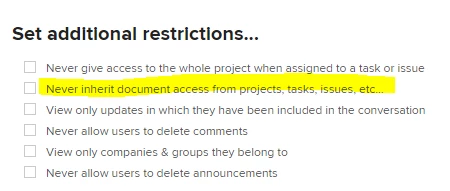
On the access level for Requester we have documents set to Edit and no additional restrictions are selected. If you have additional restrictions setup maybe one of those is impacting it?

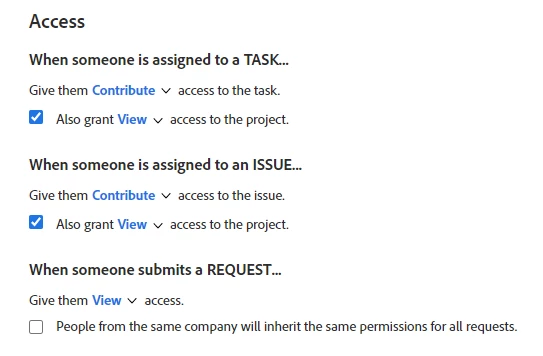
On the Project where the request queue is setup we have it set to give view access when they submit a request. 


Also, the test requester is a member of the group that the request queue project belongs to?


Oh wow I figured it out. I really appreciate this. Your saying to look at Groups triggered me to go back into the User Setup to check their groups, and it turned out I accidentally had half the people as Reviewers and half as Requesters because I was looking at their Group Name (called "Requester") and not their Access Level (since I use the same words for Access Level and Groups I am going to change the Group Name so it is obviously different than the Access level name). Once I changed them to Requesters, it all kicked in. Total error on my part and appreciate your help.  Thank you Kellie!

1 reply

KellieGardner
Community Advisor
Community Advisor
March 29, 2023

I would check here first in the access level to make sure this box isn't checked?


JillAcAuthor
March 30, 2023

Thanks Kellie, that sounded promising, and I did uncheck that box and uploaded a test document and the requester still can't see it unless I specifically share it. I'm baffled!

KellieGardner
Community Advisor
Community Advisor
March 30, 2023

Without being able to see your system it's hard to troubleshoot but here are some more areas I would check:


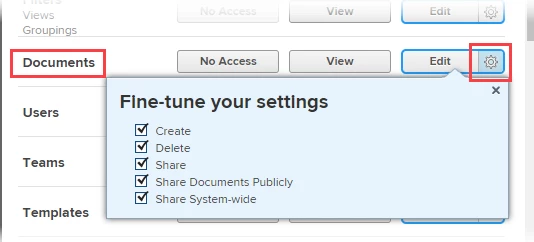
  • In the access level make sure they have at least view access to documents 
  • In the Project where your queue is set up under access make sure they have access to view the request they submitted
  • Under sharing project access: Make sure that you haven't turned off the ability to inherit permissions
  •