Report View: Display Typeahead Text Field as Column using Text Mode | Community
Skip to main content
Level 4
October 23, 2020
Solved

Report View: Display Typeahead Text Field as Column using Text Mode

  • October 23, 2020
  • 8 replies
  • 2211 views

Hello -

There doesn't appear to be native support for setting Typeahead fields as columns in report view. I have pointed the column to the values I want in text mode, however, I'm getting the whole object when I run the report.

In this case, I want a USER object typeahead field to show me the name of the user.

In text mode for the view, so far, I have:

displayname=Owner

textmode=true

valuefield=XYowner

valueformat=customDataLabelsAsString

When I run the report as is, the value that shows in the column/row (e.g.):

{"objCode":"USER","name":"Jack Jackson","ID":"5xxxxx326xxx0537abc12345d6089e48xx17"}

All we want to display is the "Jack Jackson".

Is there a way to parse the name out and omit the rest?

Thank you.

This post is no longer active and is closed to new replies. Need help? Start a new post to ask your question.
Best answer by SarahNa

Hi Mylah -

Try this:

displayname=Owner

textmode=true

valuefield=XYowner:name

valueformat=customReferenceObjectAsString

Hope that helps!

8 replies

SarahNaAccepted solution
Level 6
October 23, 2020

Hi Mylah -

Try this:

displayname=Owner

textmode=true

valuefield=XYowner:name

valueformat=customReferenceObjectAsString

Hope that helps!

Doug_Den_Hoed__AtAppStore
Community Advisor
Community Advisor
October 23, 2020

Very nice, Sarah: thanks for sharing!

May I ask where you found that particular gem?

Regards,

Doug

Level 6
October 23, 2020

Hey Doug,

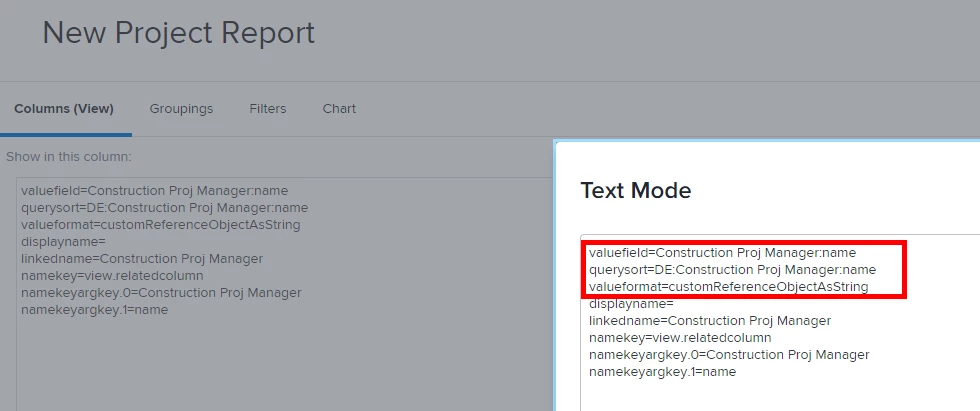
We have one user typeahead field that we use so I just created a new report and found the field. They are not listed under the object name anymore, they get their own section (screenshot 1). Then switched to text mode and pulled out the syntax (screenshot 2).

Glad you like!

Doug_Den_Hoed__AtAppStore
Community Advisor
Community Advisor
October 23, 2020

Ahh...I see! Excellent Find, and thanks again.

Regards,

Doug

Level 10
October 23, 2020

Nice work... added to the WF-Pro.com "Text Mode Examples" for future reference.

Mylah_DAuthor
Level 4
October 23, 2020

Thanks so much. Sarah's solution worked beautifully.

Best,

Mylah

Mylah_DAuthor
Level 4
October 23, 2020

However, in our instance, when I try to create a new project report, my field still does not show up anywhere in another section (unlike Sarah's screenshot.) Please see this screenshot. Our field is called "TG Individual Owner" and, comparing it to Sarah's screenshot, I would have expected to see it appear after "TG Group Owner". I couldn't find any expandable section in the list that allowed me to choose between ID and Name for that object. Hmmm. I hope I'm missing something obvious here. I'll come back and let everyone know how this ultimately resolves.

skyehansen
Community Advisor
October 23, 2020

hi Mylah, your screenshot is of fields in the Project section. Can you scroll down and confirm you don't have a TG Individual Owner section (i.e. grey bar that says TG Individual Owner, toward the bottom of your scroll list)

Mylah_DAuthor
Level 4
October 24, 2020

Hi,

Thanks, Skye. I found it.

I had been trying to limit the list by typing "Owner" in the project field name (as in screenshot), and it wasn't among the options presented,. However, just scrolling down to the bottom of the list, I found it.

@Erec Cano‚ we can cancel our meeting early next week & I'll mark the case resolved.

Thx, all!

Level 4
January 14, 2021

Is there any trick to getting this working when the custom form is at the project level and I'm trying to make a task level report? I have the exact same issue where I just need the users name, but it just displays as blank when I add :name to the valuefield and changing valueformat to customReferenceObjectAsString as what was done in this thread.

displayname=

linkedname=project

namekey=view.relatedcolumn

namekeyargkey.0=project

namekeyargkey.1=FIELD NAME

querysort=DE:project:FIELD NAME

textmode=true

valuefield=project:FIELD NAME

valueformat=customDataLabelsAsString

Is what I have that shows the {"objCode":"USER","name":"Joe Smith","ID":"xxxxxxxxxxxxxxxxxxxxxxxxxxxxxxxxxxx"}. Any thoughts for just the name?

Level 6
January 14, 2021

Hey Ryan,

We were unable to figure out how to do this without creating a reference field. On the project level, I created a calculated field - {FIELD NAME:name} - then I used that field when reporting.

Hope that helps!

Level 4
January 14, 2021

Thanks for taking a look, I really appreciate it. I was hoping to avoid that one, just to avoid cluttering up the custom forms more, but that does work for the report side so might be the way I go. Thanks again!