Report that combines record count from two custom fields? | Community
Skip to main content
June 2, 2023
Solved

Report that combines record count from two custom fields?

  • June 2, 2023
  • 3 replies
  • 1026 views

We have a custom form attached to each task in a project. There are two fields in the form (dropdowns where only one selection is allowed) -- Primary Service Line and Secondary Service Line -- that we want to report on. But we want the record count from the two fields combined. For example, if blue is chosen as the primary service line in 12 tasks and chosen as the secondary service line in 5 tasks, I want the report to show me 17 for blue. I have not been able to figure out if this can be done and if so how. I've searched help but haven't found anything on this type of scenario. Anyone have ideas or a solid answer? Any help is much appreciated.
This post is no longer active and is closed to new replies. Need help? Start a new post to ask your question.
Best answer by KierstenKollins

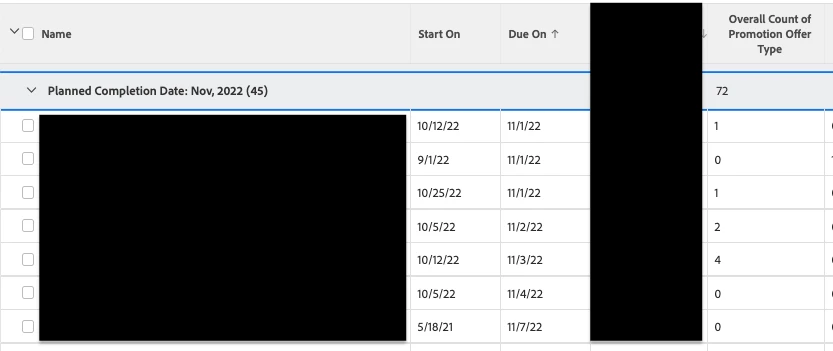
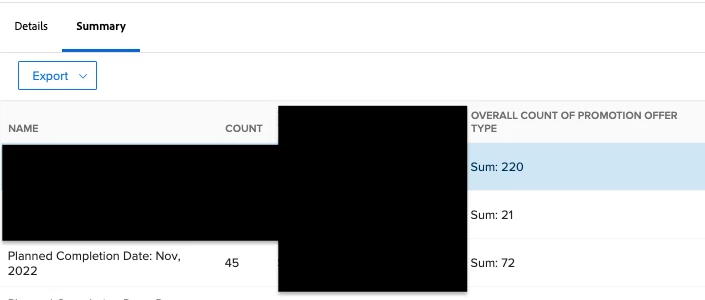
We had a similar experience where we wanted to count certain drop down options from 12 different fields with like drop down options to be able to sum them up on a summary report.


Maybe this can help you out with your scenario.


Here is an example on what we did with a calculated field that we set to a number output on the field. 


SUM(IF(CONTAINS("Promotion",{DE:Offer #1 Type}),1,0),IF(CONTAINS("Promotion",{DE:Offer #2 Type}),1,0),IF(CONTAINS("Promotion",{DE:Offer #3 Type}),1,0),IF(CONTAINS("Promotion",{DE:Offer #4 Type}),1,0),IF(CONTAINS("Promotion",{DE:Offer #5 Type}),1,0),IF(CONTAINS("Promotion",{DE:Offer #6 Type}),1,0),IF(CONTAINS("Promotion",{DE:Offer #7 Type}),1,0),IF(CONTAINS("Promotion",{DE:Offer #8 Type}),1,0),IF(CONTAINS("Promotion",{DE:Offer #9 Type}),1,0),IF(CONTAINS("Promotion",{DE:Offer #10 Type}),1,0),IF(CONTAINS("Promotion",{DE:Offer #11 Type}),1,0),IF(CONTAINS("Promotion",{DE:Offer #12 Type}),1,0))


3 replies

The_Real_Melinda_Layten
June 5, 2023

What I'm hearing is that you want a column for each possible service line and whether it is the primary or secondary count it and add up the total.


So you are logically asking: if(contains(A, "Blue") or contains(B,  "Blue"), 1, 0) and sum that up for your grouping? 


The easiest way to do this would probably be to create calculated fields on your form that are named Is Blue, Is Green, etc and then use those in reports as it will allow you fairly quickly build reports and charts that are hard or impossible when doing the calculation in the report itself.

DarcySm1Author
June 5, 2023

Thank you for your response. I was thinking it might need to be calculated fields, but was hoping for a solution in the reports. Looks like I will have to do the calculated fields!

KierstenKollins
Community Advisor
KierstenKollinsCommunity AdvisorAccepted solution
Community Advisor
June 5, 2023

We had a similar experience where we wanted to count certain drop down options from 12 different fields with like drop down options to be able to sum them up on a summary report.


Maybe this can help you out with your scenario.


Here is an example on what we did with a calculated field that we set to a number output on the field. 


SUM(IF(CONTAINS("Promotion",{DE:Offer #1 Type}),1,0),IF(CONTAINS("Promotion",{DE:Offer #2 Type}),1,0),IF(CONTAINS("Promotion",{DE:Offer #3 Type}),1,0),IF(CONTAINS("Promotion",{DE:Offer #4 Type}),1,0),IF(CONTAINS("Promotion",{DE:Offer #5 Type}),1,0),IF(CONTAINS("Promotion",{DE:Offer #6 Type}),1,0),IF(CONTAINS("Promotion",{DE:Offer #7 Type}),1,0),IF(CONTAINS("Promotion",{DE:Offer #8 Type}),1,0),IF(CONTAINS("Promotion",{DE:Offer #9 Type}),1,0),IF(CONTAINS("Promotion",{DE:Offer #10 Type}),1,0),IF(CONTAINS("Promotion",{DE:Offer #11 Type}),1,0),IF(CONTAINS("Promotion",{DE:Offer #12 Type}),1,0))


Madalyn_Destafney
Community Advisor
Community Advisor
June 5, 2023

Since these are not multi-select dropdowns, can't you just have a task report grouped by [fields dropdowns], and the record count would show with the grouping counts?

If this helped you, please mark correct to help others : )
DarcySm1Author
June 5, 2023

I can do that for one field or the other, but it won't combine the results for the two fields. Unless you know of a trick that I haven't discovered yet.