Report Showing Users that Do Not Have Tasks Ready to Begin | Community
Skip to main content
Level 5
October 7, 2020
Question

Report Showing Users that Do Not Have Tasks Ready to Begin

  • October 7, 2020
  • 2 replies
  • 1408 views

I'm afraid this is going to be a "D'oh" moment, but I can't get my head around how to do this.

I have an assignment report showing tasks that are ready to begin (Task>Can Start=True) on current projects, assigned to specific role ID's (Developers), grouped by the Assigned To Name.

  • I want a report that will show which Developers do NOT have any tasks that are ready for them to begin.
  • I don't want to see their task assignments that are Task>Can Start Equal to False.
  • The report will be used by a manager to quickly see who doesn't have any active tasks, and can pick up something new.

Basically, it should show me any Developer that does not show up on the report I mention above. The filters for that task are below.
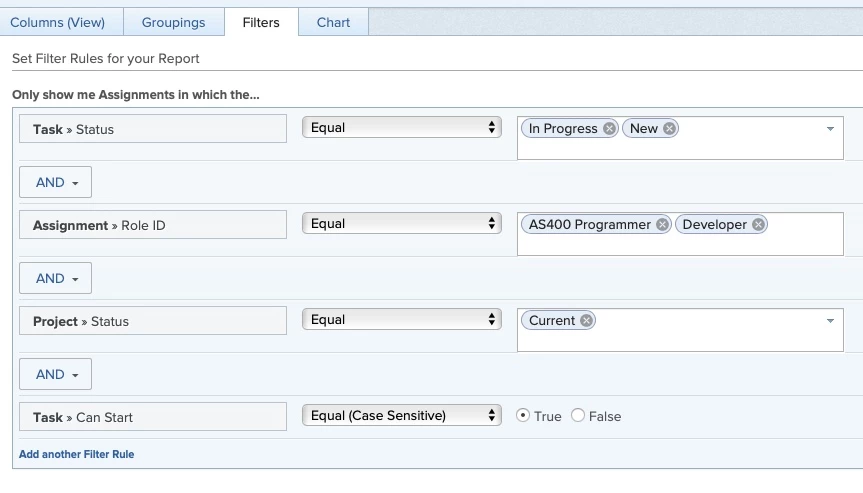
Thank you!

This post is no longer active and is closed to new replies. Need help? Start a new post to ask your question.

2 replies

Doug_Den_Hoed_AtAppStore
Community Advisor
Community Advisor
October 7, 2020

Hi Kathy,

Thanks for the opportunity to leverage @NRYN R - inactive‚ 's resources at WF-Pro.com to expand my EXISTS and NOTEXISTS repertoire, as per the Busy / Bored / Borderline User Report Filters I came up with, below.

Regards,

Doug

Busy Users (HAVE assigned tasks that can start)

EXISTS:a:$$EXISTSMOD=EXISTS

EXISTS:a:$$OBJCODE=TASK

EXISTS:a:assignedToID=FIELD:ID

EXISTS:a:canStart=true

EXISTS:a:canStart_Mod=eq

isActive=true

isActive_Mod=eq

Bored Users (have NO assigned tasks that can start, and HAVE assigned Tasks that cannot Start)

EXISTS:a:$$EXISTSMOD=NOTEXISTS

EXISTS:a:$$OBJCODE=TASK

EXISTS:a:assignedToID=FIELD:ID

EXISTS:a:canStart=true

EXISTS:a:canStart_Mod=eq

EXISTS:b:$$EXISTSMOD=EXISTS

EXISTS:b:$$OBJCODE=TASK

EXISTS:b:assignedToID=FIELD:ID

EXISTS:b:canStart=false

EXISTS:b:canStart_Mod=eq

isActive=true

isActive_Mod=eq

Borderline Users (have NO assigned tasks, period)

EXISTS:a:$$EXISTSMOD=NOTEXISTS

EXISTS:a:$$OBJCODE=TASK

EXISTS:a:assignedToID=FIELD:ID

isActive=true

isActive_Mod=eq

Level 10
October 8, 2020

Thanks for the shout out Doug. And what perfect timing, as just today I had an end user ask for a project report looking for projects without tasks of a specific name. We pulled up the "How to Add Exists Mod to a Filter" article and it turned out to be exactly what she needed. I've added your examples to the Text Mode Examples page for future reference. --Narayan

Doug_Den_Hoed_AtAppStore
Community Advisor
Community Advisor
May 16, 2022

Hi Cathy,

The original filter is looking "everywhere, across time" for Tasks, and if an (active) user has even just one such (primary) assignment on a Task, their name will not show up.

To restrict it to look in "current projects only", yes, you could add this:

EXISTS:a:$$EXISTSMOD=NOTEXISTS

EXISTS:a:$$OBJCODE=TASK

EXISTS:a:assignedToID=FIELD:ID

EXISTS:a:project:status=CUR

EXISTS:a:project:status_Mod=eq

isActive=true

isActive_Mod=eq

Regards,

Doug

Level 5
May 20, 2022

Thanks again for your help, @Doug Den Hoed‚. I added the project status statement to both the bored and borderline reports. I spot checked some users and it appeared to be giving me the correct results.

This morning though, I've discovered a user that:

--Does not have any tasks that can start

--Does have tasks that are not ready to begin

He is not showing on the report.

My filter in the report is:

EXISTS:a:$$EXISTSMOD=NOTEXISTS

EXISTS:a:$$OBJCODE=TASK

EXISTS:a:assignedToID=FIELD:ID

EXISTS:a:canStart=true

EXISTS:a:canStart_Mod=eq

EXISTS:a:project:status=CUR

EXISTS:a:project:status_Mod=eq

EXISTS:b:$$EXISTSMOD=EXISTS

EXISTS:b:$$OBJCODE=TASK

EXISTS:b:assignedToID=FIELD:ID

EXISTS:b:canStart=false

EXISTS:b:canStart_Mod=eq

EXISTS:b:project:status=CUR

EXISTS:b:project:status_Mod=eq

isActive=true

isActive_Mod=eq

Below is a screenshot of a different (assignment) report, showing that the user has assigned tasks where Can Start = False. (Other filter is Project status=Current)

-I added some additional columns on the report, thinking perhaps the issue might be with work item, assignment status, etc. But I'm not coming up with an explanation on why he isn't showing on my report with the text mode filter.

What else do I need to consider? Thank you!!

Doug_Den_Hoed_AtAppStore
Community Advisor
Community Advisor
May 25, 2022

Hi Cathy,

The two EXISTS clauses are additive (e.g. AND-ing) , so I'd suggest you separate them to see which half is not bringing back the user in question, like this:

EXISTS:a:$$EXISTSMOD=NOTEXISTS

EXISTS:a:$$OBJCODE=TASK

EXISTS:a:assignedToID=FIELD:ID

EXISTS:a:canStart=true

EXISTS:a:canStart_Mod=eq

EXISTS:a:project:status=CUR

EXISTS:a:project:status_Mod=eq

isActive=true

isActive_Mod=eq

then

EXISTS:b:$$EXISTSMOD=EXISTS

EXISTS:b:$$OBJCODE=TASK

EXISTS:b:assignedToID=FIELD:ID

EXISTS:b:canStart=false

EXISTS:b:canStart_Mod=eq

EXISTS:b:project:status=CUR

EXISTS:b:project:status_Mod=eq

isActive=true

isActive_Mod=eq

Assuming at least one clause does not return that user, you can then relax or change the criteria until the user does then appear, which should be the root cause.

Regards,

Doug