Report: Planned and Actual by Assignee | Community
Skip to main content
Level 9
February 28, 2025
Solved

Report: Planned and Actual by Assignee

  • February 28, 2025
  • 1 reply
  • 759 views

Hi WF Community,


Has anyone be able to produce a single report to show planned hrs and actual hours by resource (assignee) for a given time frame?

  • We have tasks that have multiple assignees and span one or many months.

Seems like it should be simple and maybe I'm just missing something obvious.  However, from what I can tell, in order to easily report on this I would need my tasks to only have 1 assignee and have planned start and end dates within the same month.


Thanks,

Nick


Best answer by Sven-iX

Hello @nickva7 

How's by you! 

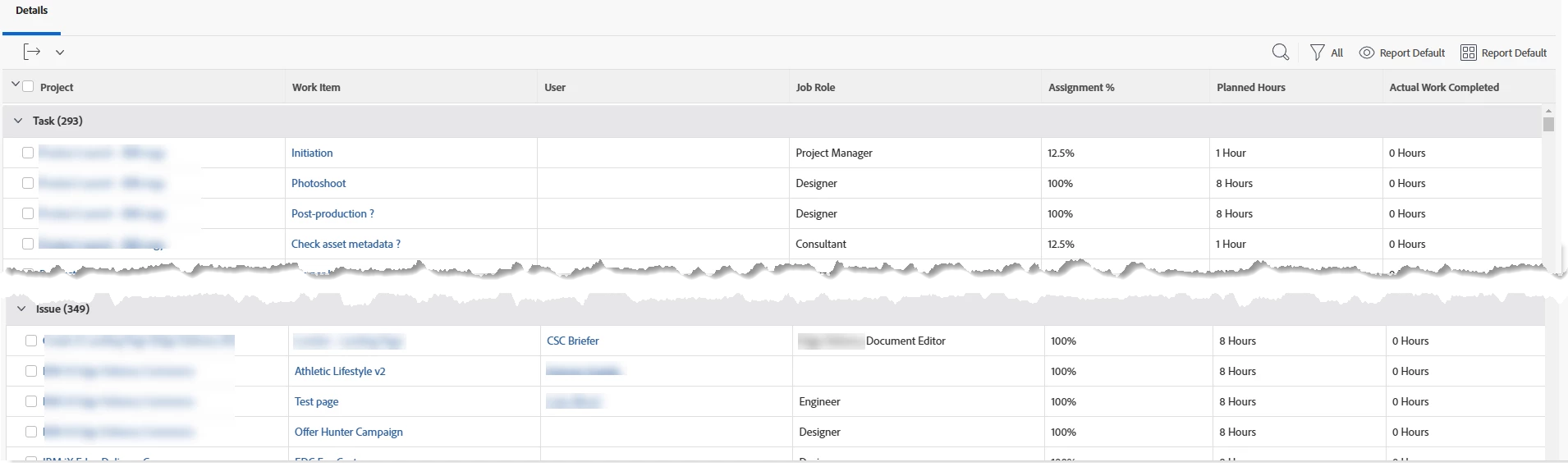
I think you want an ASSIGNMENT report - rather than a TASK based report. 

Then filter (or us prompt to filter) to the respective user. 

The screenshot is from an unfiltered report and i don't have actual hours in my test data.

  • for "Work Item" I combine the taskName and IssueName columns (an assignment is to a task, or an issue, not both)
  • The actual hours on the assignment don't show in the UI so you need to use text mode


displayname=Actual Work Completed linkedname=direct namekey=actualWorkCompleted querysort=actualWorkCompleted valuefield=actualWorkCompleted valueformat=compound viewalias=actualWorkCompleted​


1 reply

Sven-iX
Community Advisor
Sven-iXCommunity AdvisorAccepted solution
Community Advisor
February 28, 2025

Hello @nickva7 

How's by you! 

I think you want an ASSIGNMENT report - rather than a TASK based report. 

Then filter (or us prompt to filter) to the respective user. 

The screenshot is from an unfiltered report and i don't have actual hours in my test data.

  • for "Work Item" I combine the taskName and IssueName columns (an assignment is to a task, or an issue, not both)
  • The actual hours on the assignment don't show in the UI so you need to use text mode


displayname=Actual Work Completed linkedname=direct namekey=actualWorkCompleted querysort=actualWorkCompleted valuefield=actualWorkCompleted valueformat=compound viewalias=actualWorkCompleted​


NickVa7Author
Level 9
March 2, 2025

Good hearing from you @sven-ix !  Hope you are well.

That worked!  Tried an assignment report in the past but just couldn't get actual hours to display - text mode!

Thanks for this. 

Sven-iX
Community Advisor
Community Advisor
March 6, 2025

Yessir. (I cheat: I summ the planned hours and copy the text mode aggregator lines and replace the field name)

aggregator.displayformat=minutesAsHoursString aggregator.function=SUM aggregator.namekey=actualWorkCompleted aggregator.valuefield=actualWorkCompleted aggregator.valueformat=compound