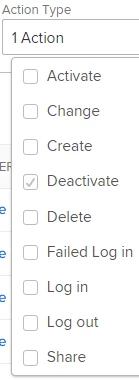
Hi Susan, I'd suggest you try Setup > System > Audit Logs > Action Type = Deleted > Date Range = "of interest" > Apply. If that's not quite what you're after, the Oldie But A Goody alternative is to:
create a User report
show Last Update Date, Last Update Name, and User Name in the view, sorted in that order
filtered by Is Active = False
group by Last Update Date (by Month)
save the report as "Recently Deactivated" and run it
The concept (ok, cheat) here is that typically, when a user is deactivated, no further updates are made to that user, so the Last Update Date matches (normally) the date of their deactivation. Regards, Doug Doug Den Hoed - AtAppStore