
Report Customization | Community
Skip to main content
SamanthaIsin
Level 7
July 27, 2020
Solved

Report Customization

  • July 27, 2020
  • 1 reply
  • 520 views

I want to be able to customize the defaults on my reports. For example, all my reports always open with all my data expanded. How do I adjust the settings to the default is a shrunken list of my groupings? Also how so I adjust the settings to by default I'm shown all the results from my report? The report settings limit is 200!
This post is no longer active and is closed to new replies. Need help? Start a new post to ask your question.
Best answer by imgrund

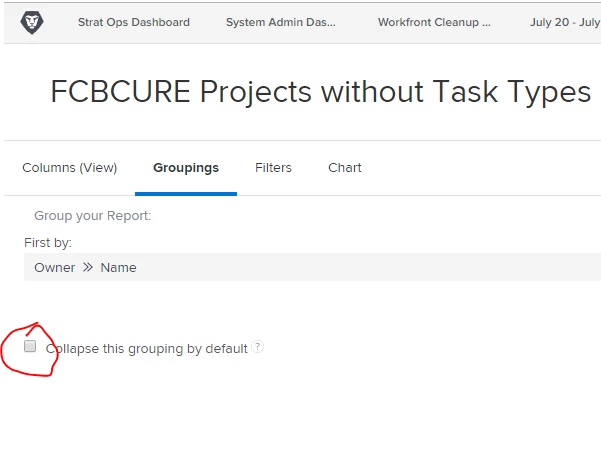
So good news.... when you are in the New Workfront Experience, you can select in the grouping areas of a report if you want it collapsed or not. For instance, I have several reports where the first grouping is opened but the second grouping is collapsed by default.

Also, in NWE, lists have a default of 2,000. So as long as you don't have more than that, everything is on one page. HOWEVER, please note that for dashboards, there is still the restriction options of 15, 25, 50, 75, 100, 200. You can't show all on a dashboard.

Hope that helps

1 reply

imgrund
Adobe Employee
imgrundAdobe EmployeeAccepted solution
Adobe Employee
July 28, 2020

So good news.... when you are in the New Workfront Experience, you can select in the grouping areas of a report if you want it collapsed or not. For instance, I have several reports where the first grouping is opened but the second grouping is collapsed by default.

Also, in NWE, lists have a default of 2,000. So as long as you don't have more than that, everything is on one page. HOWEVER, please note that for dashboards, there is still the restriction options of 15, 25, 50, 75, 100, 200. You can't show all on a dashboard.

Hope that helps

SamanthaIsin
Level 7
July 28, 2020

Good to know!! Thank you.