** Release 2019.4 Major Problems ** | Community
Skip to main content
November 5, 2019
Question

** Release 2019.4 Major Problems **

  • November 5, 2019
  • 28 replies
  • 3348 views

Release 2019.4, which is scheduled for Production the week of November 11 (see the Trust to verify your date), does not work and is a mistake. From the perspective of an end user, you've ripped away the familiar experience of the old and replaced it with a replacement that offers nothing new in terms of capability. It was bad enough that we couldn't rely on the custom interfaces to remain stable or even part of the system... remembers MyWork. However, now you've taken away the stability of views in reports and dashboards, which I viewed (until today) as the last holdout in the onslaught of new and ever-changing interfaces. Let's fix this before you create problems.

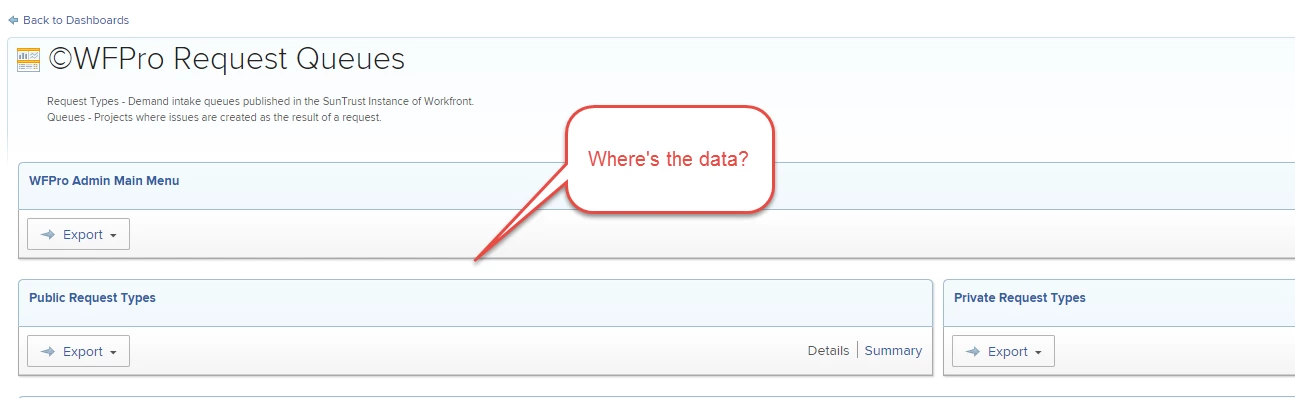
From the perspective of an admin who customizes views heavily, this release breaks much of my work and will cripple my instances if released in this state. The way HTML is rendered has been messed with so significantly that custom HTML isn't rendering anywhere close to the original. Heads up Community, if you use HTML in your views, you're going to want to get in and look at these things ASAP to gauge the impact this release will have on you.

The only reasonable solution to this problem is to postpone changes to reports and dashboards. It's clearly untested and I've only listed my issues below, but know there are more on the way.

Release Schedule (per Workfront Trust)

Title: 19.4 Release Deployment - Clusters 1, 3, & 5

Planned Start: November 14, 2019 8:00PM MST

Expected End: November 14, 2019 11:59PM MST

Critical - Will break reports resulting in a work-stoppage.

Severe - Will have significant impacts on the presentation of information.

Cosmetic - Will annoy users and likely result in requests to reformat column widths in reports.

Identified Issues (ordered by priority)

  • HTML Formatting Missing
    • Status - Unresolved
    • Severity - Critical
    • Likely the result of certain new HTML characters being restricted due to security concerns, resulting in partially-rendered views. This is inconsistent with what is in production today. (See screenshot below)
  • Auto-Collapse
    • Status - Unresolved
    • Severity - Critical
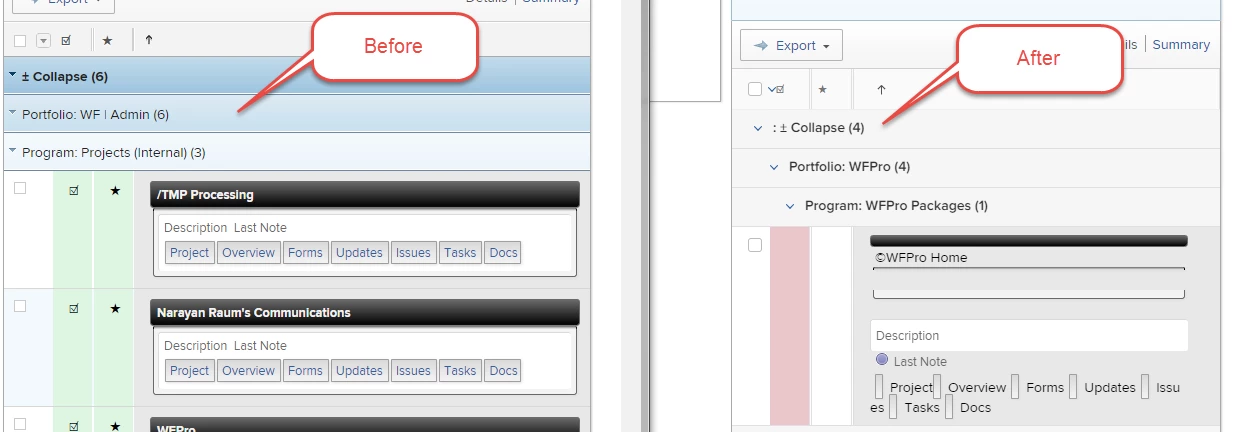
    • Seems half-baked and isn't sticky and needs to be reversed. All those years of training users on how to leverage the browser's CTRL + F to find data are out the window with this. Expanding each report on the dashboard one at a time is not a reasonable workaround.
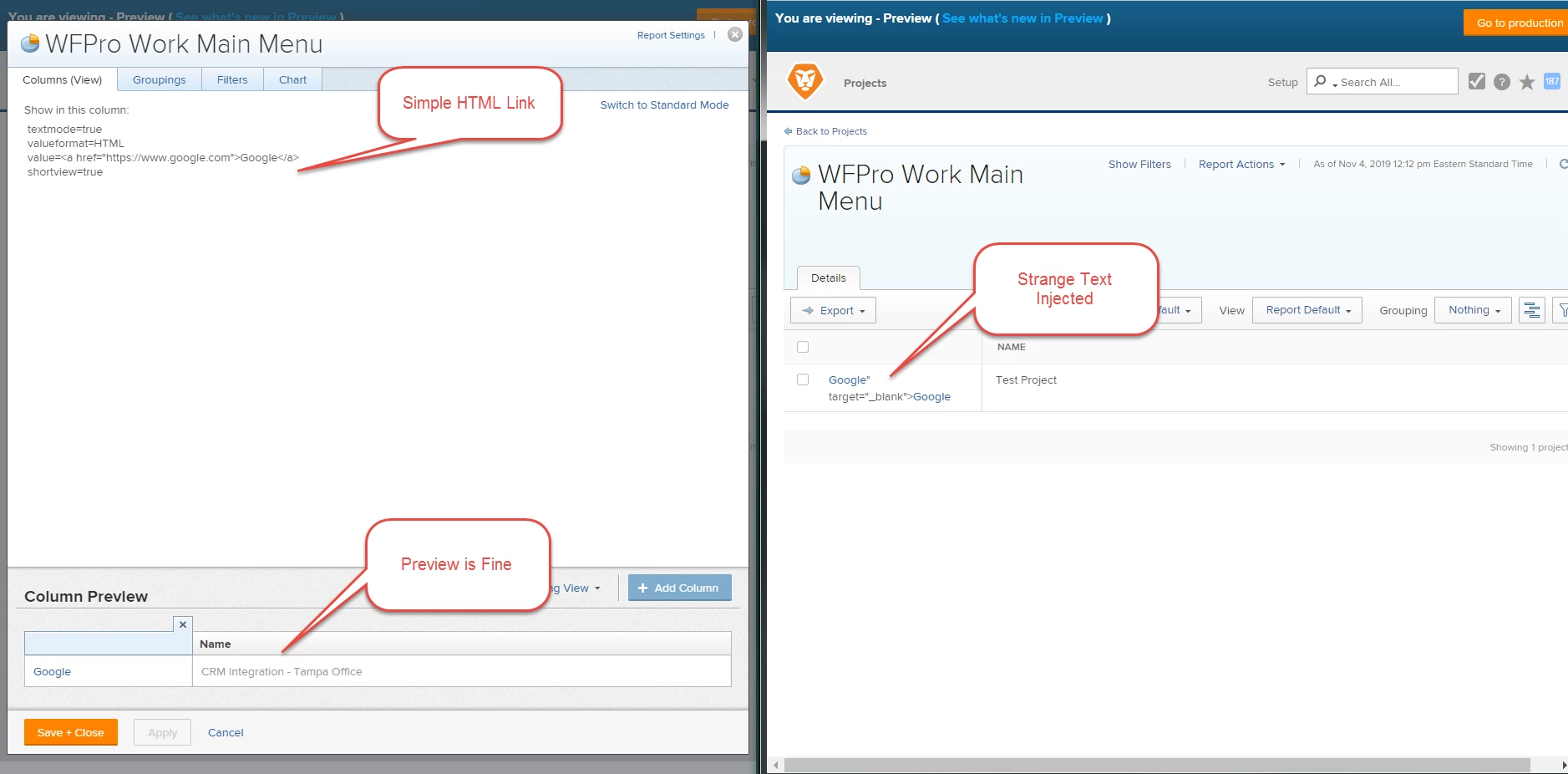
  • Anchor Tags Injecting HTML (Case 00174420)
    • Status - Unresolved
    • Severity - Critical
    • (<a href="https://www.google.com">) in your HTML don't work anymore. I've logged an issue for this one with support since it's the most bothersome.
  • link.url in Text Mode Injecting Line Break (Case 00174420)
    • Status - Unresolved
    • Severity - Severe
    • If you use "link.url=customDataLabelAsString(Field)" for rendering hyperlinks, a line break is now added to the view breaking the presentation.
  • Dashboard Refresh
    • Status - Confirmed
    • Severity -Severe
    • Loading dashboards repeatedly requires a refresh to load data
  • Column Header All Caps
    • Status - Unresolved
    • Severity - Severe
    • Column headers are used for much more than simply a label. For example, we use them to provide instructions, naming conventions and best practices for fields, often in complete sentences and case-sensitive. Changing this to all caps is unacceptable.
  • Column Header Text Cutoff
    • Status - Unresolved
    • Severity - Cosmetic
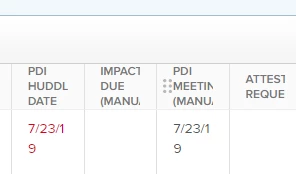
    • Text in headers used to always display regardless of column width. Now text is being cutoff and words broken mid-way.
  • Parameter Report > Forms Missing
    • Status - Unresolved
    • Severity - Cosmetic
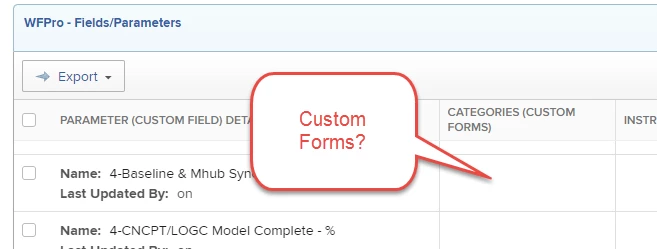
    • When viewing a parameter report, we can no longer see the custom forms that parameter exists on. See screenshot below.
  • Column Header "Description" Fails
    • Status - Unresolved
    • Severity - Cosmetic
    • When hovering over the column header, a description should display if added. See this recording of the behavior since a screenshot doesn't capture the popup tooltip.
This post is no longer active and is closed to new replies. Need help? Start a new post to ask your question.

28 replies

kynabaker16
Adobe Employee
Adobe Employee
November 5, 2019

Hello Narayan,

Thank you so much for your detailed feedback. I've raised each of these issues with the correct product teams. I can assure you that they are looking into each of these issues specifically and did not intend to break things for you.

In particular, I can tell you that this issue: Loading dashboards repeatedly requires a refresh to load data already has a fix that should be rolled out soon.

I'll keep you updated as I find more information out about these issues. As always, thank you for submitting a support ticket about each of these issues as that is the best way to stay informed about the status of any fixes or changes.

Kyna

NRYNRAuthor
November 5, 2019

Kyna, thank you for the reply. Can you provide a ticket number for the identified "Loading dashboards repeatedly..." for the documentation in this thread or should I log one of my own?

Thanks,

Narayan

SarahNau
Adobe Employee
Adobe Employee
November 5, 2019
Does anyone know when in November the release will be pushed out? This will be a huge change for my users and I want them prepared! Thanks! Sarah Nau
November 5, 2019

Hi Sarah

It depends on what cluster you are, but you should have received an email stating when the release is. Alternatively take a look at the trust site and that should include the dates. I'm in cluster 4 and the release date is Wednesday 13th November 12pm MST.

Hope this helps

Olivia

November 5, 2019

Hello, Narayan,

Thank you for taking the time to look through your report views and for providing the summary of the issues you've noticed. Looking at all your custom views, I must say I'm very impressed with your creativity and skills in text mode :)

I can assure you that the development team is looking into the broken text mode cases and will make sure to have them fixed before the release. I will keep you informed about the progress so that you can check it out in your account. The problem with column headers being cut off will be handled too.

As for the auto-collapsed state of groupings, we've decided to change the groupings to auto-collapsed based on previous customer requests. After applying this to reports and dashboards, we are getting mixed feedback and are currently discussing options for changing or improving it.

It is interesting to hear that capitalization of column headers can cause problems to users. I'll make sure to take this to the UX team for consideration.

Again, thank you for reporting the problematic parts. Please let me know if you notice any other text mode issues so that we can have a cleaner release.

Thanks!

Lilit

November 5, 2019

We're on Cluster 01. Here is the email information I received last Thursday.

Scheduled Maintenance Reminder

Workfront Status

Title: 19.4 Release Deployment - Clusters 1, 3, & 5

Planned Start: November 14, 2019 8:00PM MST

Expected End: November 14, 2019 11:59PM MST

Affected Infrastructure

Components: Workfront Application Platform

Locations: CL01, CL03, CL05

Details:

The deployment of the 2019.4 release for Clusters 1, 3, & 5 will start on Thursday November 14 at 8:00 p.m., MST. The deployment is expected to take no longer than 4 hours.

No downtime is expected and all clusters and components will be available during deployment.

For more detailed information about the functionality included with this release, see the 2019.4 release page (https://experience.workfront.com/s/article/2019-4-release-overview-102972743).

Community Advisor
November 5, 2019

And we're on Cluster 02, scheduled for November 13, 2019 8:00PM MST

Scheduled Maintenance Reminder

Workfront Status

Title: 19.4 Release Deployment - Clusters 2 & 6

Planned Start: November 13, 2019 8:00PM MST

Expected End: November 13, 2019 11:59PM MST

Affected Infrastructure

Components: Workfront Application Platform

Locations: CL02, CL06

Details:

The deployment of the 2019.4 release for Clusters 2 & 6 will start on Wednesday November 13 at 8:00 p.m., MST. The deployment is expected to take no longer than 4 hours.

No downtime is expected and all clusters and components will be available during deployment.

For more detailed information about the functionality included with this release, see the 2019.4 release page (https://experience.workfront.com/s/article/2019-4-release-overview-102972743).

SarahNau
Adobe Employee
Adobe Employee
November 5, 2019
Thanks all! I found the e-mail! Cluster 5 will be 11/14 Sarah Nau
NRYNRAuthor
November 6, 2019
FYI, I've added " Parameter Report > Forms Missing" to the original post as an unresolved issue.
NRYNRAuthor
November 6, 2019
FYI, added " Column Header "Description" Fails" to the original post in this thread. Here's a video of the behavior that fails: