"Error Generating Proof" message | Community
Skip to main content
September 28, 2023
Solved

"Error Generating Proof" message

  • September 28, 2023
  • 7 replies
  • 6516 views

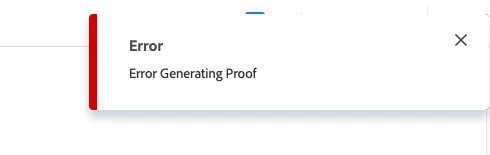
I'm suddenly unable to create proofs - I receive an "Error Generating Proof" message in the top right of the screen. First started when I tried to load a new version of an existing proof I created. Tried in both safari and chrome, restarted and shutdown. Can anyone help troubleshoot? 
 

This post is no longer active and is closed to new replies. Need help? Start a new post to ask your question.
Best answer by KellieGardner

@tmcurley @jessicam7443460 -


Just had a call with Workfront Support. They've identified what is causing the glitch and they are investigating.


In the meantime, there are 2 workarounds.

1) The one I've mentioned where they can load a document and generate a proof.

2) If you have access to modify the access levels you need to toggle on the View Contact Information under users 


I'll keep you posted on anything else I'm able to learn.


7 replies

KellieGardner
Community Advisor
Community Advisor
September 28, 2023

@tmcurley - I would submit a support ticket with Workfront. They will be able to check all of your settings and help troubleshoot your system. 


https://experienceleague.adobe.com/?lang=en&support-tab=open-ticket#support 


tmcurleyAuthor
September 28, 2023

Hi! I tried to open a ticket but i'm "not a support entitled user within the org". Unfortunately our only admin is OOO.

KellieGardner
Community Advisor
Community Advisor
September 29, 2023

some of my users are having this same issue as of yesterday without having changed anything on their profiles. I have a support ticket opened and I'll you know what I find out. One thing I found is they are able to load a document and then generate a proof from it. This might be a good workaround if you are still experiencing issues. 


Madalyn_Destafney
Community Advisor
Community Advisor
September 28, 2023

I've gotten these in the past and then honestly had to just refresh a few times over a while (or sometimes just a minute) and it works again. I know you shut down and restarted, but have you cleared your cache in a while? That also sometimes has odd impacts on things in WF. Also, are you uploading a supported proof type? Is your file size within the limit? More on that here: https://experienceleague.adobe.com/docs/workfront/using/review-and-approve-work/proofing/proofing-overview/supported-proofing-file-types.html?lang=en 

If this helped you, please mark correct to help others : )
tmcurleyAuthor
September 29, 2023

Hi! File is a pdf within the size limit and uploaded without a problem. Cleared cache and still receiving the Error message when trying to create a proof. 

Madalyn_Destafney
Community Advisor
Community Advisor
September 29, 2023

Man that's frustrating. If the person who can submit a ticket is still OOO, perhaps in the interim you can upload it as a regular document and tag the approver(s) on it to review. Not ideal like a proof, but an interim way to still get it in front of people within WF.

If this helped you, please mark correct to help others : )
jessicam7443460
October 1, 2023

I am having the same issue. Let me know if you find anything out! 

KellieGardner
Community Advisor
KellieGardnerCommunity AdvisorAccepted solution
Community Advisor
October 2, 2023

@tmcurley @jessicam7443460 -


Just had a call with Workfront Support. They've identified what is causing the glitch and they are investigating.


In the meantime, there are 2 workarounds.

1) The one I've mentioned where they can load a document and generate a proof.

2) If you have access to modify the access levels you need to toggle on the View Contact Information under users 


I'll keep you posted on anything else I'm able to learn.


jessicam7443460
October 2, 2023

Hi @kelliegardner - what do you mean by "load a document to generate a proof"? How do you do that?

Re: workaround #2 - I am not the admin on my account. If my admin did that would it work as a fix for me?

KellieGardner
Community Advisor
Community Advisor
October 2, 2023

@jessicam7443460  Yes, your admin can do that. Your admin can also submit a support ticket - typically the more people reporting an issue the higher it moves up on the fix list. 


To load a document and generate a proof. you would select add new > document (instead of proof) and then once it loads to the project, task, or issue you can select create proof on the document,


  • Simple will create the proof
  • Advanced will bring a pop up allowing you to add proofing workflows and approvals.


KellieGardner
Community Advisor
Community Advisor
October 3, 2023

@jessicam7443460 @tmcurley - I was told by support today that this is something the product team would have to roadmap into the tool.


I would suggest your System Admins submit support tickets to Workfront. As I've mentioned before, the more reports of a bug or issue the higher the chances it will make it onto a fix list.


In the meantime, providing users with view contact information access to users for our license types or using the workaround is the only way to fix the issue. 

April 5, 2024

Hi Kellie,


I am having trouble uploading proofs again. The proof will upload but it will stay stuck on "generating proof". I've tried the "upload document" workaround and that won't work either.


Can you help?


Thanks!


June 20, 2024

Workfront came back with the issue resolution saying that one of the servers wasn't responding for a period. Their devs were able to go and clear that up. More specifically, the image reader that helps render the proofs had a bit of a hiccup, but all is fixed now!

ScottBi3
June 10, 2025

I am getting this error, but not sure what it is or if it's the same issue - CJMMAS-2002-200