Expand my Community achievements bar.

SOLVED

"Done with my part" - My Tasks widget

Avatar

Level 3

Is there a way to have the option to select "Done with my part" on a multi-assignee task from the My Tasks widget on the Home screen? Or is the only solution to click into the task itself and do it there?


I see the new Priorities feature has it, which will be awesome once Priorities is up to par to work from 🙂 
Topics

Topics help categorize Community content and increase your ability to discover relevant content.

1 Accepted Solution

Avatar

Correct answer by
Employee

Hi @Kasey-Gagne


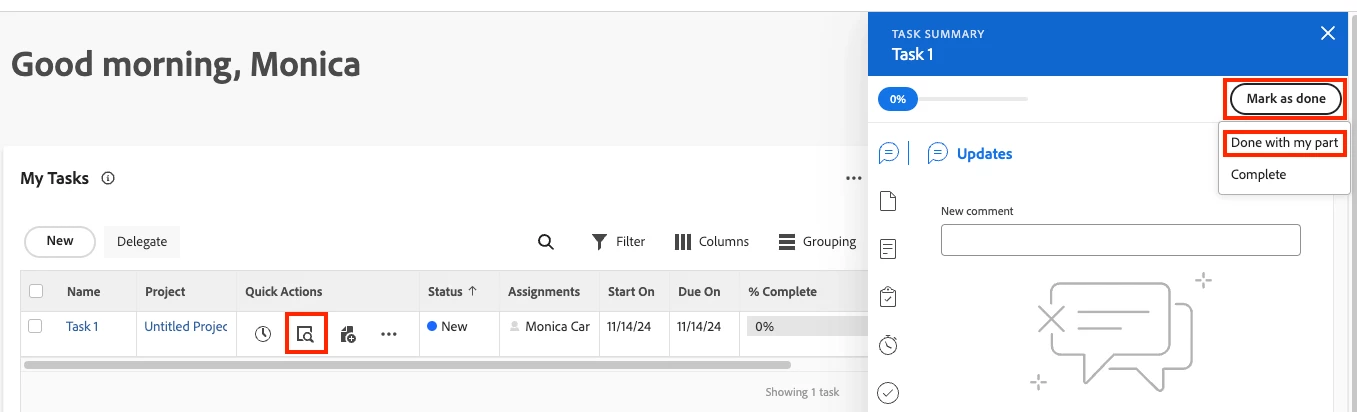
Thank you for your question! Currently, there isn't a way to select "Done with my part" directly the My Tasks widget. However, if you have the "Quick Actions" column enabled, the user can select the Summary icon (or the 3 dots if the column is narrow) → Mark as Done → Done with my part. 


Screen Shot 2024-11-14 at 10.24.51 AM.png


- Monica

View solution in original post

2 Replies

Avatar

Correct answer by
Employee

Hi @Kasey-Gagne


Thank you for your question! Currently, there isn't a way to select "Done with my part" directly the My Tasks widget. However, if you have the "Quick Actions" column enabled, the user can select the Summary icon (or the 3 dots if the column is narrow) → Mark as Done → Done with my part. 


Screen Shot 2024-11-14 at 10.24.51 AM.png


- Monica

Avatar

Level 3

Thank you very much for the workaround 🙂