Pull Planned Completion Date "Time" for a report / calendar. | Community
Skip to main content
Level 5
October 28, 2022
Solved

Pull Planned Completion Date "Time" for a report / calendar.

  • October 28, 2022
  • 1 reply
  • 737 views

We currently have a calculated field to pull the Planned Completion Date "time" for email deployments. It displays in 24:00 but suddenly it has stopped functioning properly and adds 4 hours to every Planned Completion Date "Time".


CONCAT(HOUR({plannedCompletionDate}),":",RIGHT(CONCAT('0',MINUTE({plannedCompletionDate})),2))
 
I did not change this calculation and it has been working fine for a couple years.


So if the Planned Completion Date is = Oct. 31, 2022 9:00 AM the Deployment Hour should be 9:00 but in some cases it is 13:00.


Screenshot for reference.
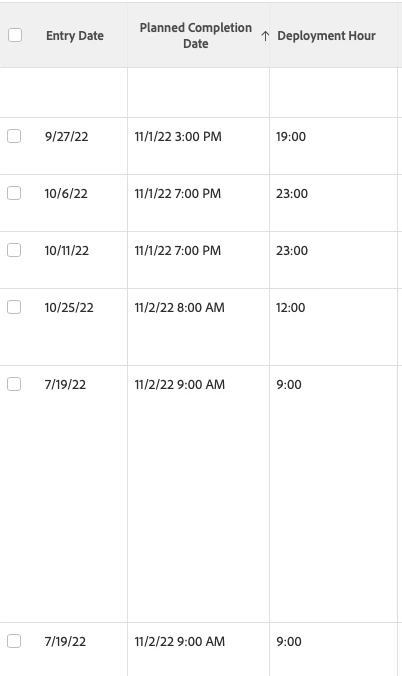
 

Any help or suggestions would be appreciated. Thank you!


This post is no longer active and is closed to new replies. Need help? Start a new post to ask your question.
Best answer by skyehansen

I'm not sure I understood your response, so just to clarify --


* are your calculated times (created after 22.4) all 4 hours off without exception?

* is your timezone 4 hours different from UTC? (or more to the point, what is your timezone)


My initial reaction would be that if it's all 4 hours off, maybe you should just subtract 4 hours from your calculation. However, this is mainly because I don't really work with time/timezones. 

1 reply

skyehansen
Community Advisor
October 28, 2022

Before I look into your question more deeply, are you aware that the recent product release mentioned a chance to calculated fields in that they now calculate in UTC? Would this have had an effect on your calculations?


https://experienceleague.adobe.com/docs/workfront/using/product-announcements/product-releases/release-22-4/22-4-release-overview.html?lang=en (word search for UTC)

Level 5
October 28, 2022

Thank you. I missed that completely.


I did some investigating and didn't find anything that was helpful. Do you know if there is a way to correct the calculated field so we could see the time in our time zone? I didn't look it but thought I would ask.


Thank you again,

Dawnmarie

skyehansen
Community Advisor
skyehansenCommunity AdvisorAccepted solution
October 28, 2022

I'm not sure I understood your response, so just to clarify --


* are your calculated times (created after 22.4) all 4 hours off without exception?

* is your timezone 4 hours different from UTC? (or more to the point, what is your timezone)


My initial reaction would be that if it's all 4 hours off, maybe you should just subtract 4 hours from your calculation. However, this is mainly because I don't really work with time/timezones.