proof stages | Community
Skip to main content
Adobe Employee
August 4, 2022
Question

proof stages

  • August 4, 2022
  • 1 reply
  • 1640 views

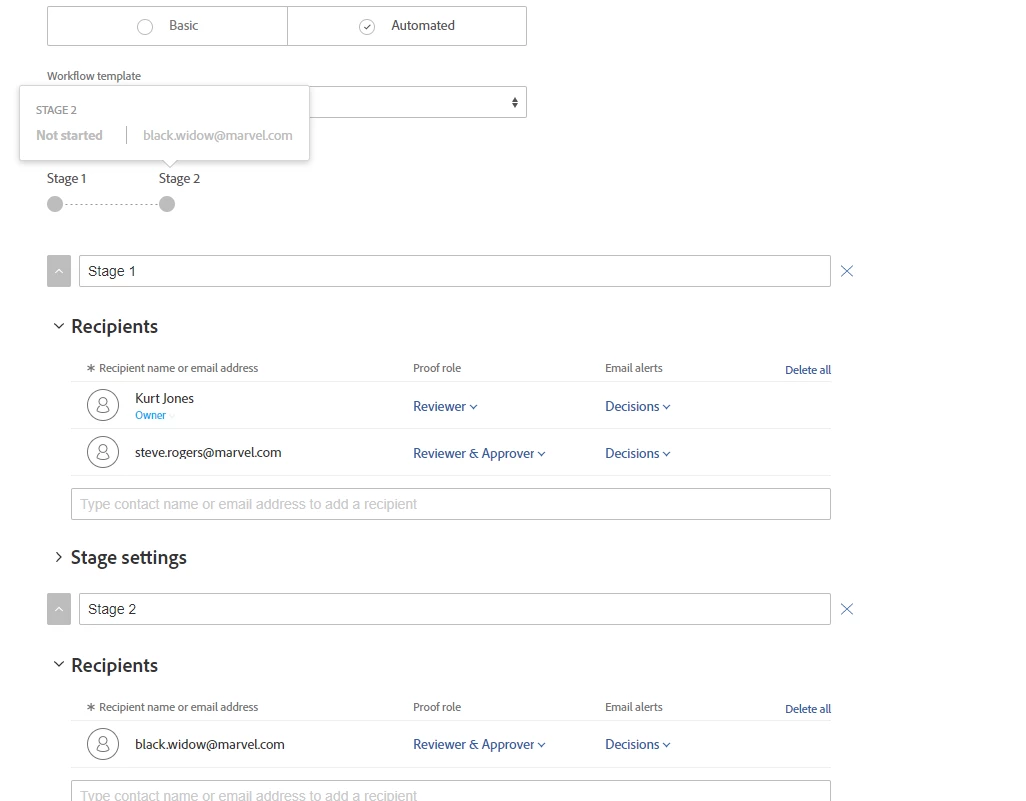
If i have multiple stages 1, 2, 3 set up in an automated proof workflow and one automatically triggers the next once approved, if stage 2 is deleted, can the system know that stage 1 should now trigger stage 3 without having to update the stage details manually?

This post is no longer active and is closed to new replies. Need help? Start a new post to ask your question.

1 reply

Kurt_Jones
Community Advisor
Community Advisor
August 5, 2022

Pam if you remove a stage, like 2, from your proof workflow, when stage 1 completes it will notify stage 3 folks as usual.  There's also an option in the proof workflow to activate stage if you wanted to make stage 3 folks able to take action before stage 1 folks finish.

January 25, 2023

Piggy-backing off this thread.

I use a pre-determined workflow. One of the reviewers in that workflow wants to look at the proof AFTER our copywriter leave comments. How do I set  it up so that "Dave" will be notified that there is a proof needing his attention after "Sam" sets his approval status?  

Thanks!

Kurt_Jones
Community Advisor
Community Advisor
January 25, 2023

Linda, you would update the pre-determined/automated workflow to add another stage after the copywriter review that sends to "Dave" as review/approver so he's notified.  You'll see a button to Add Stage.


IF the workflows are locked down, you could share the proof, click on Proof Workflow, the 3 dots to share then fill in and it creates another stage for you and sends out the proof.