Proof Issue on Versions 2 or Higher | Community
Skip to main content
imgrund
Adobe Employee
Adobe Employee
February 25, 2021
Solved

Proof Issue on Versions 2 or Higher

  • February 25, 2021
  • 7 replies
  • 3608 views

Hi All - Support is working on this but this has caused a lot of issues on my end and I wanted to make any Proof Integrated users aware.

When a user uploads a new version of a proof, the "Notify Recipients about this Proof" box is showing up unchecked even though it is checked for the previous version. This means that approvers and reviewers are not being notified when it is their turn to look at a proof.

The proof owner can go into the Proof Workflow and "message all" via each stage, but that is a manual workaround.

Once Support/Engineering has it fixed, I'll let you all know, but wanted to give you the heads up as a lot of things have been at a stand still today for us.

This post is no longer active and is closed to new replies. Need help? Start a new post to ask your question.
Best answer by imgrund

Interesting! I was told that the fix was implemented during maintenance this weekend. Doing some tests and it looks good for new proofs, but if the proof was created last week and is still pending, the notification isn't going out.

At least we will be good going forward. :)

7 replies

February 26, 2021

So weird. We are having a similar issue. Any new proof created is not notifying the original recipient via email. If we use an automated workflow it does not notify the first stage people. We are using the message all method as a workaround as well. After the first stage is completed it does notify the subsequent stages (thank goodness) It doesn’t work if we create a basic proof either.

In all of my investigating several users noticed that notify user check box (that is usually checked as part of our workflows) was now unchecked. But checking it did not solve the messaging issue.

I checked the proofing workflow activity and noticed that where it lists the recipients it says email notifications disabled. But no changes were made recently and when I checked all the places that could influence this we have everything set up correctly.

I do have a support ticket in but this really is causing an issue for our team. Not to mention how much of my day this hijacked. But admittedly it’s these types of mysteries that I most enjoy investigating. I just usually prefer to uncover a solution. Lol

imgrund
Adobe Employee
imgrundAdobe EmployeeAuthor
Adobe Employee
February 26, 2021

Sadly still not fixed and even worse, I'm not getting the same result that Tracy is where subsequent stages are getting notifications. We still have to do the Message All Proof Reminder emails for all stages.

What we have been doing to help:

  • Made sure that Proof Owners are selecting the Decisions email notification type so they get that email when a decision is made. (This is great in case someone forgets to at mention them that it is done)
  • Made a Proof Approval Report for all users. (Sadly a bunch of them hate logging in so not sure if it will help too much).

Proof Approval Report Info: (Unfortunately, I will only work if you have documents at the project level like us. If you have it at the task level, project name is too far)

Object Type: Proof Approval

Fields: Project Name*, Document Name, Version, Proof Creator, Document Version Entry Date (which renamed to Upload Date)

Project Name text mode:

displayname=Project

querysort=documentVersion:document:project:name

textmode=true

valuefield=documentVersion:document:project:name

valueformat=HTML

Grouping Text Mode:

group.0.name=

group.0.valuefield=documentVersion:document:project:Portfolio Name

group.0.valueformat=customDataLabelsAsString

textmode=true

Filter Text Mode:

isCurrentDocumentVersion=true

isCurrentDocumentVersion_Mod=eq

approverID=$$USER.ID

approverID_Mod=in

approverDecision=Pending

approverDecision_Mod=cieq

isAwaitingDecision=true

isAwaitingDecision_Mod=eq

documentVersion:entryDate=2021-02-25T00:00:00:000

documentVersion:entryDate_Mod=gt
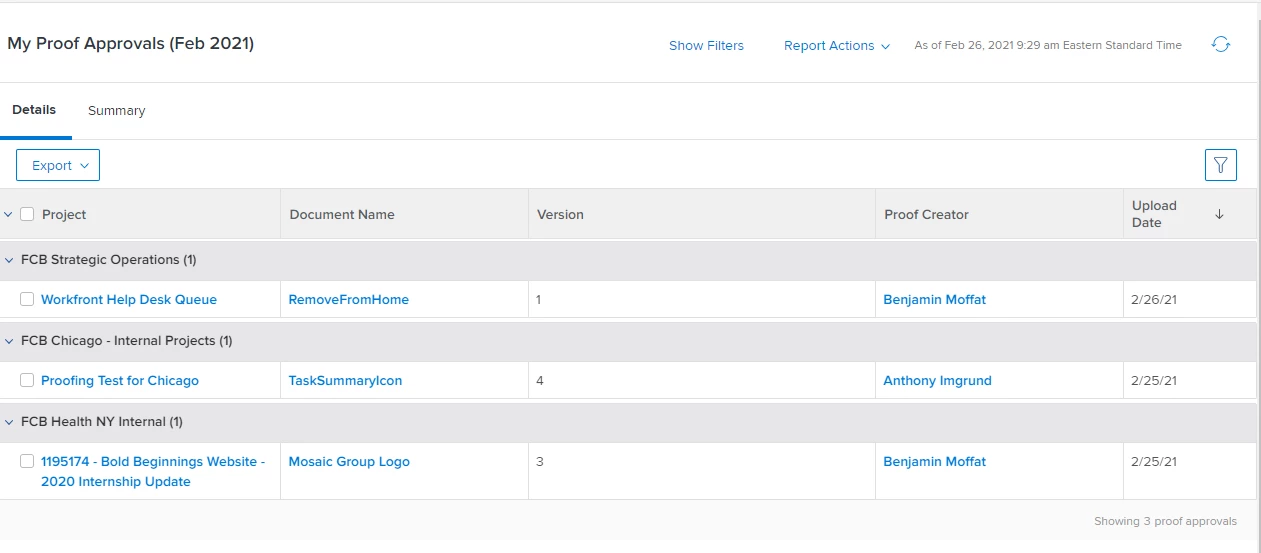
Hope that is helpful to others who needed to get a large Margarita after work yesterday. ;)

Heather_Kulbacki
Community Advisor
Community Advisor
March 1, 2021

UGH!! We went through what sounds like the very same issue last year. It started in January and had been fixed in late April. But then 20.2 rolled out in May and broke it again. Luckily they knew what had been done to fix it the first time, so the second fix was a little quicker.

I'm waiting to hear back from my project managers if it has come back for us again.

These are my case numbers from last year if they might help at all: 00185005 and 00205308

imgrund
Adobe Employee
imgrundAdobe EmployeeAuthorAccepted solution
Adobe Employee
March 1, 2021

Interesting! I was told that the fix was implemented during maintenance this weekend. Doing some tests and it looks good for new proofs, but if the proof was created last week and is still pending, the notification isn't going out.

At least we will be good going forward. :)

Heather_Kulbacki
Community Advisor
Community Advisor
March 1, 2021

I just got notification from one of my project managers that a proof notification didn't send - on a new proof version uploaded this morning. It does look like the notifications were disabled when the new proof was created and if I go in to upload a new version, that "notify recipients..." checkbox is unchecked.

Unfortunately, for us the proof workflow and any updates to it are the responsibility of the project manager, not whoever is uploading a new proof - so those folks aren't used to needing to watch for that checkbox and make sure it's checked. And especially for webpage proofs that already have an automated workflow attached, that checkbox is buried way down in the workflow.

So with no way for the project manager to check that box after the proof is created this is going to be an issue.

March 8, 2021

we have had the same issue but through document proofing, not "ProofHQ" proofing. proof 2 and beyond we need to manually resubmit to all proof approvers. very annoying and time consuming.

imgrund
Adobe Employee
imgrundAdobe EmployeeAuthor
Adobe Employee
March 8, 2021

Hi - Just to clarify, Workfront utilizes ProofHQ (now called Workfront Proof) technology even though you are working through Workfront. "Proof Integrated Users" is what we used to say to separate people who used stand-alone Workfront Proof/ProofHQ, although I don't think there are anymore of those. LOL!

The issue we had was people using the Proofing technology through Workfront.

Now, our issue was fixed at 3:30pm EST on Friday, February 26th. Any new proofs are not having issues.

HOWEVER... if you are doing a new version on a proof that has a V1 before 3:30 EST on February 26th, you still have to manually message the teams.

We also have an ongoing bug where if you put in a custom message for a version, it is not there for the next version to edit/update. Support is working on that.

March 8, 2021

thank you, yes the naming is always confusing/difficult in trying to differentiate. i'm referring to document approvals - we do not use the ProofHQ interface for proof approvals.

March 8, 2021

We have a lot of guest users and I went into the contacts on the proof side and found that all guest users have had the Default email alert disabled. We have had to manually change those. But it happened the beginning of last week and people stopped getting notifications. And we are on NWE

imgrund
Adobe Employee
imgrundAdobe EmployeeAuthor
Adobe Employee
March 8, 2021

Those email alerts don't deal with new or late proof notifications. Those are for additional notifications. I know it is confusing and has confused my team for 6 years now. LOL!

The issue we had is with the "Notify recipients of this proof" checkbox that you see in New Proof upload page that isn't working right. We have over 10,000 users with Email Notifications Default and that has never affected New Proof notifications.

March 8, 2021

Wait, that is confusing. You mean the user level notification setting for 'A document is added to a project I'm on' doesn't have any bearing on Proofs? It's only for docs that are not turned into proofs, is that it?

March 8, 2021

I just tested this and it is still an issue for us.

kynabaker16
Adobe Employee
Adobe Employee
March 9, 2021

Hi all,

I know most of you are in touch with support about this already, but I just wanted to let you know that the support team is working together directly with development team leadership to get to the root cause.

In the meantime, the workaround for the proofs that notifications were not triggered would be to use Message All function after the proof is created using the below instructions.

Workarounds:

1. Create a new Proof entirely (not a new proof version)

2. Go to the Workflow and manually send the email (see screenshot)

Screenshot: https://drop.workfront.com/DOu2Lv2g

Thank you for continuing to update your support tickets, this is something our teams are continuing to address.

Kyna

