Proof HQ -- Workflow type will not load | Community
Skip to main content
January 15, 2021
Solved

Proof HQ -- Workflow type will not load

  • January 15, 2021
  • 3 replies
  • 1453 views

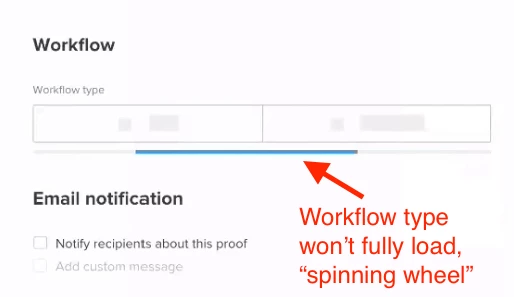
My co-worker is trying to generate a new proof in Workfront, but is unable to move forward with the request because the Workflow type will not fully load. He just gets a "spinning wheel" (or a bar, rather), see screenshot below.

What he is seeing:
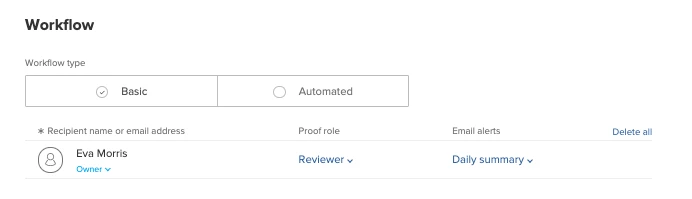
What he should be seeing:
System: Mac 10.14 Mojave

Browser: Chrome/Firefox/Safari (he's tried them all)

Does anybody know what the issue might be? Brief recording of his screen is also attached, in case this is helpful. Thanks in advance! ~ Eva

UPDATE: It does not appear to be a system- or browser-related issue. "Workflow type" loads fine for our WF admin, but when she [the admin] logs in with my co-worker's user account from the same computer, it does not load either.

This post is no longer active and is closed to new replies. Need help? Start a new post to ask your question.
Best answer by IanRe

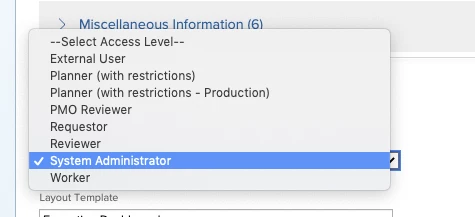
Hi Jen have you tried in WF changing the users account type to one that doesn’t give proof access. Then switch them back, I believe this was a recommended fix when some of our proof users started getting issues with Proof in classic.

3 replies

imgrund
Adobe Employee
Adobe Employee
January 16, 2021

Hi - this happened to us back in August, but only for users that were still using the Classic interface. (Those using NWE were fine). Is the person having the issue in Classic and your admin in NWE?

If they are, tell the support team to look at the notes on case 00217869 to see if the resolution for my ticket helps you. (They didn't write to me what they fixed, just that they fixed something and it worked. LOL! )

January 18, 2021

Hi Anthony, I'm the System Admin on this one. The user was in Classic until this happened. We did try switching him to the new experience, but it did not help. Maybe there were some background refreshes of some sort that have yet to take? I'll have him try it again this week. And we will take a look at the 00217869 case notes, Thanks! -Jen

IanReAccepted solution
January 24, 2021

Hi Jen have you tried in WF changing the users account type to one that doesn’t give proof access. Then switch them back, I believe this was a recommended fix when some of our proof users started getting issues with Proof in classic.

January 25, 2021

That did the trick. Thanks a million, Ian!

January 13, 2022

Hi Ed

so in their profile you can select whether they are requester, worker, planner or admin. Worker, Planner and admin give you the proof licence access now (or back when they made the change that meant proof was included if you where one of those) switching them to one that isnt like requester or reviewer disconnects proof, then switch them back to their correct access level and proof should sort itself out.

Ian