Proof Approval Reporting Examples | Community
Skip to main content
KellieGardner
Community Advisor
Community Advisor
August 5, 2022
Solved

Proof Approval Reporting Examples

  • August 5, 2022
  • 3 replies
  • 11826 views

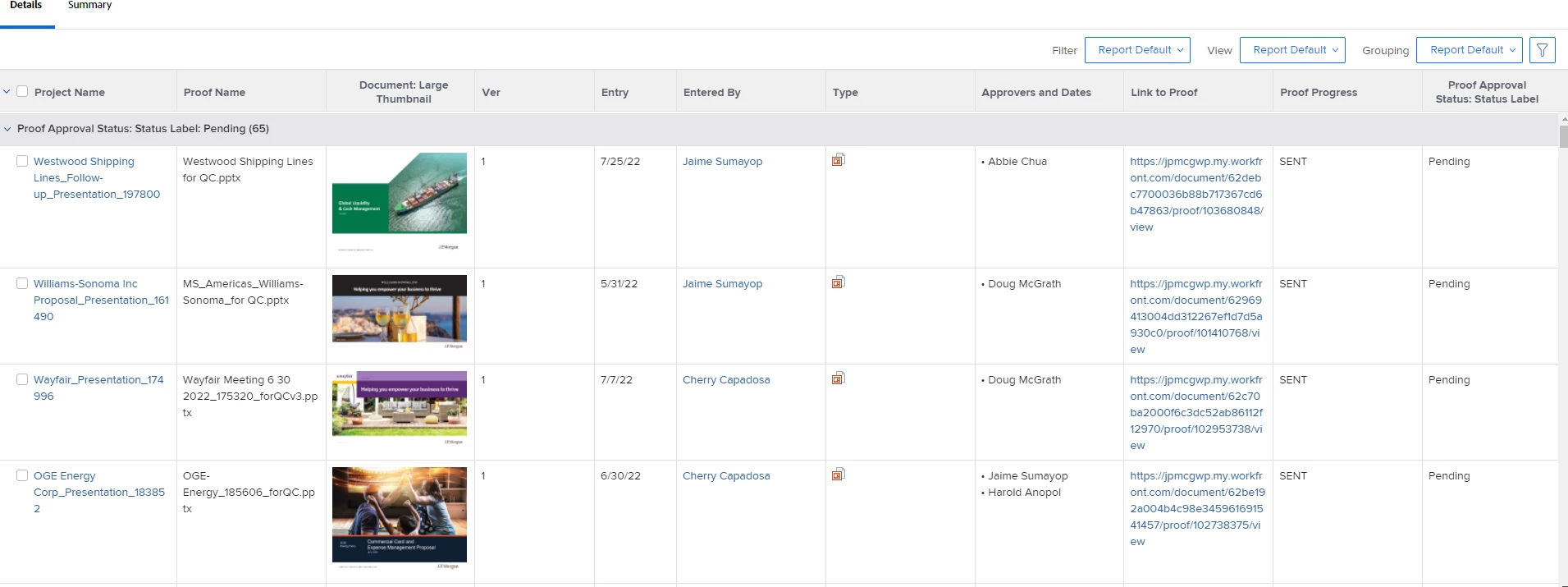
I'm looking for some examples of reports people are using for proof approvals. What columns are you displaying, anything fun i could be adding in text mode, etc. Our users want reporting but don't do a great job elaborating on what they want to see so hoping some creatives out there have ideas. 


I would also like to know which type of reports people are using for proof approvals and the reasoning. They each have their own limits on functionality they can display.

  • Document
  • Document Version
  • Proof Approvals


Best answer by Doug_Den_Hoed__AtAppStore

Hi Doug,

Happy to work within your schedule over the next few weeks when you have time and we can do it.  Hopefully you still have my email for our earlier work, send invite and we'll go from there.  Thanks for the offer.


Thanks for meeting with me on this yesterday, @kurt_jones,


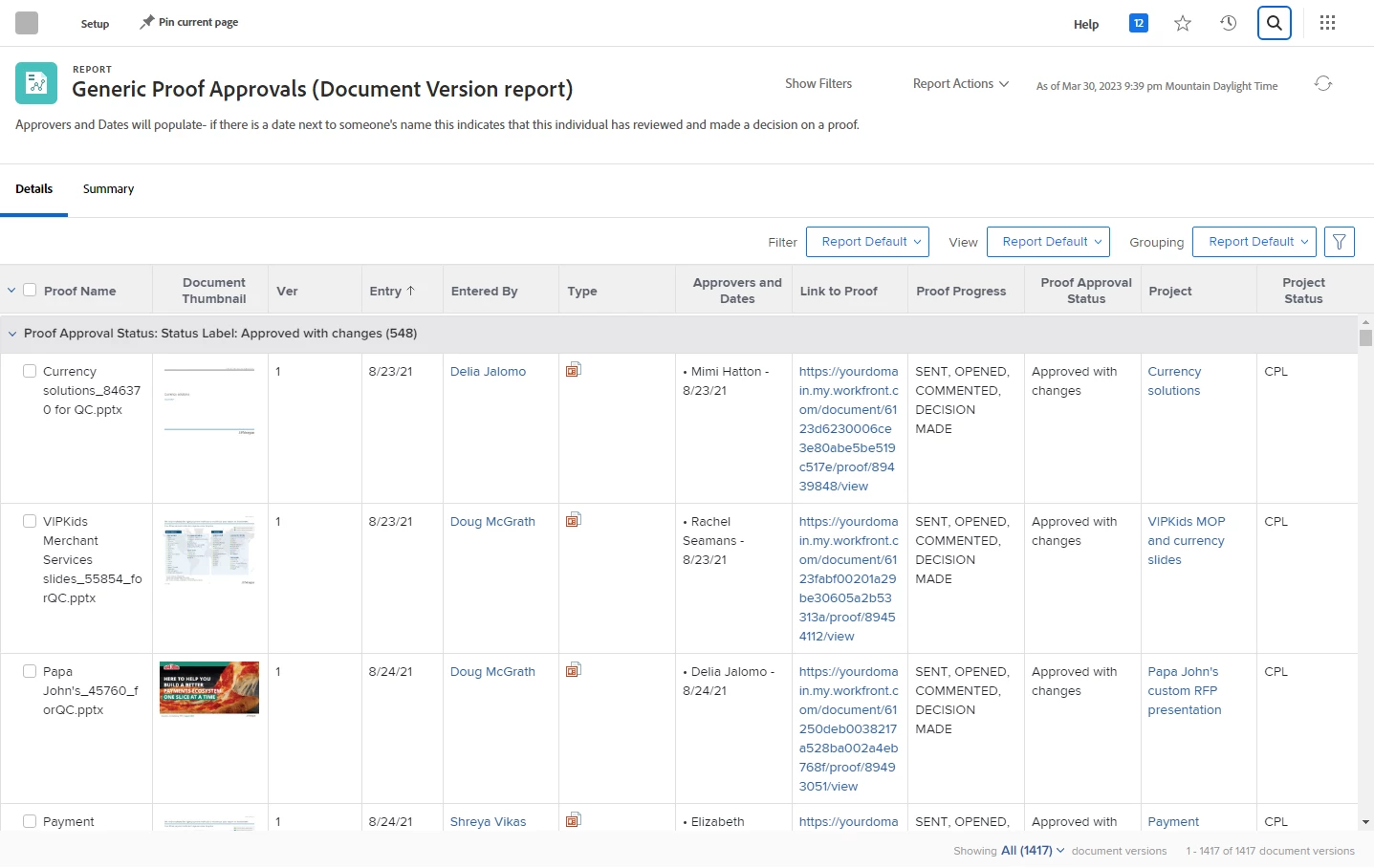
Hey folks! I'm pleased to announce that the Package of Kurt's Generic Proof Approvals Report is now available for anyone interest to deploy into their own Workfront domain, as follows:


  • Log In to AtAppStore (or Create Account if it's your first time)
  • Under My Account > Connections ensure (or set up) your Workfront domain
  • In the Packages side menu, click the Generic Proof Approvals icon
  • Click the Parameters tab then log in to your Workfront domain
  • Once connected, click the orange [Good! Lets run it!] button
  • Check the confirmation box and click the [Run Solution] button


With the report now deployed to your environment...


  • In Workfront, search for a report called Generic Proof Approvals and open it
  • Click Report Actions > Edit Report
  • Click the Link to Proof Column, then edit its textmode
  • Replace yourdomain.my.workfront.com with your Workfront domain
  • Save the report, run it to confirm it's working, share as needed, and enjoy!

Regards,

Doug (and Kurt -- thanks again!)


3 replies

Kurt_Jones
Community Advisor
Community Advisor
August 5, 2022


This is one we just created as we start to use Proof, there is some textmode with it.  Happy to share how its made.

KellieGardner
Community Advisor
Community Advisor
August 5, 2022

I like this! Which type of report did you use to build this? I would love more on how it was built especially text mode components. 

WhitUser
Level 3
January 23, 2024

Hi all

I feel like I might be in the right place for this query.. I have 6 project managers that send 100's of proofs for approvals to usually 3 completely variable approvers. My project managers would like a proof approval report that shows only the proofs that have been through the first three approvers and are now 'back with them' as the final approver, they are not interested in ones that are still being reviewed by 1,2 or 3. 
Approver1
Approver2
Approver3
Approver 4 (Project manger). I just want to see lines that are at this stage

So its a filter by final approval stage that I am trying to achieve but I cant seem to do this - any tips would be a game changer for us!
Thank you in adavance

Madalyn_Destafney
Community Advisor
Community Advisor
January 8, 2025

Hi @kurt_jones this thread is a wealth of info and I remember you sharing these reports in that past and I do use some of the columns. Hoping you can help with a proof approval report filter that I just can't crack. I have a custom form field for regions and I have a different proof approval report for each of our 4 regions. Since some proof creators overlap regions, I want to filter the reports to be only proofs projects of the respective region of the report. I can pull in region in a COLUMN of the report just fine:

displayname=Region
shortview=true
valuefield=documentVersion:document:project:DE:Region - DX Campaign Ops
valueformat=HTML

 But when I try to translate this into a filter instead I keep getting errors. I tried using the same logic as filtering out projects in only a certain status and still nothing, tried multiple variations in the text mode below. Can you show me where I'm off?
EXISTS:1:$$OBJCODE=DOCU

EXISTS:1:currentVersionID=FIELD:documentVersionID
EXISTS:1:project:DE:Region - DX Campaign Ops_Mod=eq

EXISTS:1:project:DE:Region - DX Campaign Ops=Americas

If this helped you, please mark correct to help others : )
Kurt_Jones
Community Advisor
Community Advisor
January 9, 2025

Madalyn, do you get an error if you use EXISTS:1:ID=FIELD:currentVersionID?  Does that get you the info you're looking for?

Madalyn_Destafney
Community Advisor
Community Advisor
January 9, 2025

Hi Kurt, I used this to filter in only Current projects, which works:
EXISTS:1:$$OBJCODE=DOCU
EXISTS:1:currentVersionID=FIELD:documentVersionID
EXISTS:1:project:status=CUR
EXISTS:1:project:status_Mod=in

So figured I'd use the same logic to also filter in only projects in Americas region, for example but it doesn't work, why not? I tried with and without the 'DE'
EXISTS:2:$$OBJCODE=DOCU
EXISTS:2:currentVersionID=FIELD:documentVersionID
EXISTS:2:project:DE:Region - Campaign Ops=Americas
EXISTS:2:project:DE:Region - Campaign Ops_Mod=eq

If this helped you, please mark correct to help others : )