Projected Start Date, Planned Completion Date, and Projected Completion Date not calculating | Community
Skip to main content
January 23, 2025
Solved

Projected Start Date, Planned Completion Date, and Projected Completion Date not calculating

  • January 23, 2025
  • 1 reply
  • 585 views

I have a project with two tasks that are not calculating the Projected Start Date, Planned Completion Date, and Projected Completion Date. Those fields just list N/A. I have checked the start mode (which is set to Start Date) and constraint (which is set to As Soon As Possible). I can't figure out what else I'm missing that might be causing this. Anyone have an idea?

Best answer by KellieGardner

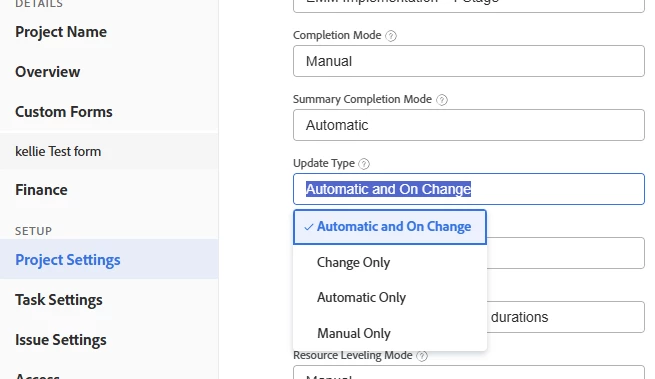
Check your update type and make sure it's not set to manual. If it's set to manual your project will only update when you tell it to.


Project Update Type overview | Adobe Workfront

1 reply

KellieGardner
Community Advisor
KellieGardnerCommunity AdvisorAccepted solution
Community Advisor
January 23, 2025

Check your update type and make sure it's not set to manual. If it's set to manual your project will only update when you tell it to.


Project Update Type overview | Adobe Workfront

DarcySm1Author
January 23, 2025

That was it! Thank you!