Planned hours for tasks with multiple assignees | Community
Skip to main content
Level 5
October 30, 2024
Solved

Planned hours for tasks with multiple assignees

  • October 30, 2024
  • 1 reply
  • 500 views

Our team is trying to encourage better collaboration amongst copywriters/designers and would like to start having 1 task that is assigned to the both of them so they can easily see who they are working with rather than 2 separate tasks for Copy & Design. 


Doing this seems to be throwing off our Planned Hours reporting for each user. Is there a way to allocate Planned Hours on 1 task that is assigned to multiple users? For example: a task that has 8 hours assigned to it; we want 3 of those hours for the Copywriter & 5 of those hours for the designer. Or is the only option to keep these as separate tasks?


Also open to other suggestions for anyone that may have a similar process 🙂
This post is no longer active and is closed to new replies. Need help? Start a new post to ask your question.
Best answer by KellieGardner

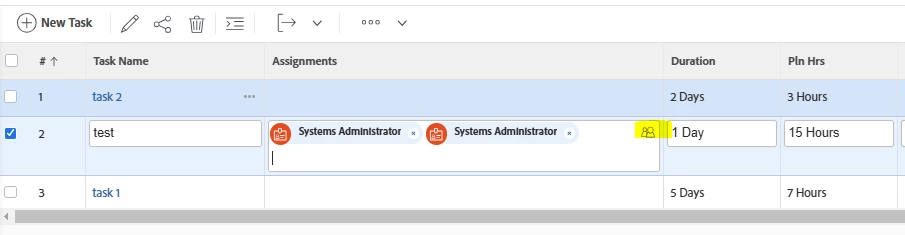
You have to do a few extra steps. Easiest way I've found is to click on the people icon on the assignments box from the project interface.


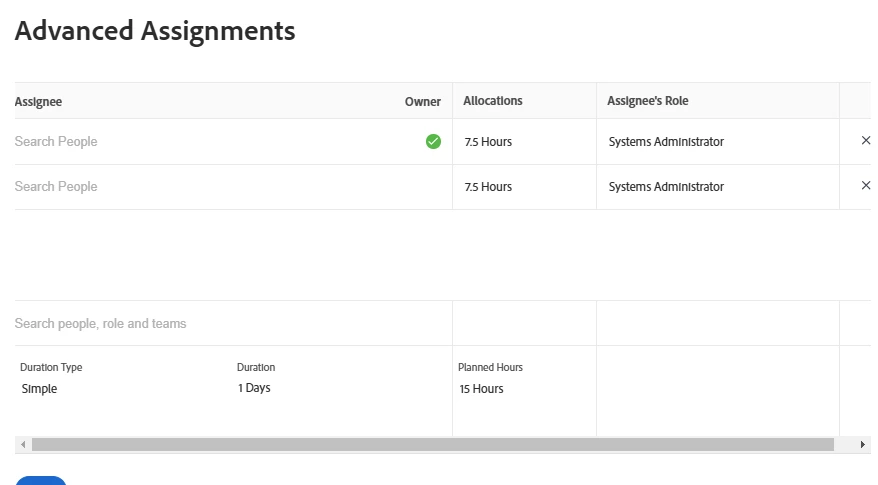
Then it will give you a pop up where you can allocate the hours by user. (note: your duration type should be simple if you want to allocate hours vs percentages of work)


1 reply

KellieGardner
Community Advisor
KellieGardnerCommunity AdvisorAccepted solution
Community Advisor
October 30, 2024

You have to do a few extra steps. Easiest way I've found is to click on the people icon on the assignments box from the project interface.


Then it will give you a pop up where you can allocate the hours by user. (note: your duration type should be simple if you want to allocate hours vs percentages of work)


Level 5
October 30, 2024

AH I knew there had to be a way!!! Thank you so much, this is perfect. 


Is there anyway to have the Duration Type default to Simple?