
Pages are dancing and its making me dizzy | Community
Skip to main content
PaulaKo1
Level 2
November 13, 2024
Question

Pages are dancing and its making me dizzy

  • November 13, 2024
  • 4 replies
  • 1686 views

I don't know how else to describe this other than my pages are dancing. I have a project open and my tasks look like this one second 
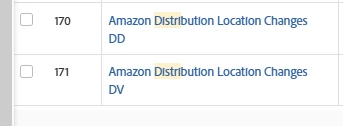
and like this the next second 
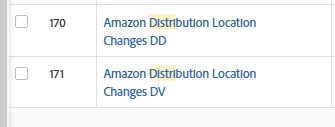
I have cleared cache and history, cursed,  refreshed my pages cursed some more. Has anyone else seen this and found a fix?  


This post is no longer active and is closed to new replies. Need help? Start a new post to ask your question.

4 replies

Ross_Barton
Level 4
November 14, 2024

This was happening to me yesterday (11/13). It seems to have corrected itself overnight. Did yours?

PaulaKo1
PaulaKo1Author
Level 2
November 14, 2024

Nope this morning its the mentions on my home page reminds me of the GIF of Shaq where he shimmies his shoulders. 

Back in the day I used a computer program that would bomb out if you hit the . while using the 10-Key on a key board. I will live through this too. 

KierstenKollins
Community Advisor
Community Advisor
November 14, 2024

I have 1 user on my team that was having this same issue yesterday for the home page and reports. It was only happening when using Chrome and we had cleared the cache and history a couple of times. I am hoping it resolved for them overnight like Ross's did.

Ross_Barton
Level 4
November 14, 2024

Turns out I spoke to soon. I'm going to submit a support ticket and reference this thread as others seem to have the same issue.

KierstenKollins
Community Advisor
Community Advisor
November 14, 2024

Darn it. I am putting in a ticket too. 

skyehansen
Community Advisor
November 14, 2024

Page shimmy can sometimes be cured by zooming in or out. e.g. if you're zoomed at 100%, try zooming in at 110 or 90. 


Also try a different browser -- like if you're in chrome, take a break and head over to firefox.

Ross_Barton
Level 4
November 14, 2024

I tried zooming in Chrome, no luck.


No shimmy in Firefox. 


I'll report both findings to support who has escalated the case to development to determine the root cause.

PaulaKo1
PaulaKo1Author
Level 2
November 18, 2024

The Grammarly extension is the culprit! That explains why no one else on my team was experiencing it. I'm the only Grammarly user.


Here is what support shared with me:


We discovered the Grammarly extension is the culprit so any user reporting this will likely be using the extension as well. We have not found a case where the extension was not being used. 

After further investigation, we found that this issue is not limited to Workfront—other software in the market is experiencing similar behavior. Additionally, some users have reported encountering this problem while using the Edge browser with the Grammarly extension.

At this time, there isn't much our development team can do to resolve this. We recommend that users either disable the extension or reach out to Grammarly's support team for assistance in addressing the issue through their developers. We truly wish we could offer more support in this situation.


Huh, very interesting, I am indeed a Grammarly user granted it is disabled at the moment so that is probably the culprit somewhere in the back end of the ether. I will dig around and thanks for the note below about disabling! 

-JC
Level 6
November 18, 2024

I've had this happening in a somewhat similar fashion - the page will bounce up and down repeatedly. It fixes itself if I zoom in or out--apologies as I can't quite remember which % was the "culprit"--but I also narrowed it down to a browser extension of mine causing the issue. When I disabled the extension, the bouncing stopped. However, I simply cease to exist without this particular extension, so I've added it back in and just zoom in/out to make the bouncing stop.