Not getting notification with new work request | Community
Skip to main content
Level 4
December 7, 2017
Question

Not getting notification with new work request

  • December 7, 2017
  • 12 replies
  • 1817 views
Hi there, I am having troubles with the email notification. I have set my profile to received daily and instant notification for everything. I have received emails when a task was deleted or complete, etc. However, when I assign tasks to myself, I never receive the "New Work Request" email. Is this normal? Or it is assumed that since I assume work to myself, I don't need to be notified? Thank you.
This post is no longer active and is closed to new replies. Need help? Start a new post to ask your question.

12 replies

Level 9
December 7, 2017

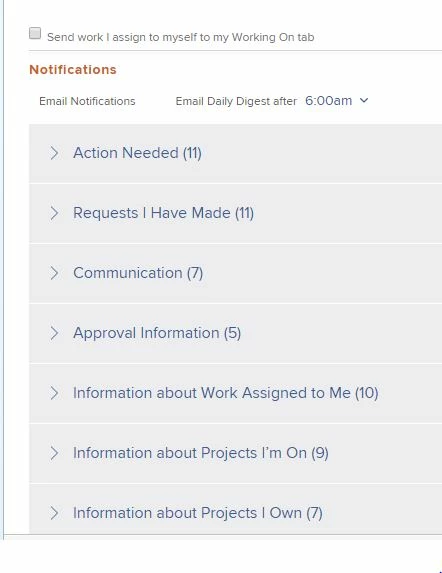
Do you have the box checked "send work I assign to myself to my working on tab"? Do you have "email me when " get a new work request" checked? attach a screen shot of your settings Benetta Perry APS
Level 4
December 7, 2017
Hi Benetta, I checked the boxes to "send work I assign to myself to my working on tab" and email me when "I get a new work request". However, it didn't work. I have tried to log out of Workfront and log back in to see if that makes a difference. May be I should only select "Instant" and not both "Daily" and "Instant"? Thoughts? Thanks again!
Level 8
December 8, 2017
Hi Esther, When you have the box checked to "Send work I assign to myself to my Working On tab", the system assumes you know you're creating a work item for yourself, and does not send an email alerting you that you have one. I hope this information helps! Thanks, Dustin Martin Tier 2 Assigned Support Engineer Workfront
Level 4
December 8, 2017
Thanks Dustin. If I uncheck the box to "Send work I assign to myself to my Working On tab", would I be getting an "New Work Request" email? I did had this setting unchecked before, however, I still didn't get a notification. Thanks.
Level 9
December 8, 2017

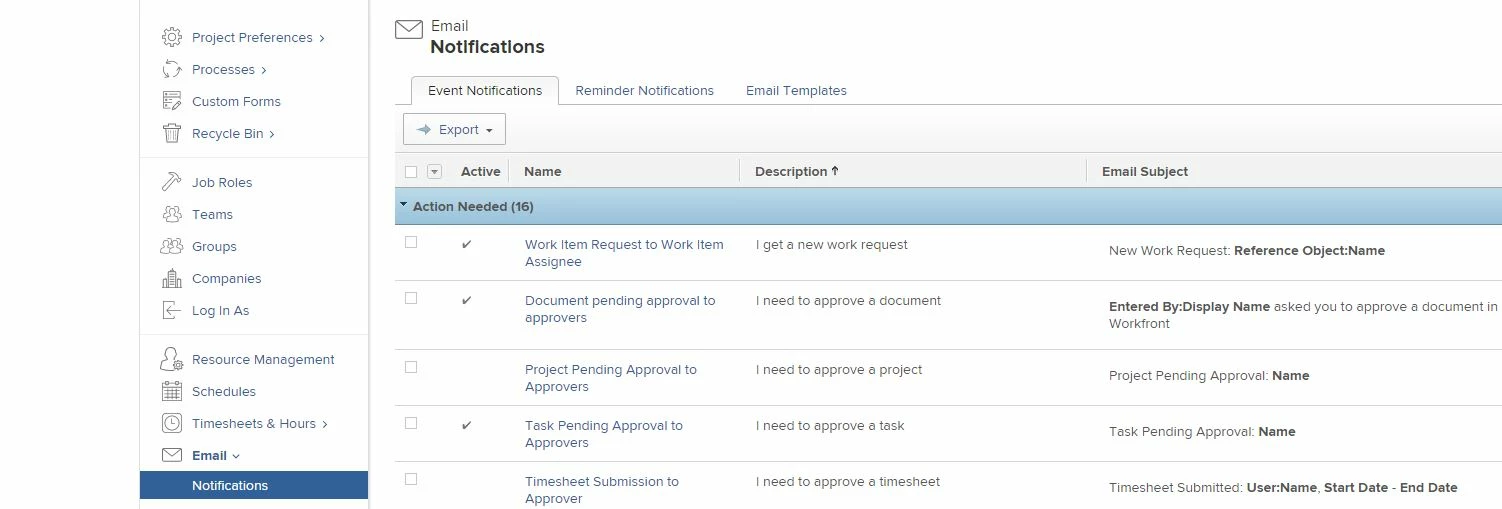
The system administrator has to go to setup and in the email notifications - that has to be specifically turned on, in order for email notifications to work. I have attached the screen shot. I am our system administrator - so I've enabled (turned it on). Hope this solves your problem. Benetta Perry APS

Level 4
December 12, 2017
Thank you Benetta. I do have the notifications checked as Active for New Work Request. Everyone on the project team has been getting the "New Work Request" email notifications except me, so I am going to let this one go... Just to clarify, I do receive emails when a task was completed. So it's not like I don't receive any notifications. It just strange that I receive some notifications, but not all, even though I checked "instant" notification for everything. Thank you for everyone's input. Much appreciated!
Level 2
December 13, 2017
We discovered... When we set a project to CURRENT in the initial Convert To Project set up screen, everyone assigned on the template gets a notification. If we hit Save Changes while it's still in Planning, task non-owners (assigned but not the task owner) get left out of the initial notification. I hope that helps. Renee Guengerich SBD
Level 9
December 27, 2017
No notification or work request being sent out whilst a project s is set to /Planning' status. The notification will go out as soon as the status of a project is change to 'Current'. Dagmara Garwell BAKKAVOR LTD
Level 2
February 27, 2018
Hi, I recently submitted a help ticket since we noticed that some of users were not receiving notification when we shift a project from "Planning" to "Current". We were asked to go ahead and activate an event notification to send a summary to the Project team (reference screenshot). Just curious if others have had this issue per the previous comments. Thanks! Anna Adams Envolve PeopleCare
Level 2
February 27, 2018
Sorry couldn't get the screenshot to upload. Reference "Information about Projects I'm On" - "Current Project Status Change to Project Team" Anna Adams Envolve PeopleCare