Nicknames with SSO | Community
Skip to main content
Level 4
June 28, 2021
Solved

Nicknames with SSO

  • June 28, 2021
  • 1 reply
  • 1379 views

Someone on the forum once mentioned a workaround to updating user's first name with a nickname via Fusion. Does anyone have a working example? My biggest concern is what to use as the event trigger. We use SSO and I have a trigger set up on each user update. If the user's lastlogindate is less than 10 seconds old, it will check if the user's first name should be updated. Is there a better way?
This post is no longer active and is closed to new replies. Need help? Start a new post to ask your question.
Best answer by William

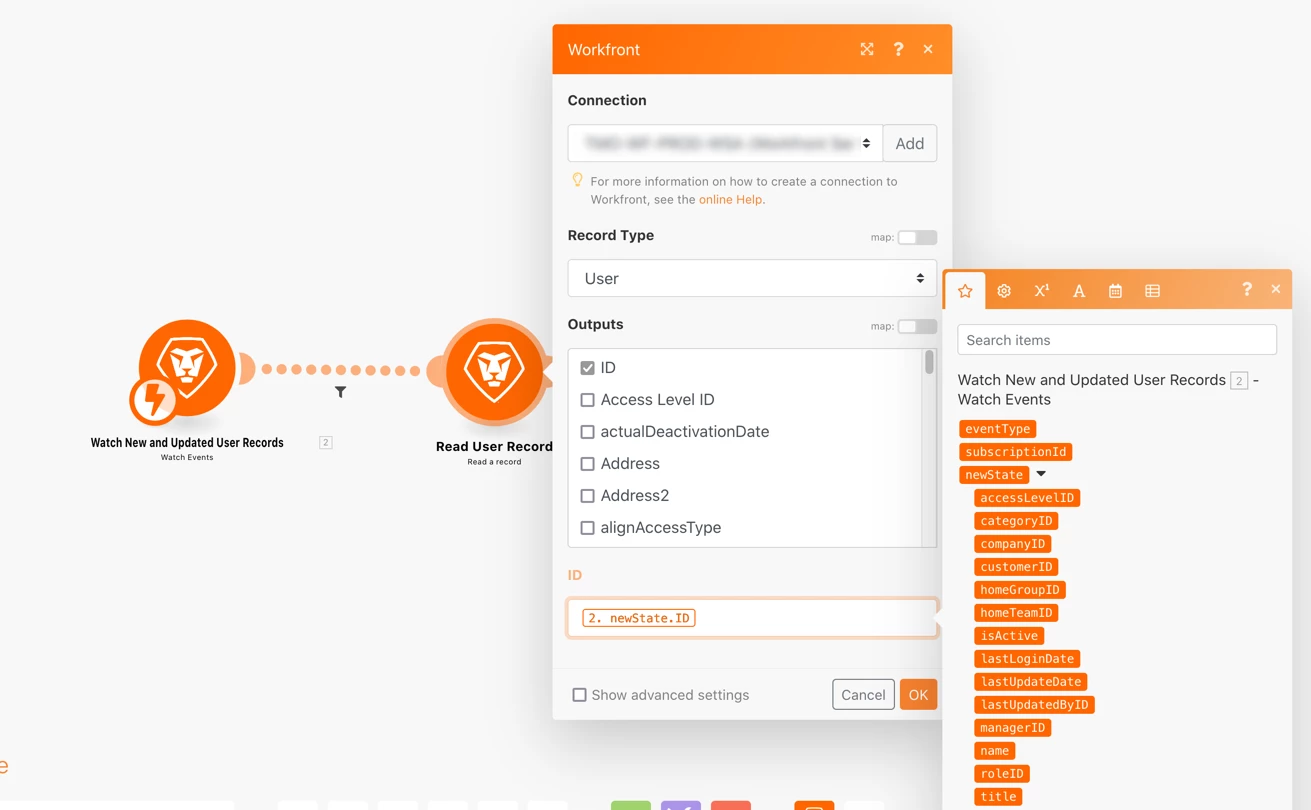
It should just be available as an output from your trigger module - no need to set a custom variable. You can see in my example, I didn't do anything to make it available.

You may have to run the scenario in order for the trigger module to know what outputs it can make available to downstream modules as inputs. I have to do that frequently in order to get outputs to show up.

If an output from a prior module isn't available, you can manually enter it in a field with this syntax (presuming the module number you want the output from is module 1):

{{1.newState.ID}}

It will show up in orange text/white background like your example, because the scenario hasn't validated it as a valid input.

1 reply

William
Community Advisor
Community Advisor
June 29, 2021

Hi Jason, that may have been one of my posts.

And, that's very similar to how we do it (trigger on user update). We used to run it on a schedule, but users were confused as to why they sometimes (briefly) saw the "wrong" name.

What is it that concerns you about that approach, or leads you to wonder if there's a better way?

If you like my content, please take a moment to view and vote on my Idea Requests: https://tinyurl.com/4rbpr7hf
Level 4
June 29, 2021

I was wondering if there was another trigger. Something like a login event. Right now, the code runs on every user update and also runs multiple times for each user within that 10 second timeframe.

William
Community Advisor
Community Advisor
June 29, 2021

We tried doing it off something like the value of login count or last login date having changed, but those didn't trigger the scenario as expected.

I ended up putting a calculated field on the user form "useAlias" that is either true or false depending if the preferred first or preferred last name fields contain a value. I use that as a filter right after the trigger so it never bothers to check users that don't use preferred names.

For those who do use a preferred name, it will always run twice: once when SSO resets their name, then again when Fusion overwrites that.

If you like my content, please take a moment to view and vote on my Idea Requests: https://tinyurl.com/4rbpr7hf