New Timesheet Interface | Community
Skip to main content
Tami_Gomez
April 8, 2022
Question

New Timesheet Interface

  • April 8, 2022
  • 9 replies
  • 5458 views

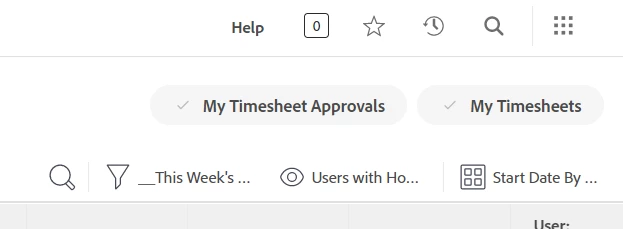
This new update is THE WORST update! Now, if I need to open timesheets for a single user. it seems as though I have to create a filter just for that specific user so I can then use the magnifying glass search to search the date. Does anyone have an easier way to do this?

This post is no longer active and is closed to new replies. Need help? Start a new post to ask your question.

9 replies

Heather_Kulbacki
Community Advisor
Community Advisor
April 8, 2022

I switched my filter to just what I was looking for (open), then used the User grouping to create a new User grouping that defaults to collapsed, then I can expanded just the user I wanted and used the magnifying glass to search

Seems like a long work-around, but it worked :/

Tami_Gomez
April 8, 2022

Thanks Heather. I really appreciate the workaround. This is what I did, I created filters for various time groupings: this month, last month, this year, etc. I select one of those, it displays everyone, and then I use the quick search to type in the name of the person whose timesheet I need to open. Though I like the newly added functionality, I wish it was in addition to existing functionality. It takes a good bit of extra effort to do something that was so simple before.

April 8, 2022

this is beyond frustrating - there are times when time is entered incorrectlya nd I dicover on a report. I used to be able to put in several names and filter by dates to see multiple timesheets at a time.

This needs to be fixed -- I cannot believe thisis something people actually asked for as an enhancement

April 8, 2022

100% agree.

Adobe Employee
April 11, 2022

Greetings, everyone.

Thank you for taking the time to outline your feedback about the timesheet filters. We wanted to highlight more information about the change. With this new consistent list interface, we delivered the following:

-Flexible filters

-Added functionality such as saving (so filters remain in place) and sharing filters (so users can help other users)

-Support for specific fields per user, allowing for more refined filtering

-Better list performance load times

These changes did necessitate a change in user experience; however, the list now provides easier and more powerful filtering capabilities that are consistent with all the rest of the application. The same functionality is still there but there require some additional set up with new filters that are not the out of the box filters. If you need assistance, our customer support team can help walk you through this.

We are currently working on a new enhanced filter experience which will be available in production as a beta with 22.4 which makes the experience even easier and faster to use. If you would like to contribute to providing feedback for that beta or walk me through the issue above by setting up some time on my calendar, please let me know.

Tami_Gomez
April 11, 2022

I would love to be part of the beta. I like the new features I just wish that these features were an addition to the old features rather than removing them.

April 12, 2022

Functionality Gap has caused our user community frustration.

Adobe Employee
April 18, 2022

Greetings.

If you need the new functionality turned off, we can work with engineering to toggle it off until we can find a better solution for the "search for user" issue. The functionality of the old experience was suppose to be the same with the new experience with only needing to set up some new filters as needed. If you need it turned off, please let me know and we can set up a discussion for the process or send an email to shayan@adobe.com.

I would love to have someone walk me through the user search issue so that I can work with teams to find a solution in the newly released experience.

If you would like to see how new Timesheets looks in the beta filter experience (not what was released recently but a more robust filter service coming in the future), I am more than happy to demonstrate that to you. Our first beta is almost done for projects/tasks/issues and we have not specifically launched a timesheets beta yet but would love to hear your feedback.

Here is the link to meet with me to discuss any of the items I listed above: https://calendly.com/wf-product-and-design-research/timesheets?month=2022-04.

Thank you.

ChloeWY
April 18, 2022

I'm curious as to what the beta filter experience for projects will look like.

May 25, 2022

This new interface is extremely frustrating, on a monthly basis I have to view and correct users timesheet entries for up to 100 people. This task used to be straight forward but now extremely laborious. Do we know if there are any improvements to the filtering at any point?

Doug_Den_Hoed__AtAppStore
Community Advisor
Community Advisor
June 1, 2022

Hi Jaclyn,

I understand that there's a new Timesheet coming to preview tomorrow, but didn't catch whether it will include any filtering improvements.

Regards,

Doug

June 3, 2022

100% agree. Wish Adobe would focus on functionality and usability.

June 2, 2022

The only change I see in Preview is a new item in the timesheet screen called "groupings". This doesn't add any value for me at all (see attached).

candacelance
Adobe Employee
Adobe Employee
June 2, 2022

@Denise Cossa‚ I see above you were looking to connect with Jess. Did you have a chance to connect? Some folks are having to clear their cache & cookies to see the new features in preview. Also, our support teams are available to assist if you are not seeing what you are looking for.

June 3, 2022

I cleared my cache twice and even opened an incognito window. The only change I (still) see is the option for groups. Which does nothing for me.

Tami_Gomez
June 3, 2022

@Candace Lance‚ I'm unable to view the timesheets in preview. I receive the following error:

Error

Whoops! Something went wrong. Please contact Workfront so we can figure out what went wrong and fix it.

candacelance
Adobe Employee
Adobe Employee
June 3, 2022

@Tami Gomez‚ I know that some folks are having to clear their cache & cookies to have everything function correctly. If that doesn't work, let us know.

nryan2
June 6, 2022

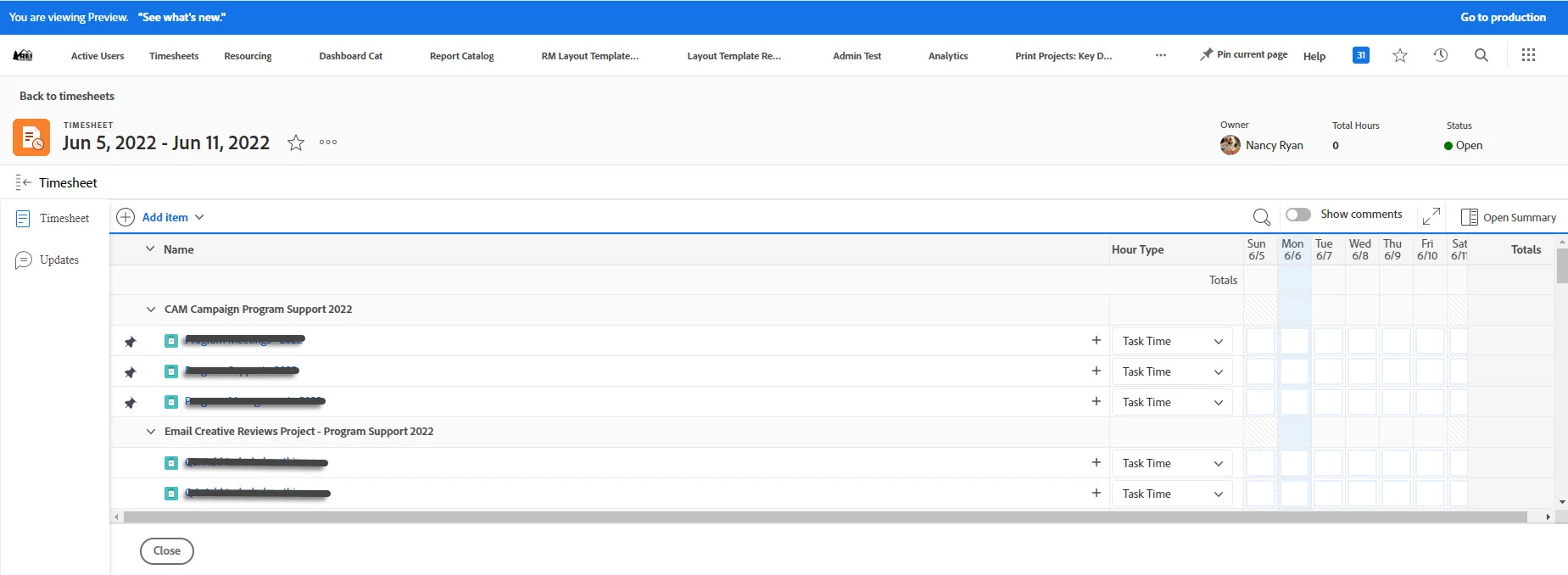
My feedback on the timesheet in Preview is that the "name" column is too wide. We only show one week at at time on the timesheet so there is a lot of white space between the name and the hour entry columns. It results in unnecessary horizontal scrolling to see the full week to enter hours.

The shading on the weekend days could be darker so that is easier to see the difference between the weekdays.