Making a field in Workfront View only / Not editable | Community
Skip to main content
Level 3
September 29, 2023
Question

Making a field in Workfront View only / Not editable

  • September 29, 2023
  • 1 reply
  • 14415 views

Hey all, 


I have a custom form and projects in Workfront. To enable the user to use Workfront, some of the fields should be view only at the start; hence, the user cannot edit those fields. 


In Workfront, the ability to make a field read-only often depends on the field type and the permissions of the user. Standard fields, for example, cannot be made read-only. 

Could anyone tell me how could I do that? 

This post is no longer active and is closed to new replies. Need help? Start a new post to ask your question.

1 reply

Community Advisor
September 29, 2023

Hi,


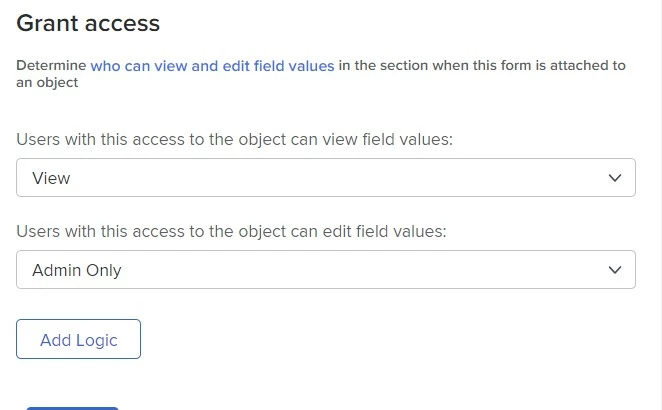
You can achieve this with a section break in your custom form.


Having a section break appear above the fields that you want to restrict access to will give you the ability to make those fields view only and not editable.


In the below screenshot I have configured a section break so that anyone with view access to the object can view the fields, but only admins have the ability to edit the fields.


You can read more on this here.


Best Regards,

Rich.


Level 2
December 8, 2023

Hi Richard,

I fully agree with the approach, but in so many use cases I come across the need to allow edit to some custom fields is required to users who are not System Admins. An example use case:

Bruce is the project owner of a project that has a custom field "Budget Requested" where he puts a financial value of the budget he is asking for.

Victoria is the financial controller and should have access to another custom field in the same form "Budget Approved" where she puts a financial value of the budget approved.


Bruce should be able to view the field "Budget Approved" but not be able to edit it. Neither Bruce or Victoria are System Admins.


How would you approach this use case. Thanks in advance for taking the time to advise on this, truly appreciated.

Doug_Den_Hoed__AtAppStore
Community Advisor
Community Advisor
December 8, 2023

Hi Ahmed,


I replied here.


Regards,

Doug