Make Workfront Full Screen (in Chrome) | Community
Skip to main content
June 8, 2016
Question

Make Workfront Full Screen (in Chrome)

  • June 8, 2016
  • 33 replies
  • 4215 views
Workfront's fixed width at 1400px drives me nuts. I have 2560px of horizontal screen space. If I could use that full width it might mean being able to add 4 to 5 more columns into a task view, or use the gantt chart while actually seeing all the important columns. For anyone else annoyed by this, here is a quick solution. Step 1: Get the stylebot plugin for chrome. Step 2: Click into Options -> styles -> "Add a new style..." Step 3: For the pattern use yoursubdomain.attask-ondemand.com (you can use /projects or other at the end if you only want to go full screen in a certain area). Then enter the CSS below into the style area: .page-content-width { max-width: 99%; } .table-list { width: 100%; } .table-list-head { width: 100%; } .listWrapper { width: 100%; } .listToolbar { width: 99%; } Now refresh and you should be in full screen mode. See attachment for example.
This post is no longer active and is closed to new replies. Need help? Start a new post to ask your question.

33 replies

June 8, 2016
Thanks for the awesome tip!! I have many views with 10+ columns, and this makes my life so much easier! No more scrolling required!
June 9, 2016
Thank you Craig!!!!!!! I submitted a product request about this a while ago. Now I can use all of the glorious real-estate on my 27" Cinema display!!! Why Workfront can't implement this themselves is beyond me...
CraigLaAuthor
June 9, 2016
I submitted this as a request too a few months ago. When I actually looked at how little CSS needed to change I was surprised. I thought the reason they didn't implement the request was because it was very hard or would break something.
June 9, 2016
It doesn't seem to work with the gantt, but I'll take having the extra width regardless...thanks again!
June 10, 2016
Yes - the only issue I can see is the gantt doesn't work. If there is any way you can fix this, I would roll it out to all my users.....it would make everyone's life so much easier! Or - Workfront, please fix it for us! :)
CraigLaAuthor
June 10, 2016
If I get some time later today I will look at fixes for the Gantt chart. I'm concerend that the Gantt is resizing the task view container when it loads. That might be difficult to work around. I can make the inside of the Gantt container white, but you would loose the horizontal scrolling capbility. I will havet to do some thinking on it.
CraigLaAuthor
June 10, 2016
The CSS at the bottom of this post will allow Gantt to work, however it will not allow scrolling of the columns behind the Gantt chart. Instead all the columns are moved to the left. I have specific views setup for Gantt charts with limited columns, so this will work for me. It might not be ideal for everyone though. I won't get into the details, but it appears that it would be pretty hard to replicate the scrolling behind the Gantt chart via this CSS modification method. Workfront could do this easily, but it needs to be something done in their JavaScript code. .page-content-width { max-width: 99%; } .table-list { width: 100%; } .table-list-head { width: 100%; } .listToolbar { width: 100%; left: 0px; }
CraigLaAuthor
June 10, 2016

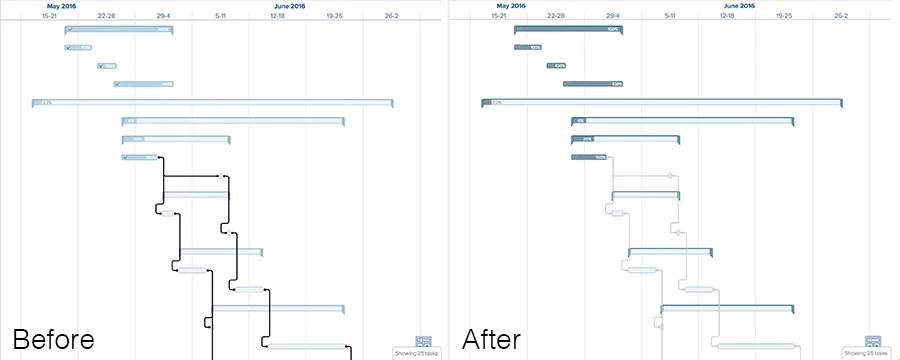
One more update here. While I was at it I changed the colors on the Gantt chart a bit. I really dislike the look of the new HTML based Gantt. The concept is a step in the right direction, but the choice of colors is tough on the eyes, especially the super dark black predecessor lines. If you add the CSS below to the other (or run it on its own) it will change the look of the Gantt chart as shown in the attached image:

.predecessor-line { stroke:

#ccc

; }

.predecessor-dot { fill:

#ccc

; }

.bubble-bk { stroke:

#8cb9d6

; }

.progress { fill-opacity: .5; fill: #083456; }

.progress-text.dark { color: #888; }

.parent-indicator { fill:

#7a95a9; stroke: #457e9e; }

June 11, 2016
Nice work Craig! Will check it out......
June 11, 2016
When I search for the Stylebot I receive numerous results... Can you provide the URL? tx