Looking for help on a task report. | Community
Skip to main content
January 25, 2022
Question

Looking for help on a task report.

  • January 25, 2022
  • 1 reply
  • 691 views

Does anyone know how to display a list of tasks, the planned completion date of those tasks along with that tasks predecessors and their predecessors planned completion date?

Example

Task Name Planned Completion Date Predecessor Predecessor Planned Completion Date

Task 1 1/25/22 3 3/15/22

This post is no longer active and is closed to new replies. Need help? Start a new post to ask your question.

1 reply

imgrund
Adobe Employee
Adobe Employee
January 25, 2022

Hi Nicole, a task can have multiple predecessors so you need to do a collection.

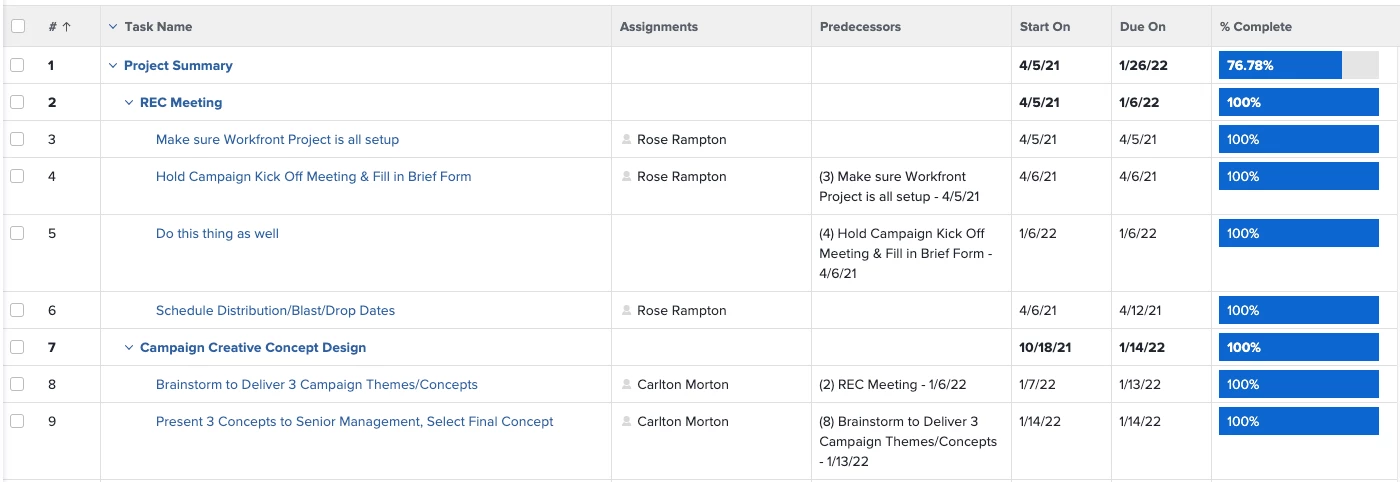
I have this text mode I've used in the past. It should the task number, name, and planned completion date of the predecessors for a task

displayname=Predecessors

listdelimiter=<br>

listmethod=nested(predecessors).lists

textmode=true

type=iterate

valueexpression=CONCAT("(",{predecessors}.{taskNumber},") ",{predecessors}.{name}," - ",{predecessors}.{plannedCompletionDate})

valueformat=HTML

Hope that helps.

NicoleFi1Author
January 26, 2022

Thanks so much! Unfortunately, this did not work for me.

It didn't error out or produce a report.

imgrund
Adobe Employee
Adobe Employee
January 27, 2022

Hi Nicole, So sorry... the code was wrong. #facepalm

displayname=Predecessors

listdelimiter=<br>

listmethod=nested(predecessors).lists

textmode=true

type=iterate

valueexpression=CONCAT("(",{predecessor}.{taskNumber},") ",{predecessor}.{name}," - ",{predecessor}.{plannedCompletionDate})

valueformat=HTML

Here is what it looks like: