
Keeping all custom forms when converting issue to project | Community
Skip to main content
Lawson02
Level 6
May 22, 2024
Solved

Keeping all custom forms when converting issue to project

  • May 22, 2024
  • 1 reply
  • 1015 views

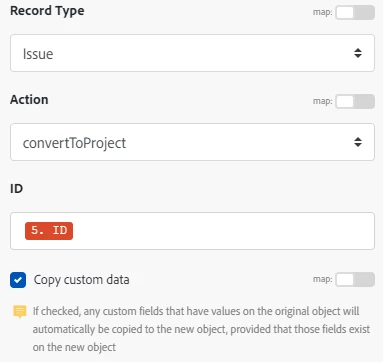
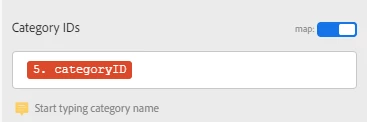
I'm trying to convert an issue to a project, attach a template to the project, and keep all custom forms and data associated with them. I can't seem to get the custom forms from the issue and their data to transfer over. At first I tried using the "Convert Object" module but after reading a previous post "Workfront module Convert object - custom form data" it looks like I need to use the "Misc Action" module and Issue -> convertToProject" to prevent data loss and keep all of the form metadata. I tried using only the "Copy custom data" checkbox but I'm only able to transfer the data from one form over to the new project via the "Category ID" which doesn't accept more than 1 form. I tried mapping over the objectCategories:category ID's but I can't find that section in the "Misc Action" module. How would I transfer multiple forms and their data to the new project?
 

This post is no longer active and is closed to new replies. Need help? Start a new post to ask your question.
Best answer by ChrisStephens

As long as you have the "copy custom data" checkbox checked, and the forms are also project forms, you shouldn't need to specify anything else, Workfront will do it for you.

1 reply

ChrisStephens
Community Advisor
ChrisStephensCommunity AdvisorAccepted solution
Community Advisor
May 23, 2024

As long as you have the "copy custom data" checkbox checked, and the forms are also project forms, you shouldn't need to specify anything else, Workfront will do it for you.

Lawson02
Lawson02Author
Level 6
May 23, 2024

When I don't specify the Category ID the forms don't transfer over. Why would that be?

ChrisStephens
Community Advisor
Community Advisor
May 23, 2024

Is there data on those forms? There has to be some piece of data filled out for the form to attach. If there isn't any data, you can either set the "copy custom forms" field to "true" and that will bring the forms over or have fusion add the forms after the fact