Issue with Calculated field interacting with typeahead fields? | Community
Skip to main content
Kurt_Jones
Community Advisor
Community Advisor
October 2, 2023
Solved

Issue with Calculated field interacting with typeahead fields?

  • October 2, 2023
  • 2 replies
  • 1054 views

Friends,

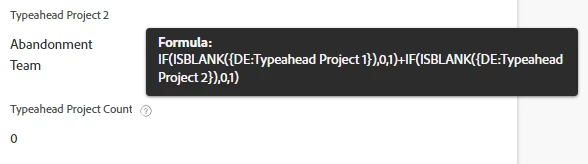
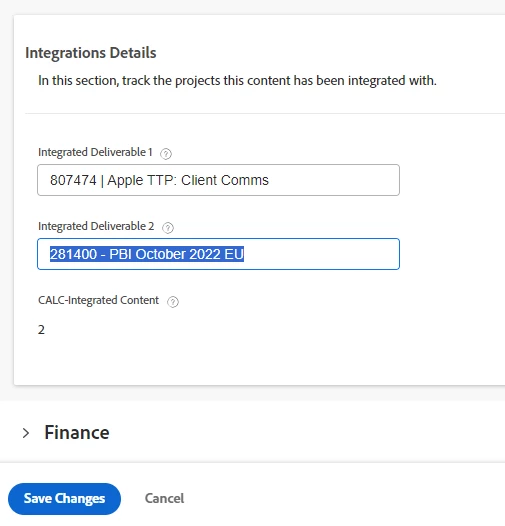
This item has stumped me.  I created a calc field to do a simple sum of if a typeahead field has a project in it or not...a 0 if nothing, a 1 if something in it.  It works correctly when editing the form and choosing something in the typeahead field.  As soon as I save the form the calculated field reverts to 0 (instead of 2 as the image shows) even though the typeahead fields have something in it.  Any thoughts on why this might be occurring?
 

This post is no longer active and is closed to new replies. Need help? Start a new post to ask your question.
Best answer by Kurt_Jones

Following up to close this item out.  I found out you can use the parameter in a typeahead field within a calculated expression.  In the issue I outlined above code would look like the below:


SUM(IF(ISBLANK({DE:Integrated Deliverable 1:name}),0,1),IF(ISBLANK({DE:Integrated Deliverable 2:name}),0,1))
 
A tricky note: the calculation will not show/work properly within the Calculation Editor within the custom form, it will still calc to 0 even if you have something chosen in your custom fields, HOWEVER, on the live form it does calculate properly allowing to use the field in reporting or any other endeavor.

2 replies

Doug_Den_Hoed__AtAppStore
Community Advisor
Community Advisor
October 3, 2023


Hi @kurt_jones,


I modeled the same thing, but noticed that the typeahead parameters are not among those listed in the formula builder, so even though I was able to syntactically get my formula to save, suspect that Workfront calculated expressions might not (yet) support typeaheads.


Regards,

Doug


Kurt_Jones
Community Advisor
Kurt_JonesCommunity AdvisorAuthorAccepted solution
Community Advisor
October 3, 2023

Following up to close this item out.  I found out you can use the parameter in a typeahead field within a calculated expression.  In the issue I outlined above code would look like the below:


SUM(IF(ISBLANK({DE:Integrated Deliverable 1:name}),0,1),IF(ISBLANK({DE:Integrated Deliverable 2:name}),0,1))
 
A tricky note: the calculation will not show/work properly within the Calculation Editor within the custom form, it will still calc to 0 even if you have something chosen in your custom fields, HOWEVER, on the live form it does calculate properly allowing to use the field in reporting or any other endeavor.
Doug_Den_Hoed__AtAppStore
Community Advisor
Community Advisor
October 3, 2023


Attaboy Kurt!


I'd forgotten, but am glad you remembered, that going the extra step to check the :name (or :ID) syntax does then return a value for the calc to work against, as opposed the the typeahead object, which does not. 


Regards,

Doug