
Is there a way to Export to PDF a Gantt view of a project with just the parent tasks? | Community
Skip to main content
SuzannaHathaway
New Member
February 27, 2024
Question

Is there a way to Export to PDF a Gantt view of a project with just the parent tasks?

  • February 27, 2024
  • 3 replies
  • 1662 views

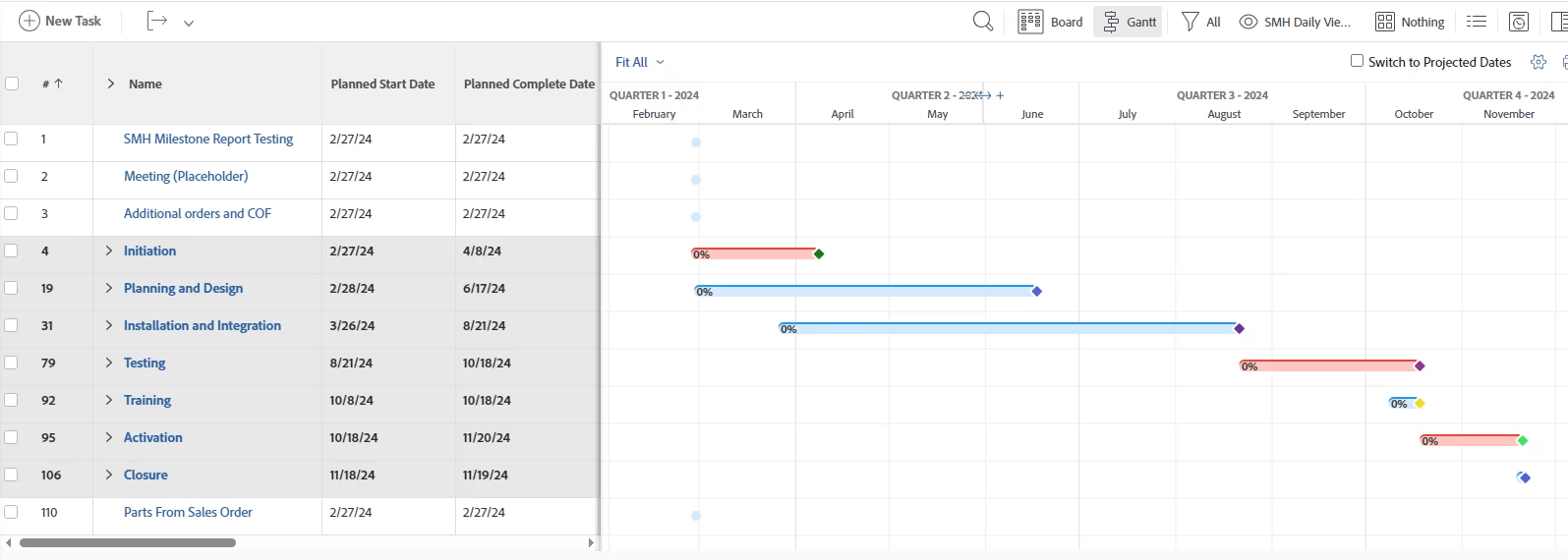
I am working with a customer and they would like a Gantt chart as part of their weekly status.  This is for the executives, so they only want to see the Summary or Parent Tasks.  I created a view, and it is exactly what they want.  When I utilize the Export to PDF - even if I select Export what I see - I still get an output of every task, not just the summary tasks.  I have put in a picture of the view below.  This is exactly what I would like to see output to PDF if possible.  I am sure I am just missing something somewhere.  Any help would be appreciated!
Thanks!

sue


This post is no longer active and is closed to new replies. Need help? Start a new post to ask your question.

3 replies

skyehansen
Community Advisor and Adobe Champion
February 27, 2024

I'm not sure how manual you want to be, but you could create a task report with the relevant tasks (parents are usually any task with more than one child), and group by project. Switch the report over to show the gantt view and use the little printer icon to export it to a PDF. The beauty of this is that if you want to show a particular project it's easy enough to put the task report into a dashboard and add it as custom section in your projects so you can access any project with this same view.


The downside is that you can't export a PDF if there are more than 500 tasks.

SuzannaHathaway
New Member
February 27, 2024

Thank you so much!  For long term, I am going to set this up and try it now.


I appreciate it!

Sue

RandyRoberts
Community Advisor
Community Advisor
February 27, 2024

or you could create a "Parent Tasks Only" filter and share it with others, like this:

SuzannaHathaway
New Member
February 27, 2024

Thank you so much!  That was easy and looks really nice when PDF'd.  I appreciate it!

Sue

RandyRoberts
Community Advisor
Community Advisor
February 27, 2024

And if you open the PDF in Illustrator, you can turn this:

Into this:

Doug_Den_Hoed_AtAppStore
Community Advisor
Community Advisor
February 27, 2024


Hi @suzannahathaway,


When it comes to Gantt chart nirvana...


Under the "any help would be appreciated" clause, I invite you to consider our various Gantt Chart (and related) Calendaring solutions in general, and our UberGantt and Executive Status Report solutions in particular, which we could easily tailor to your exact specification.


Regards,

Doug