Is there a way to add custom forms when a task is created or added to a project? | Community
Skip to main content
Level 2
April 8, 2021
Solved

Is there a way to add custom forms when a task is created or added to a project?

  • April 8, 2021
  • 3 replies
  • 1650 views
No text available
This post is no longer active and is closed to new replies. Need help? Start a new post to ask your question.
Best answer by TealeMcCleaf

Hi Kelly,

Rich is correct, except that using a template isn't the only way to accomplish this.

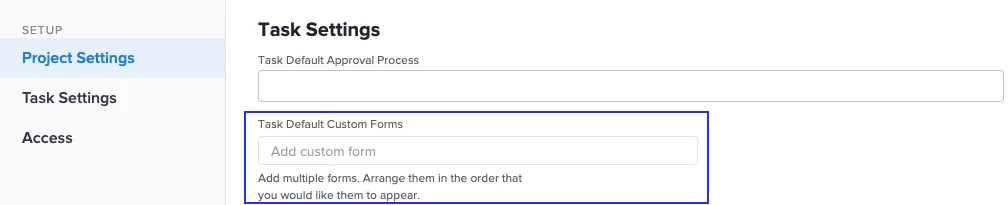
In the Project Settings, you can add a custom form that will automatically be associated with every new task that is created in the project. The catch is, if you already have tasks in the schedule, you will need to bulk edit them to add the form.
Hope this helps,

Teale

3 replies

Community Advisor
April 8, 2021

Hi Kelly,

If you create your projects from a template, then yes you can automatically add custom forms to every new task that is created. In the projecttemplate settings you can specify a task default custom form (see screen shot below). Then, when you spin up a project from this template, any new tasks that you add to the newly created project will automatically have the default task custom form that you specified in the template settings attached to it.

As far as I am aware, this is only possible when creating projects from a template.

Best Regards,

Rich.

KellyHa1Author
Level 2
April 8, 2021

Thanks Richard! But I'm looking for a way to add/create new Tasks.

Community Advisor
April 8, 2021

Hi Kelly,

The custom form would automatically be applied to any new tasks that you add / create on the project as well. So long as your project was originally created from a template where the default task custom form was set, any brand new tasks that you add to that project will also have the custom form automatically applied.

Best Regards,

Rich.

TealeMcCleafAccepted solution
Level 6
April 8, 2021

Hi Kelly,

Rich is correct, except that using a template isn't the only way to accomplish this.

In the Project Settings, you can add a custom form that will automatically be associated with every new task that is created in the project. The catch is, if you already have tasks in the schedule, you will need to bulk edit them to add the form.

Hope this helps,

Teale

Community Advisor
April 9, 2021

Thanks Teale! Every day's a school day! 😁