Is it possible to display a custom name in groupings based on what is entered in a custom text field? | Community
Skip to main content
Level 5
March 9, 2021
Solved

Is it possible to display a custom name in groupings based on what is entered in a custom text field?

  • March 9, 2021
  • 1 reply
  • 1004 views

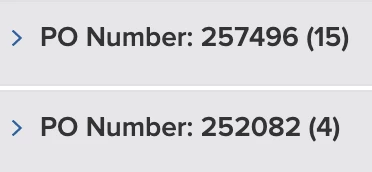
I have a report that I have grouped by master PO numbers. Instead of using the number to display in the grouping, I'd like it to read what the PO is for. So instead if 257496, I'd like it to say Exterior. I only want this information in the text display of the report grouping - not in the actual data field itself. Is this possible? And if so, how? This is a project report.
This post is no longer active and is closed to new replies. Need help? Start a new post to ask your question.
Best answer by imgrund

Oh okay, so my first thought was right. Sorry, when you said display name like in a column, I thought you meant the column/grouping label which is called display name.

The only thing I can think of is hard coding in all the PO numbers via IF statements, kind of like...

group.0.valueexpression=IF({DE:PO Number}="257496","Exterior",IF({DE:PO Number}="252082","Something Else","What appears when none are true"))

Not sure how many POs you have. But that is the best I can think

1 reply

imgrund
Adobe Employee
Adobe Employee
March 9, 2021

Hi - is "Exterior" in Workfront somewhere? You can do references or valueexpressions as groupings. Just need a little more info.

Level 5
March 9, 2021

Not really. I have a custom drop down field where there are 3 options that have the word "exterior" in the selection. And all 3 fall under this 'Exterior' category that would be under the number 257496.

imgrund
Adobe Employee
Adobe Employee
March 9, 2021

OH! I'm sorry. If you just want to update the display name, you just add

group.0.displayname=Exterior

I thought you were looking to have the number changed into Exterior, not the actual words "PO Number"