Is it Possible to create a report with grouping with "Portfolio", "Project" and "Task List" from each project? | Adobe Higher Education
Skip to main content
Kundanism
Level 10
October 31, 2022
Répondu

Is it Possible to create a report with grouping with "Portfolio", "Project" and "Task List" from each project?

Hi


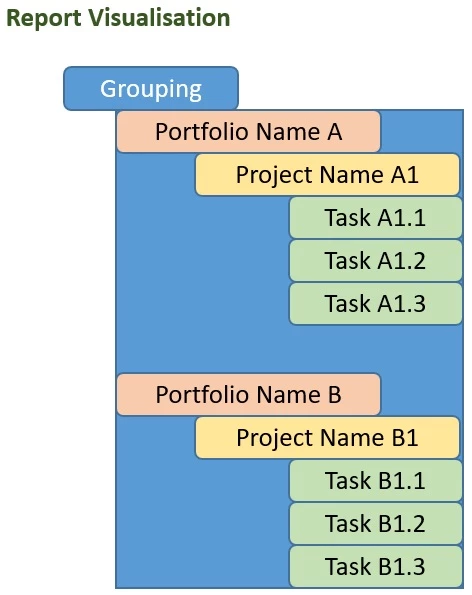
Is it possible to create a report with grouping with "Portfolio", "Project" and "Task List" from each project?

I tried to create a field in custom form for Task/ project / portfolio, then connected that custom form at Portfolio level,

but no success. Does this need to create a calculated field or there could be a simple way to do this?

Best regards,

Kundan.

Sharing expected view of report for your reference;


Ce sujet a été fermé aux réponses.
Meilleure réponse par Madalyn_Destafney

Sorry to bother you @madalyn_destafney . I tried as you recommended, still not showing project name. After that I tried, the text code you shared earlier which is,

group.0.iscollapsed=true
group.0.linkedname=project
group.0.name=
group.0.namekeyargkey.0=project
group.0.namekeyargkey.1=name
group.0.valuefield=project:portfolio:name
group.0.valueformat=string
textmode=true

Still this also shows only portfolio name. ANy thing if I am missing more somewhere.


HIghly appreciate you help in this regard.

Mvh

Kundan.


Hi there, the text mode I sent is only for the 1 grouping of portfolio name. As I said in a couple responses, you need another grouping for project, what I provided above was just for the portfolio grouping. I've gone ahead and built it out more for you to use this:


group.0.iscollapsed=true
group.0.linkedname=project
group.0.name=
group.0.namekeyargkey.0=project
group.0.namekeyargkey.1=name
group.0.valuefield=project:portfolio:name
group.0.valueformat=string
group.1.iscollapsed=true
group.1.linkedname=project
group.1.name=
group.1.namekeyargkey.0=project
group.1.namekeyargkey.1=name
group.1.valuefield=project:name
group.1.valueformat=string
textmode=true



1 commentaire

Madalyn_Destafney
Community Advisor
Community Advisor
October 31, 2022

Hi Kundan, yes. Since you need to get down to a task level, you need a task report. Grouping by portfolio isn't a native grouping in WF since it's too many 'jumps' but you can do it in text mode. Make your task report and add a grouping by Project Name. Then add another Project Name grouping and change it to text mode, then change one of the groupings to project:portfolio:name, like the below:


group.0.valuefield=project:portfolio:name

If this helped you, please mark correct to help others : )
Kundanism
KundanismAuteur
Level 10
November 1, 2022

Thank you for your suggestion @madalyn_destafney , a great help. However, I tried this to collection projects under each portfolio in Charts, but no success. I thought the details to categories as mentioned earlier, and the chart I can categorise with respect to project name under each portfolio. The report created was Task type report.

Please suggest, if you have any tips for the same.


Mvh

Kundan.

Kundanism
KundanismAuteur
Level 10
November 1, 2022

Hi @kundanism , here is an example of one of my task reports grouped by portfolio. I suggest you have your report in standard mode grouping with grouping first by anything (bc you'll change it in text mode, so doesn't matter) and then by project name. Then switch to text mode and replace your first grouping (grouping 0) with this text mode:


group.0.iscollapsed=true
group.0.linkedname=project
group.0.name=
group.0.namekeyargkey.0=project
group.0.namekeyargkey.1=name
group.0.valuefield=project:portfolio:name
group.0.valueformat=string
textmode=true


HI @madalyn_destafney 


Absolutely understand your point, as your recommendation makes complete sense. Although I was trying to make via Chart. No success yet.

Mvh

Kundan.


info makes