Integration with Microsoft Teams | Community
Skip to main content
February 20, 2019
Question

Integration with Microsoft Teams

  • February 20, 2019
  • 18 replies
  • 3238 views
I am looking for user experiences integrating Workfront with Microsoft Teams. The test integration I have set up sends Workfront updates to my Outlook 365 Inbox rather than to Teams, yet there seems to be no place to change settings (perhaps this is a Workfront Admin thing?) and the documentation and discussion boards are not much help. Any advice, links to documentation pages I may have missed or shared experiences would be helpful. Thanks. Joel Martin Program Manager Secureworks
This post is no longer active and is closed to new replies. Need help? Start a new post to ask your question.

18 replies

imgrund
Adobe Employee
Adobe Employee
August 27, 2019
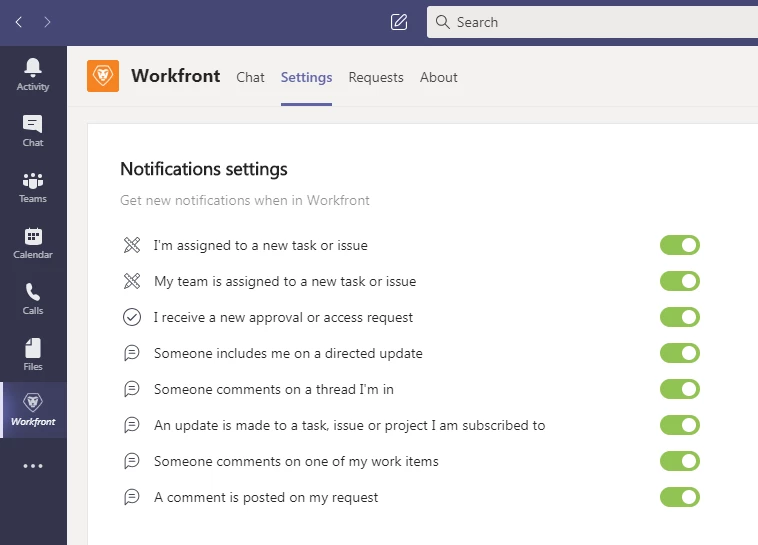
Hi Sean - I get notifications in Teams (both the desktop application and my mobile app). Do you have the Workfront app installed in your instance of Teams? You will see the Workfront chat bot. That is where the notifications go. Anthony Imgrund FCB
August 28, 2019
And, just to add on to what Anthony said, if you have the Workfront app installed, also be sure that you are logged in to Workfront from it. Terry Hynd EBSCO Information Services
LAK01
July 28, 2023

When you reply to a Workfront Update in Teams, we need to be able to Add  - @6359502 another person and add them to the thread if needed, just like in Workfront,

September 12, 2019
Does anyone use Teams and Workfront both to manage work/projects? What sort of parameters do you have as to when work goes in Teams and when it should be in WF? Mohini Sinha, CSM Project Coordinator Excelsior College
September 12, 2019
Great question Mohini! In addition to what work/projects gets put into WF and MS Teams, I'm wondering if anyone has provided their teams guidelines on where communication and files is stored. For example, if communicating about a project, is it best to do that through updates on a task, or in a conversation in one of the Team's channels? And where is the final "place of record" when it comes to files? Should they be stored in MS Teams or WF? Scott Jones Harvard Alumni Affairs and Development
imgrund
Adobe Employee
Adobe Employee
September 17, 2019
Hi - to be honest, we just use the current Teams integration for notifications that the Chatbot gives you. You can easily reply to an update in Teams (or grant view access to object types which I get a lot as system admin). Otherwise you can use it to easily view the item in Workfront from your teams. Unfortunately, the Teams integration isn't quite where the Slack one is where you can call forward a list of work items you need to work on or items still pending your approval (although Kathy and I met with someone from product to talk about this a few weeks ago so fingers crossed for some enhancements in 2020!) Also, we don't really use the functionality where you can search for a project, task or issue and post it into a Team Channel. Would like to use that more but we are finding the search takes too long so people just paste URLs in their channels. Also, we don't really use the Requests option in Teams because there is a bug where you can't upload a document right now and our two biggest request queues almost always have some file attached to them. But hoping that will be helpful to people once that bug is fixed. As for Scott's question about files, all projects files HAVE TO be in the Workfront project. That is the source of truth for all things related to the project. We can't have that some of them in Teams. Anthony Imgrund FCB

LAK01
July 28, 2023

When you reply to a Workfront Update in Teams, we need to be able to Add - @6359502 another person and add them to the thread if needed, just like in Workfront,

November 26, 2019
Hi, I am having almost the opposite of this problem. I seem to be getting three notifications in Teams for each update I have in WF. See screen cap below. The bottom 3 are all the same and come in about 10 - 15 seconds apart. Thanks in advance for any help. -AK Alan Kane
November 26, 2019
Thank you for letting us know, Alan. I'll ask our developers to look into this. If you keep seeing the same issue, please escalate it through support channels. Hayk Falakyan Workfront
CJasonJackson
July 21, 2020

I've installed it and it is pretty basic. I have started getting notifications for alerts that I do not have turned on. I have Teams on my phone and I woke up today with 95 alerts via Teams. However, when I logged into my email I only had 3 notifications from Workfront. Pretty annoying...

imgrund
Adobe Employee
Adobe Employee
July 21, 2020

Hi Jason - there was a bug that has been fixed. I woke up to over 200 when really it should have been four. I contacted Support and the team says the issue has been resolved. So you shouldn't get anymore duplicate notifications.

And remember, the chat bot has its own settings separate from what you have in Workfront