Insert Task | Community
Skip to main content
Level 2
May 31, 2023
Solved

Insert Task

  • May 31, 2023
  • 1 reply
  • 788 views

Hello,


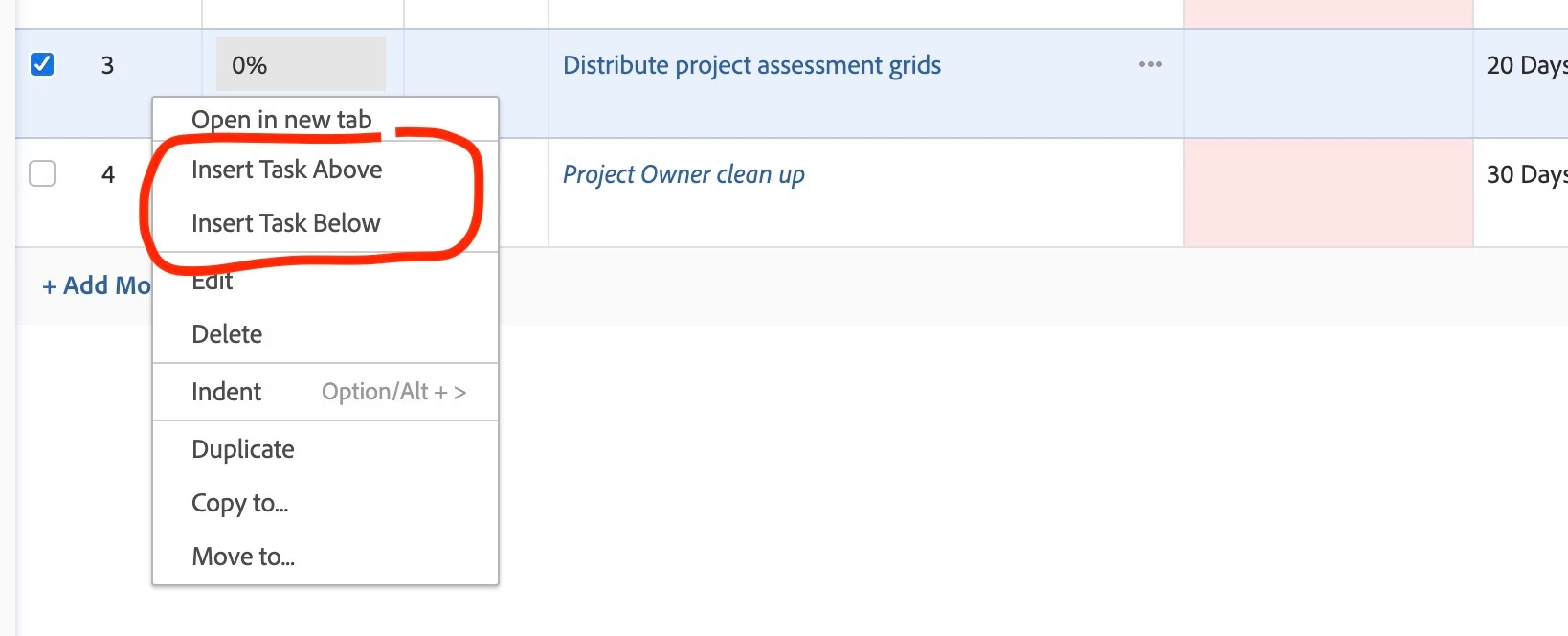
Currently when I insert a new task, the task appears at the bottom of the task list / project plan.  And I have to manually move it to the desired location.


Is it possible to insert a task anywhere in the plan or is it forced to be inserted at the bottom?


Thank you,
- Andrew.
This post is no longer active and is closed to new replies. Need help? Start a new post to ask your question.
Best answer by RandyRoberts

Right click in the light blue area where the task number is:

make sure your task list is sorted by task number or it limits a lot of actions.


TIP: if this solved your problem, I invite you to consider marking it as a Correct Answer to help others who might also find it of use.

1 reply

RandyRoberts
Community Advisor
RandyRobertsCommunity AdvisorAccepted solution
Community Advisor
May 31, 2023

Right click in the light blue area where the task number is:

make sure your task list is sorted by task number or it limits a lot of actions.


TIP: if this solved your problem, I invite you to consider marking it as a Correct Answer to help others who might also find it of use.

AndrewHe2Author
Level 2
May 31, 2023

Thank you!!