Include Times in Date Fields | Community
Skip to main content
November 28, 2023
Solved

Include Times in Date Fields

  • November 28, 2023
  • 1 reply
  • 549 views

I am trying to run a report to show the Planned Start & Completion Dates on a number of Issues.

I need the times to be included in this column as it shows in the Issue itself.

Is there something for text mode I can include to pull the date in?

This post is no longer active and is closed to new replies. Need help? Start a new post to ask your question.
Best answer by Richard_Le_

Hi,


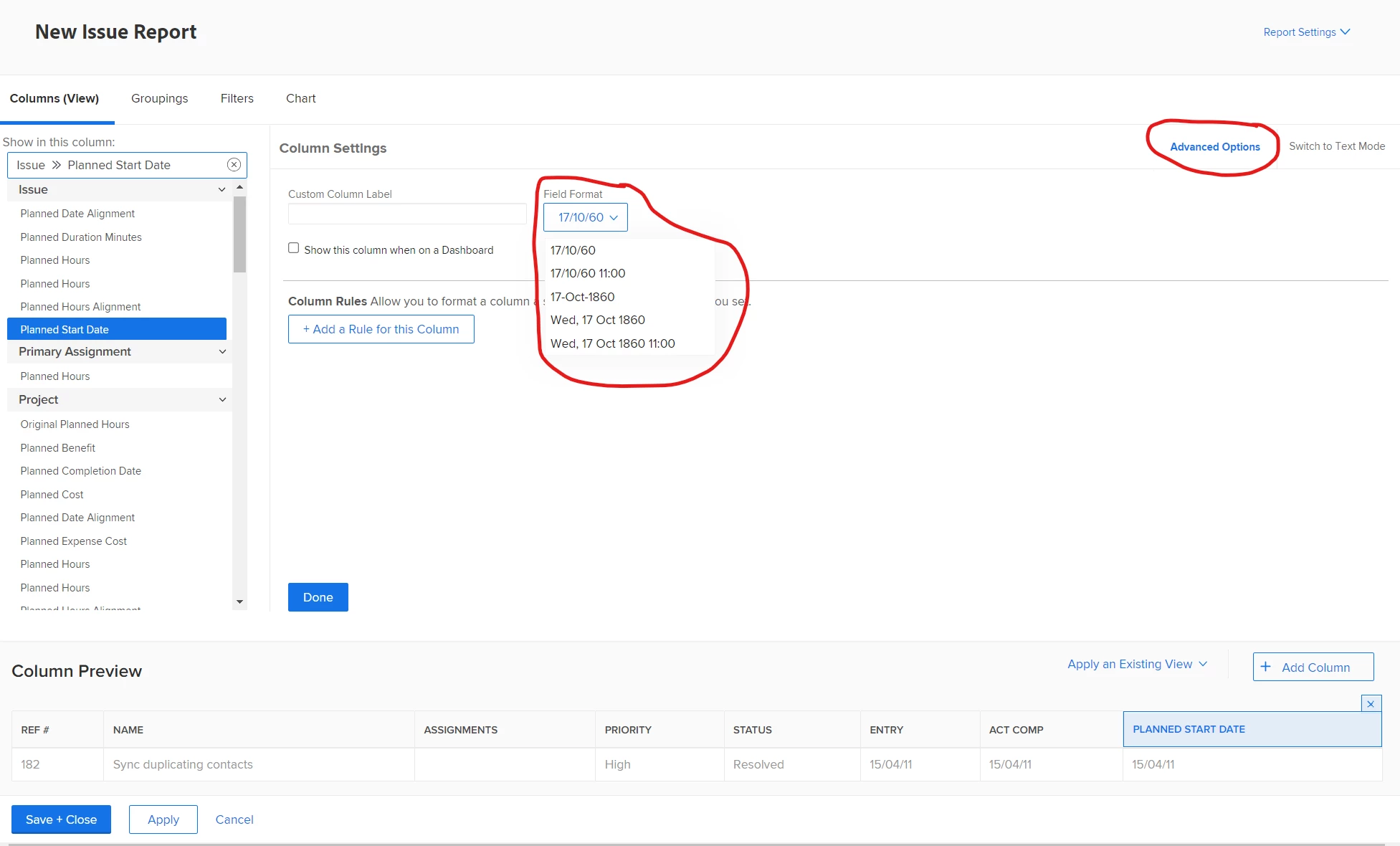
No textmode needed for this. In the report builder, go to the report view and click the planned completion date column. In the top right hand corner click "Advanced Option", here you can pick the date time format that you require.


Best Regards,

Rich.


1 reply

Richard_Le_Community AdvisorAccepted solution
Community Advisor
November 28, 2023

Hi,


No textmode needed for this. In the report builder, go to the report view and click the planned completion date column. In the top right hand corner click "Advanced Option", here you can pick the date time format that you require.


Best Regards,

Rich.