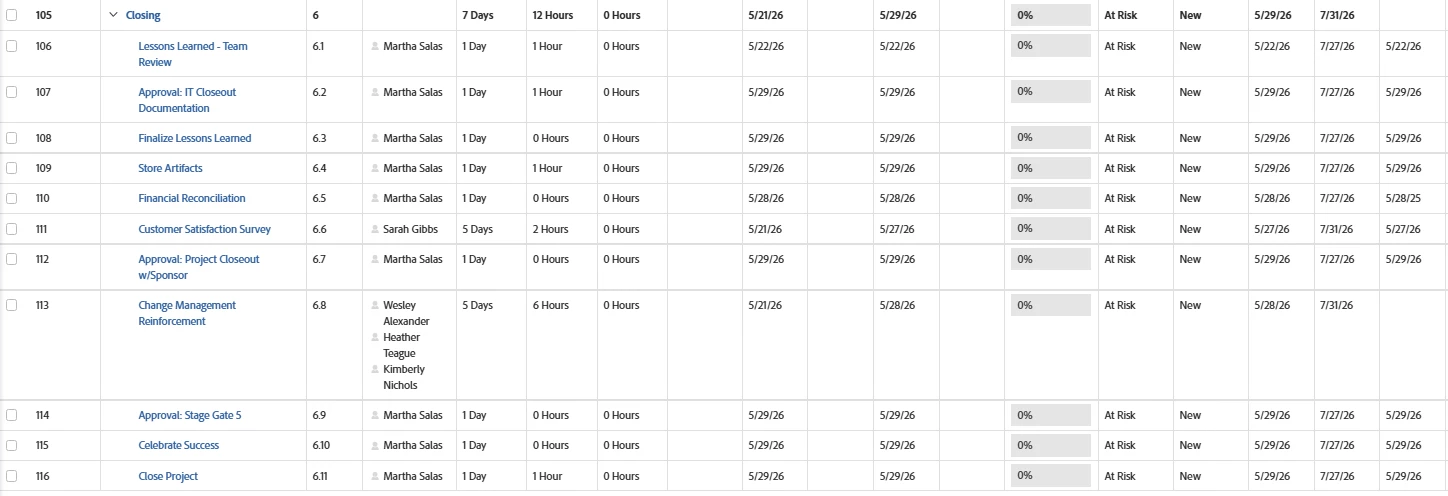
I have a project with tasks that have the status of New, have a start date in the future, but they have a progress status of At risk. If I change the status to In Progress, the progress status changes to ON Time | Community
Skip to main content
Level 3
July 17, 2025
Solved

I have a project with tasks that have the status of New, have a start date in the future, but they have a progress status of At risk. If I change the status to In Progress, the progress status changes to ON Time

  • July 17, 2025
  • 3 replies
  • 339 views

I have a project with tasks that have the status of New, have a start date in the future, but they have a progress status of At risk. If I change the status to In Progress, the progress status changes to ON Time.  I know that the estimate due date is out in July 2026 but I do not know how to change it.

Here is a snippet of the tasks from the project.  Any help would be greatly appreciated

 

Best answer by Kurt_Jones

BillPe,


Take a look at this article it will provide better detail on how the task Progress Status works, https://experienceleague.adobe.com/en/docs/workfront/using/manage-work/tasks/task-information/task-progress-status, so you can check against how your project is set up and how your estimated completion date and any task constraints that may be lurking.

3 replies

Kurt_Jones
Community Advisor
Kurt_JonesCommunity AdvisorAccepted solution
Community Advisor
July 18, 2025

BillPe,


Take a look at this article it will provide better detail on how the task Progress Status works, https://experienceleague.adobe.com/en/docs/workfront/using/manage-work/tasks/task-information/task-progress-status, so you can check against how your project is set up and how your estimated completion date and any task constraints that may be lurking.

July 21, 2025

Do you happen to have the projected start dates as well? Adding that in addition to the task constraints might be helpful.


If the task's projected start date is past the planned start date, that could explain why the tasks are showing as at risk.


LauraRa8
July 23, 2025

Hi BillPe,


The issue in this case is that there are no predecessors set and I guess your scheduling is done with task constraint "as soon as possible". Since there are no predecessors the system says you should have started working on this already and therefore you are late.

As soon as you enter the predecessors this should be fixed for all except the first task.


Additionally you could change either change the task constraint to as late as possible, but keep in mind this has the risk of users not starting early enough as they are not reminded early. That you need to decide based on your user behavior. Or you change the first task to a fixed must start on date.


Hope this helps.