How to filter report based on task status change date? | Community
Skip to main content
Level 2
September 22, 2023
Solved

How to filter report based on task status change date?

  • September 22, 2023
  • 2 replies
  • 1358 views

I want to make the report with the filter of date when the task status changed to X, how do I do that as I don't see any option like that in the filter and there is no solution anywhere? 


It's such a basic function and we continue to struggle to use workfront like this.
This post is no longer active and is closed to new replies. Need help? Start a new post to ask your question.
Best answer by VicSellers

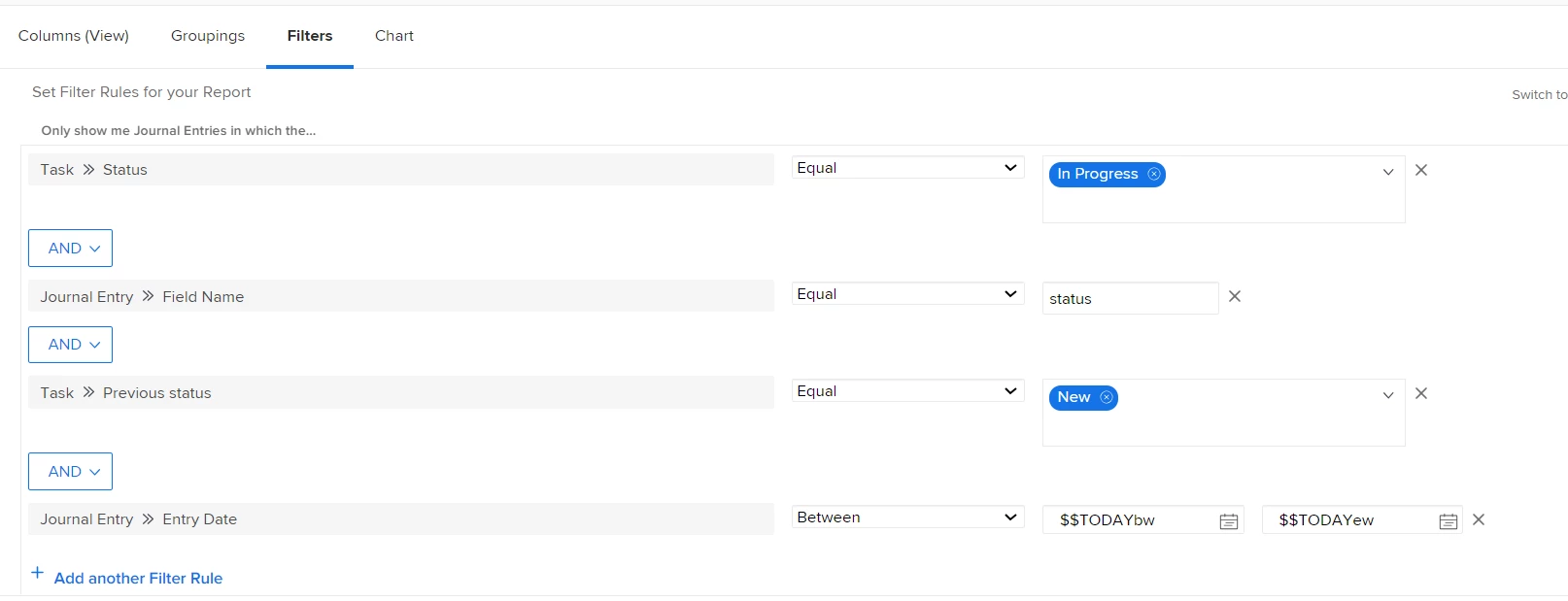
Hi @sidkarora - So, the best way to go about this would be to use a Journal Entry report. I attached a screenshot of what you might want to experiment with in the filters of the report, changing the statuses and time range. On the columns in the report, you can pull in the Task > Previous Status + Task > Status too to see the change.


Hope this helps!


2 replies

VicSellers
Community Advisor
VicSellersCommunity AdvisorAccepted solution
Community Advisor
September 22, 2023

Hi @sidkarora - So, the best way to go about this would be to use a Journal Entry report. I attached a screenshot of what you might want to experiment with in the filters of the report, changing the statuses and time range. On the columns in the report, you can pull in the Task > Previous Status + Task > Status too to see the change.


Hope this helps!


_Manish_Singh
Level 9
September 22, 2023

Hello @sidkarora - If your focus is on a particular status only, let's say when the task status is set to "Complete". You'll have to create a calculated field and apply the formula. More details below:

Calculated Field: Date of Completion (set as Date or DateTime format)
Formula: IF({status}="CPL",IF(ISBLANK({DE:Date of Completion}),$$NOW,{DE:Date of Completion}),{DE:Date of Completion})