How to create a Report that show full list of users? | Community
Skip to main content
Level 3
October 10, 2023
Solved

How to create a Report that show full list of users?

  • October 10, 2023
  • 1 reply
  • 592 views

Hi Community,

I'm trying to build a report to know the number of users that accessed a particular report. For example you have a report 

called "Time Logged Errors to Parent Task by current Login User" then want to know how my users are actually viewing the report, that is the report I want to create to know users viewing the report. This essence of this report is to know how users are consuming report. You can call it report usage if you like.  

How I create this kind of report? what kind of filters do  I use? 

Thanks for your input.

Mesh 
This post is no longer active and is closed to new replies. Need help? Start a new post to ask your question.
Best answer by Madalyn_Destafney

Hi there! You can get report stats like this using a report report...you read that right : )
'Report' is a report type just like project, task, etc. 
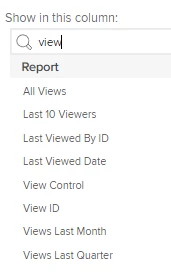
When creating the report, you can have columns for last viewed by name, last viewed by date, and other things like this, including all views. 


NOTE: There has been some muddy data around report views on reports in a dashboard and what counts as a view or not. 
If this is what you're looking for, please mark correct to help others : )


1 reply

Madalyn_Destafney
Community Advisor
Madalyn_DestafneyCommunity AdvisorAccepted solution
Community Advisor
October 10, 2023

Hi there! You can get report stats like this using a report report...you read that right : )
'Report' is a report type just like project, task, etc. 
When creating the report, you can have columns for last viewed by name, last viewed by date, and other things like this, including all views. 


NOTE: There has been some muddy data around report views on reports in a dashboard and what counts as a view or not. 
If this is what you're looking for, please mark correct to help others : )


If this helped you, please mark correct to help others : )
meshackOmAuthor
Level 3
October 11, 2023

Thanks @madalyn_destafney for your input. It is deeply appreciated. 

Mesh