How to change how Statuses are synchronized on Resolving and Resolvable Objects (Requests and Projects) | Community
Skip to main content
Level 4
July 18, 2024
Solved

How to change how Statuses are synchronized on Resolving and Resolvable Objects (Requests and Projects)

  • July 18, 2024
  • 3 replies
  • 2525 views

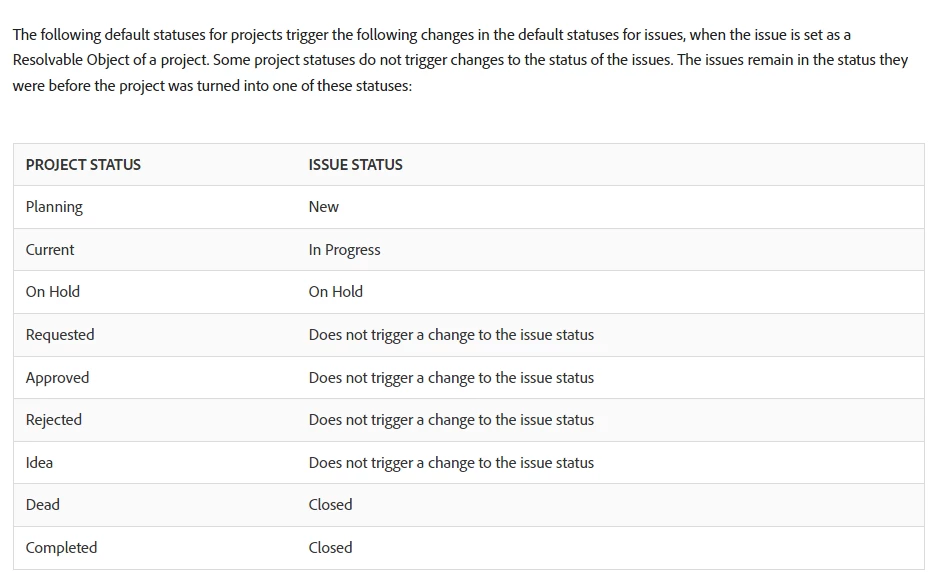
When we convert a request to a project, its default status is set to Planning. According to this documentation, this means the request will remain in a New status. How can we change this? For example, if we wanted the request to go to "In Progress" when the project is in Planning. The documentation gives a handy chart of the synchronized statuses, but doesn't say how you can change them. TIA!


Overview of Resolving and Resolvable Objects | Adobe Workfront


This post is no longer active and is closed to new replies. Need help? Start a new post to ask your question.
Best answer by KatherineLa

This takes a little extra setup to make work, here's how I did it in our environment:


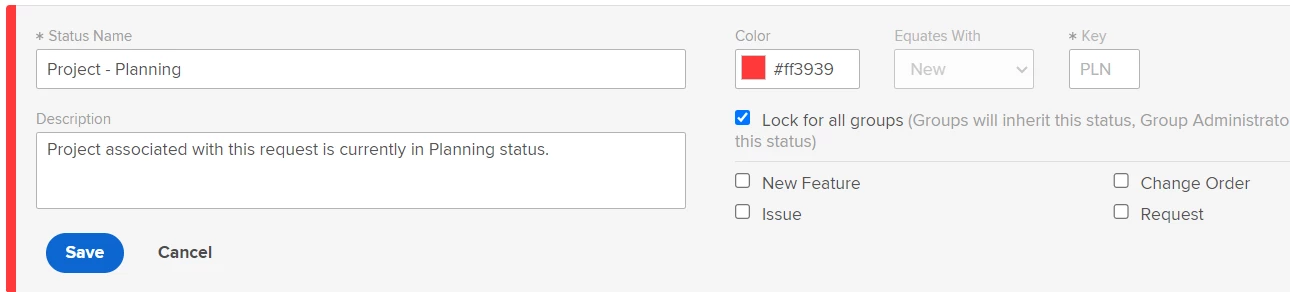
On the Issue side, I've got a set of custom Statuses set up. They're named things like 'Project - Planning', 'Project - Current' etc. I've got one created for each of the possible possible Project status values. The trick to making it work is the 'Key' value for the Issue-status. It's got to match the 'Key' value for the paired Project-level status. The screenshot below shows my 'Project - Planning' one with a Key of PLN since that's the key value for the Planning status in my Project setup. 


In my case, I also only wanted Workfront to use these statuses and didn't want to confuse my end-users, so I created the statuses and then promptly locked them so nobody can see them. Workfront still uses them to update the Issue status, they just don't show in drop-down menus for my end-users. The only minor, but manageable, pain point this last step causes is in reporting. The locked values also won't show up when you're trying to build Issue-level reports, so you have to get clever there. 


3 replies

KatherineLaCommunity AdvisorAccepted solution
Community Advisor
July 19, 2024

This takes a little extra setup to make work, here's how I did it in our environment:


On the Issue side, I've got a set of custom Statuses set up. They're named things like 'Project - Planning', 'Project - Current' etc. I've got one created for each of the possible possible Project status values. The trick to making it work is the 'Key' value for the Issue-status. It's got to match the 'Key' value for the paired Project-level status. The screenshot below shows my 'Project - Planning' one with a Key of PLN since that's the key value for the Planning status in my Project setup. 


In my case, I also only wanted Workfront to use these statuses and didn't want to confuse my end-users, so I created the statuses and then promptly locked them so nobody can see them. Workfront still uses them to update the Issue status, they just don't show in drop-down menus for my end-users. The only minor, but manageable, pain point this last step causes is in reporting. The locked values also won't show up when you're trying to build Issue-level reports, so you have to get clever there. 


Level 4
July 22, 2024

Hi @katherinela, thanks for this! Wow, what you shared makes sense but I do see how it could get tricky. We've been talking about the possible need for custom statuses on requests and projects anyway, so the method you're using could fit in nicely for us.


Are your custom statuses on Issues set specifically on the "Request" type?  I assume by your instructions that this is where I'd need to go, but would like to confirm. (Screenshot below)


Also, you mentioned that your custom statuses are hidden from the dropdown menu for your end users -- Does that mean that users also can't see the statuses when looking at Issues on a project? For example, if our PMO director wanted to see the status of all open Requests on our request queue project under the Issues page, would she be unable to see the status of issues that are using a custom Status? (Hope that makes sense)


Thanks again!


Community Advisor
July 22, 2024

In this particular case, because I don't want the users themselves to be able to interact with the options, I have them unselected for all Issue options as below. That's what causes them to be Hidden statuses. I do that configuration under the 'Master List' and then nothing shows at all if I were to go to one of the other four tabs.


From the user perspective, the Status of the issue still behaves the way I want, see the second screenshot. But if they go into an Issue and interact with the Status dropdown, none of my custom options are available (third screenshot).


For displaying the data later, your PMO Director would be able to see the options just as my first screenshot demonstrates. What does get complicated is trying to build filters in reports though, since fully disabled options don't show up even to an admin for selection.


I'm going to respond with a build on a second post because I just had an idea that fixed my objection above. 🙂 This is why I like these forum discussions.


KellieGardner
Community Advisor
Community Advisor
July 22, 2024

We do this in our instance in a similar setup to Katherine and you align them by Key. There use to be a really good article on experience league about this but I just searched and couldn't find what I read previously.


Some considerations.


  • Only one object can use the Key. So, if you have multiple groups setup in your system with different settings and a group creates the custom statuses with the key for just their group then it doesn't get inherited UP to the system settings. So in the future no other group can create a status that maps and use the key. 
    • We have different group setups so what I did to get around this was to create the mapping for the standard statuses, like planned and complete, at the system level but any custom statuses for the group can be done at the group level. 
  • For reporting which i recently learned from support is that if the status is "hidden" and equates with complete when you use the filter "is complete" = true/false then it doesn't include hidden statuses.

  • If you have multiple groups there isn't a way to really easily report on statuses they have created so I suggest creating some really good documentation around this for your instance if you create custom statuses that map.

Level 4
July 22, 2024

Thanks @kelliegardner for your feedback!  I think I understand what you've described as a limitation with the Keys; that is good to know, appreciate the word of caution there. It sounds like the workaround you're using could work for our instance too.

Community Advisor
July 22, 2024

Responding again with a build that I didn't want to confuse with another post - 


In my original design, I created my custom Issue statuses and then disabled them for all four Issue types in my instance. This was meant to hide those options from end-users, to allow only WF to set them automatically. See screenshot #1. This had a cost in functionality though, since those values being hidden for all Issue types also completely hides it in the Report menus even from me. 


In the discussion here, it occurred to me to wonder what would happen if I allowed the custom Status to be visible - but only to an Issue type that was NOT one used in my instance? Turns out I get the best of both worlds. When I interact with the Status options on an Issue with a type 'Request', the 'Project - Planning' status is not visible. But when I go into Reporting, I DO see that option in the overall drop-down now that I've told WF it should be available for Issues with a type of 'Change Order'. See screenshot #2.


In my instance this works because  A) We happen to have an Issue Type that's entirely un-used, and B) I don't have a requirement to prevent the status from being visible in reporting. 


@kelliegardner Might this fix your 'isComplete' challenge you mentioned too? I hadn't run into that yet, this hidden status setup is fairly new for us so thank you for pointing it out. 


Level 4
July 22, 2024

Brilliant!  I think I could make this work for our instance too, since there are issue types we're not currently using. Thanks for sharing!