How to assign user system admin permission on Workfront | Community
Skip to main content
February 12, 2025
Solved

How to assign user system admin permission on Workfront

  • February 12, 2025
  • 1 reply
  • 677 views

Normally I should can assign user "system admin" permission on user access settings. But today I cannot find "system admin" on user's access setting selection. Are there anyone know how to assign user "system admin" permisssion now? Thanks for help.
This post is no longer active and is closed to new replies. Need help? Start a new post to ask your question.
Best answer by Kurt_Jones

Shuqin,

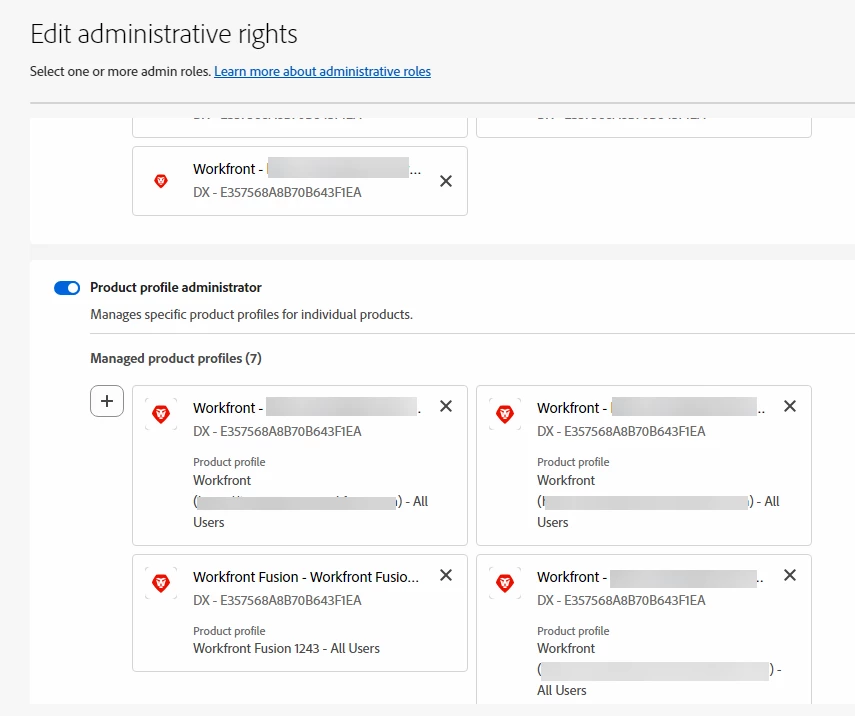
Your instance is likely behind the Admin console now.  In order for the System Admin role to show/be available for a user in Workfront they need to be made an admin of the Product Profile for your Workfront instance within the Admin console.  Once that is complete then the System Admin option should show for that user in Workfront.


1 reply

Kurt_Jones
Community Advisor
Kurt_JonesCommunity AdvisorAccepted solution
Community Advisor
February 12, 2025

Shuqin,

Your instance is likely behind the Admin console now.  In order for the System Admin role to show/be available for a user in Workfront they need to be made an admin of the Product Profile for your Workfront instance within the Admin console.  Once that is complete then the System Admin option should show for that user in Workfront.