
How do you combine multiple columns (4) with line breaks into one column on a report?
Help! I want to combine 4 columns of stakeholder names in blue into one column with each name on a separate line.
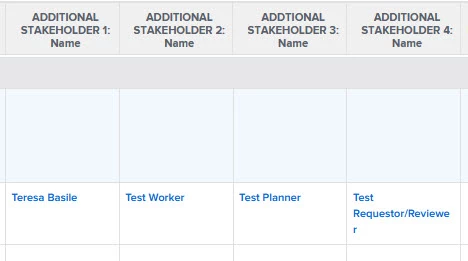 I managed to get all the names into one column by combining the first 2 (with line breaks) using the insert column in middle and add code:
value=<br>
valueformat=HTML
width=1
sharecol=true
Then I did the same with columns 3 & 4. From there I combined the 2 shared columns into one using the same method. There may be a better way to do this out there but I couldn't find one that was easy to understand or had a working link to the answer.
I got all the names into one column now, but they are all bunched up. No line breaks.
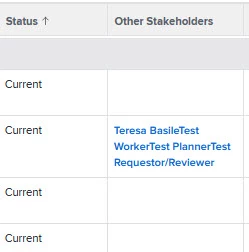
I tried adding value=<br> here and there, but the lines aren't breaking or they disappear altogether. Can someone please point me in the right direction? Any help would be greatly appreciated!
Here is my code:
column.10.displayname=Other Stakeholders
column.10.linkedname=ADDITIONAL STAKEHOLDER 1
column.10.namekey=view.relatedcolumn
column.10.namekeyargkey.0=ADDITIONAL STAKEHOLDER 1
column.10.namekeyargkey.1=name
column.10.querysort=DE:ADDITIONAL STAKEHOLDER 1:name
column.10.sharecol=true
column.10.textmode=true
column.10.valuefield=ADDITIONAL STAKEHOLDER 1:name
column.10.valueformat=customReferenceObjectAsString
column.11.displayname=
column.11.linkedname=ADDITIONAL STAKEHOLDER 2
column.11.namekey=view.relatedcolumn
column.11.namekeyargkey.0=ADDITIONAL STAKEHOLDER 2
column.11.namekeyargkey.1=name
column.11.querysort=DE:ADDITIONAL STAKEHOLDER 2:name
column.11.sharecol=true
column.11.textmode=true
column.11.valuefield=ADDITIONAL STAKEHOLDER 2:name
column.11.valueformat=customReferenceObjectAsString
column.12.displayname=
column.12.linkedname=ADDTIONAL STAKEHOLDER 3
column.12.namekey=view.relatedcolumn
column.12.namekeyargkey.0=ADDTIONAL STAKEHOLDER 3
column.12.namekeyargkey.1=name
column.12.querysort=DE:ADDTIONAL STAKEHOLDER 3:name
column.12.sharecol=true
column.12.textmode=true
column.12.valuefield=ADDTIONAL STAKEHOLDER 3:name
column.12.valueformat=customReferenceObjectAsString
column.13.displayname=Stakeholders
column.13.sharecol=true
column.13.textmode=true
column.13.valueformat=
column.14.displayname=
column.14.linkedname=ADDITIONAL STAKEHOLDER 4
column.14.namekey=view.relatedcolumn
column.14.namekeyargkey.0=ADDITIONAL STAKEHOLDER 4
column.14.namekeyargkey.1=name
column.14.querysort=DE:ADDITIONAL STAKEHOLDER 4:name
column.14.textmode=true
column.14.valuefield=ADDITIONAL STAKEHOLDER 4:name
column.14.valueformat=customReferenceObjectAsString
Thank you!
-Teresa